
Cemu
 Cemu copied to clipboard
 cemu-project
[MacOS] Corrupt pipeline cache when when booting game a 2nd time
I'm using the latest commit 271a4e4 nightly and the latest molten-vk via homebrew
I've noticed that if I run BOTW it all runs fantastic!!
Then if I quit and boot the game again, it crashes instantly with the error Failed to create pipeline cache
If I then delete the shaderCache folder then I can boot again and it works great again.
This is the full log
$ /Applications/_GAMING_EMU/cemu/Cemu/Cemu ; exit;
No bundle id found
[mvk-info] MoltenVK version 1.2.0, supporting Vulkan version 1.2.231.
	The following 83 Vulkan extensions are supported:
		VK_KHR_16bit_storage v1
		VK_KHR_8bit_storage v1
		VK_KHR_bind_memory2 v1
		VK_KHR_buffer_device_address v1
		VK_KHR_create_renderpass2 v1
		VK_KHR_dedicated_allocation v3
		VK_KHR_depth_stencil_resolve v1
		VK_KHR_descriptor_update_template v1
		VK_KHR_device_group v4
		VK_KHR_device_group_creation v1
		VK_KHR_driver_properties v1
		VK_KHR_dynamic_rendering v1
		VK_KHR_external_fence v1
		VK_KHR_external_fence_capabilities v1
		VK_KHR_external_memory v1
		VK_KHR_external_memory_capabilities v1
		VK_KHR_external_semaphore v1
		VK_KHR_external_semaphore_capabilities v1
		VK_KHR_fragment_shader_barycentric v1
		VK_KHR_get_memory_requirements2 v1
		VK_KHR_get_physical_device_properties2 v2
		VK_KHR_get_surface_capabilities2 v1
		VK_KHR_imageless_framebuffer v1
		VK_KHR_image_format_list v1
		VK_KHR_maintenance1 v2
		VK_KHR_maintenance2 v1
		VK_KHR_maintenance3 v1
		VK_KHR_multiview v1
		VK_KHR_portability_subset v1
		VK_KHR_push_descriptor v2
		VK_KHR_relaxed_block_layout v1
		VK_KHR_sampler_mirror_clamp_to_edge v3
		VK_KHR_sampler_ycbcr_conversion v14
		VK_KHR_separate_depth_stencil_layouts v1
		VK_KHR_shader_draw_parameters v1
		VK_KHR_shader_float_controls v4
		VK_KHR_shader_float16_int8 v1
		VK_KHR_shader_subgroup_extended_types v1
		VK_KHR_spirv_1_4 v1
		VK_KHR_storage_buffer_storage_class v1
		VK_KHR_surface v25
		VK_KHR_swapchain v70
		VK_KHR_swapchain_mutable_format v1
		VK_KHR_timeline_semaphore v2
		VK_KHR_uniform_buffer_standard_layout v1
		VK_KHR_variable_pointers v1
		VK_EXT_buffer_device_address v2
		VK_EXT_debug_marker v4
		VK_EXT_debug_report v10
		VK_EXT_debug_utils v2
		VK_EXT_descriptor_indexing v2
		VK_EXT_fragment_shader_interlock v1
		VK_EXT_hdr_metadata v2
		VK_EXT_host_query_reset v1
		VK_EXT_image_robustness v1
		VK_EXT_inline_uniform_block v1
		VK_EXT_memory_budget v1
		VK_EXT_metal_objects v1
		VK_EXT_metal_surface v1
		VK_EXT_post_depth_coverage v1
		VK_EXT_private_data v1
		VK_EXT_robustness2 v1
		VK_EXT_sample_locations v1
		VK_EXT_scalar_block_layout v1
		VK_EXT_separate_stencil_usage v1
		VK_EXT_shader_stencil_export v1
		VK_EXT_shader_viewport_index_layer v1
		VK_EXT_subgroup_size_control v2
		VK_EXT_swapchain_colorspace v4
		VK_EXT_texel_buffer_alignment v1
		VK_EXT_texture_compression_astc_hdr v1
		VK_EXT_vertex_attribute_divisor v3
		VK_AMD_gpu_shader_half_float v2
		VK_AMD_negative_viewport_height v1
		VK_AMD_shader_image_load_store_lod v1
		VK_AMD_shader_trinary_minmax v1
		VK_IMG_format_pvrtc v1
		VK_INTEL_shader_integer_functions2 v1
		VK_GOOGLE_display_timing v1
		VK_MVK_macos_surface v3
		VK_MVK_moltenvk v36
		VK_NV_fragment_shader_barycentric v1
		VK_NV_glsl_shader v1
[mvk-info] GPU device:
		model: Apple M1 Max
		type: Integrated
		vendorID: 0x106b
		deviceID: 0xc0603ef
		pipelineCacheUUID: 000027D8-0C06-03EF-0000-000000000000
	supports the following Metal Versions, GPU's and Feature Sets:
		Metal Shading Language 2.4
		GPU Family Apple 7
		GPU Family Apple 6
		GPU Family Apple 5
		GPU Family Apple 4
		GPU Family Apple 3
		GPU Family Apple 2
		GPU Family Apple 1
		GPU Family Mac 2
		GPU Family Mac 1
		GPU Family Common 3
		GPU Family Common 2
		GPU Family Common 1
		macOS GPU Family 2 v1
		macOS GPU Family 1 v4
		macOS GPU Family 1 v3
		macOS GPU Family 1 v2
		macOS GPU Family 1 v1
[mvk-info] Created VkInstance for Vulkan version 1.2.231, as requested by app, with the following 3 Vulkan extensions enabled:
		VK_KHR_surface v25
		VK_EXT_debug_utils v2
		VK_EXT_metal_surface v1
[mvk-info] Vulkan semaphores using Metal implicit guarantees within a single queue.
[mvk-info] Created VkDevice to run on GPU Apple M1 Max with the following 3 Vulkan extensions enabled:
		VK_KHR_driver_properties v1
		VK_KHR_sampler_mirror_clamp_to_edge v3
		VK_KHR_swapchain v70
[mvk-info] Created 3 swapchain images with initial size (1280, 720) and contents scale 1.0 for screen Built-in Retina Display.
[mvk-info] Created 3 swapchain images with initial size (1728, 1057) and contents scale 1.0 for screen Built-in Retina Display.
[mvk-info] Created 3 swapchain images with initial size (1728, 1057) and contents scale 1.0 for screen Built-in Retina Display.
[mvk-error] VK_ERROR_INITIALIZATION_FAILED: Render pipeline compile failed (Error code 3):
output of type float4 is not compatible with a MTLPixelFormatRGBA16Uint color attachement..
-[MTLVertexDescriptorInternal newSerializedDescriptor]:726: failed assertion `Serialized Descriptor Creation
None of the attributes set bufferIndex to 29, but MTLVertexDescriptor set buffer layout[29].stride(16).
'
Abort trap: 6!
Error: signal 6:
0   Cemu                                0x0000000101311b52 _Z20handlerDumpingSignali + 98
1   libsystem_platform.dylib            0x00007ff80861edfd _sigtramp + 29
2   ???                                 0x0000000000000000 0x0 + 0
3   libsystem_c.dylib                   0x00007ff808554d24 abort + 123
4   libsystem_c.dylib                   0x00007ff8085540cb err + 0
5   Metal                               0x00007ff8114fb8a4 _Z13MTLGetEnvCaseI16MTLErrorModeTypeEbPKcRT_RKNSt3__16vectorINS5_4pairIS2_S3_EENS5_9allocatorIS8_EEEE.cold.1 + 0
6   Metal                               0x00007ff8114e5c05 MTLReportFailure + 529
7   Metal                               0x00007ff8114de378 _MTLMessageContextEnd + 1278
8   Metal                               0x00007ff81143ac85 -[MTLVertexDescriptorInternal newSerializedDescriptor] + 827
9   Metal                               0x00007ff81143a516 -[MTLRenderPipelineDescriptorInternal newSerializedVertexDataWithFlags:options:error:] + 751
10  AGXMetalG13X                        0x00007ffa1837dea9 AGXMetalG13X + 3677865
11  AGXMetalG13X                        0x00007ffa1836f43c AGXMetalG13X + 3617852
12  libMoltenVK.dylib                   0x00000001131156c5 ___ZN25MVKRenderPipelineCompiler25newMTLRenderPipelineStateEP27MTLRenderPipelineDescriptor_block_invoke + 117
13  libMoltenVK.dylib                   0x000000011314edb9 ___ZN16MVKMetalCompiler7compileERNSt3__111unique_lockINS0_5mutexEEEU13block_pointerFvvE_block_invoke + 25
14  libdispatch.dylib                   0x00007ff8084510cc _dispatch_call_block_and_release + 12
15  libdispatch.dylib                   0x00007ff808452317 _dispatch_client_callout + 8
16  libdispatch.dylib                   0x00007ff808461c0c _dispatch_root_queue_drain + 673
17  libdispatch.dylib                   0x00007ff80846225c _dispatch_worker_thread2 + 160
18  libsystem_pthread.dylib             0x00007ff808605f8a _pthread_wqthread + 256
19  libsystem_pthread.dylib             0x00007ff808604f57 start_wqthread + 15

Saving session...completed.

[Process completed]


This issue can be reliably reproduced when rendering Kakariko Village inside Breath of the Wild.
Steps to reproduce:
- (optional) delete the shader cache
- load the game using this save file (using version 1.5.0 / "208")
- Quit Cemu.
Now Cemu will crash when loading BotW, with the same error message as OP provided

[mvk-error] VK_ERROR_INITIALIZATION_FAILED: Render pipeline compile failed (Error code 3):
output of type float4 is not compatible with a MTLPixelFormatRGBA16Uint color attachement..
What happens when you run your emulator with the Vulkan validation layer enabled? (You don't even have to do this on a Mac; you can use Linux or Windows for this as well.)

RPCS3 had a very similar issue and it was caused by the default thread stack size being too small. RPCS3/rpcs3@0d1c0e72a6049359a461e2557b36dff87ceaaa29 (though I don't recall issues with pixel formats, so it may be unrelated)


Im back, 3 months later, and there is still no definite fix to this issue.
However, I do have a temporary solution that works for me every time.
Following the path below:
Macintosh HD/Users/USER_NAME/Library/Caches/Cemu/
Once we open the path we find a folder named shaderCache
Delete that, then open the game and you can play it normally, however, as expected, you would have a poor gaming time because the mac needs to regenerate every shader again.
Another method is just to open the cemu menu, then right click the game, then click remove shader caches.
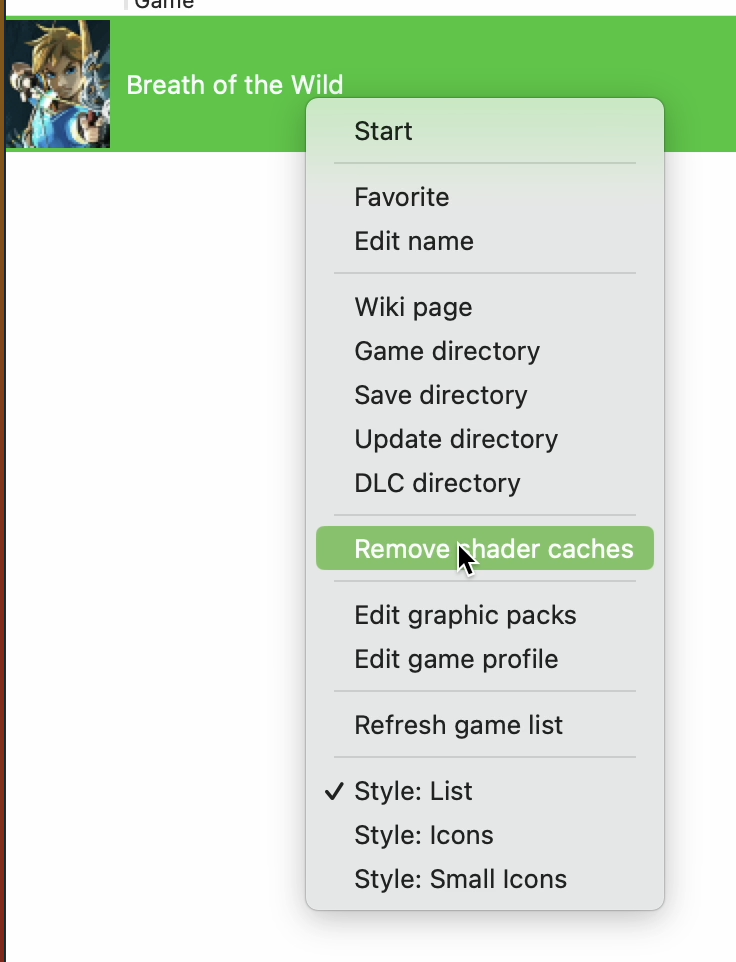
It does the same thing, but just faster.
Both ways lead to the deletion of the shader caches and generated pipelines, which would make it pretty slow but like it works so i'll take it as a temporary solution.
Hey @EDED2314 I have found that you only need to delete shaderCache/driver/vk/00050000101c9400.bin. This only affects startup and there is no need to regenerate in-game shaders, so gameplay will not be impacted. I am using a basic AppleScript application to automate this on Cemu startup since I got annoyed with doing it myself. Here is how you can do the same:
- Open "Script Editor"
- Write the following code:
try
	do shell script "rm ~/Library/Caches/Cemu/shaderCache/driver/vk/*.bin"
end try

tell application "Cemu"
	activate
end tell
- File -> Save
Save As:     CemuFix
File Format: Application
- If you want to set an icon, just change
CemuFix.app/Contents/Resources/applet.icnsto the icon of your choosing (easiest to just copy the Cemu icon, but fun to do a BOTW icon)
It's a workaround/quick fix, but it works for now.

Could you share that file? Perhaps it can help people from MoltenVK fix the underlying issue.

Hey @EDED2314 I have found that you only need to delete
shaderCache/driver/vk/00050000101c9400.bin. This only affects startup and there is no need to regenerate in-game shaders, so gameplay will not be impacted. I am using a basic AppleScript application to automate this on Cemu startup since I got annoyed with doing it myself. Here is how you can do the same:
- Open "Script Editor"
- Write the following code:
try
	do shell script "rm ~/Library/Caches/Cemu/shaderCache/driver/vk/*.bin"
end try

tell application "Cemu"
	activate
end tell
- File -> Save
Save As:     CemuFix
File Format: Application
- If you want to set an icon, just change
CemuFix.app/Contents/Resources/applet.icnsto the icon of your choosing (easiest to just copy the Cemu icon, but fun to do a BOTW icon)It's a workaround/quick fix, but it works for now.
Sadly at one point when the cache gets too big, I would still have to delete the cache...

I'm using the latest commit 271a4e4 nightly and the latest molten-vk via homebrew
I've noticed that if I run BOTW it all runs fantastic!!
Then if I quit and boot the game again, it crashes instantly with the error
Failed to create pipeline cacheIf I then delete the shaderCache folder then I can boot again and it works great again.
This is the full log
$ /Applications/_GAMING_EMU/cemu/Cemu/Cemu ; exit;
No bundle id found
[mvk-info] MoltenVK version 1.2.0, supporting Vulkan version 1.2.231.
	The following 83 Vulkan extensions are supported:
		VK_KHR_16bit_storage v1
		VK_KHR_8bit_storage v1
		VK_KHR_bind_memory2 v1
		VK_KHR_buffer_device_address v1
		VK_KHR_create_renderpass2 v1
		VK_KHR_dedicated_allocation v3
		VK_KHR_depth_stencil_resolve v1
		VK_KHR_descriptor_update_template v1
		VK_KHR_device_group v4
		VK_KHR_device_group_creation v1
		VK_KHR_driver_properties v1
		VK_KHR_dynamic_rendering v1
		VK_KHR_external_fence v1
		VK_KHR_external_fence_capabilities v1
		VK_KHR_external_memory v1
		VK_KHR_external_memory_capabilities v1
		VK_KHR_external_semaphore v1
		VK_KHR_external_semaphore_capabilities v1
		VK_KHR_fragment_shader_barycentric v1
		VK_KHR_get_memory_requirements2 v1
		VK_KHR_get_physical_device_properties2 v2
		VK_KHR_get_surface_capabilities2 v1
		VK_KHR_imageless_framebuffer v1
		VK_KHR_image_format_list v1
		VK_KHR_maintenance1 v2
		VK_KHR_maintenance2 v1
		VK_KHR_maintenance3 v1
		VK_KHR_multiview v1
		VK_KHR_portability_subset v1
		VK_KHR_push_descriptor v2
		VK_KHR_relaxed_block_layout v1
		VK_KHR_sampler_mirror_clamp_to_edge v3
		VK_KHR_sampler_ycbcr_conversion v14
		VK_KHR_separate_depth_stencil_layouts v1
		VK_KHR_shader_draw_parameters v1
		VK_KHR_shader_float_controls v4
		VK_KHR_shader_float16_int8 v1
		VK_KHR_shader_subgroup_extended_types v1
		VK_KHR_spirv_1_4 v1
		VK_KHR_storage_buffer_storage_class v1
		VK_KHR_surface v25
		VK_KHR_swapchain v70
		VK_KHR_swapchain_mutable_format v1
		VK_KHR_timeline_semaphore v2
		VK_KHR_uniform_buffer_standard_layout v1
		VK_KHR_variable_pointers v1
		VK_EXT_buffer_device_address v2
		VK_EXT_debug_marker v4
		VK_EXT_debug_report v10
		VK_EXT_debug_utils v2
		VK_EXT_descriptor_indexing v2
		VK_EXT_fragment_shader_interlock v1
		VK_EXT_hdr_metadata v2
		VK_EXT_host_query_reset v1
		VK_EXT_image_robustness v1
		VK_EXT_inline_uniform_block v1
		VK_EXT_memory_budget v1
		VK_EXT_metal_objects v1
		VK_EXT_metal_surface v1
		VK_EXT_post_depth_coverage v1
		VK_EXT_private_data v1
		VK_EXT_robustness2 v1
		VK_EXT_sample_locations v1
		VK_EXT_scalar_block_layout v1
		VK_EXT_separate_stencil_usage v1
		VK_EXT_shader_stencil_export v1
		VK_EXT_shader_viewport_index_layer v1
		VK_EXT_subgroup_size_control v2
		VK_EXT_swapchain_colorspace v4
		VK_EXT_texel_buffer_alignment v1
		VK_EXT_texture_compression_astc_hdr v1
		VK_EXT_vertex_attribute_divisor v3
		VK_AMD_gpu_shader_half_float v2
		VK_AMD_negative_viewport_height v1
		VK_AMD_shader_image_load_store_lod v1
		VK_AMD_shader_trinary_minmax v1
		VK_IMG_format_pvrtc v1
		VK_INTEL_shader_integer_functions2 v1
		VK_GOOGLE_display_timing v1
		VK_MVK_macos_surface v3
		VK_MVK_moltenvk v36
		VK_NV_fragment_shader_barycentric v1
		VK_NV_glsl_shader v1
[mvk-info] GPU device:
		model: Apple M1 Max
		type: Integrated
		vendorID: 0x106b
		deviceID: 0xc0603ef
		pipelineCacheUUID: 000027D8-0C06-03EF-0000-000000000000
	supports the following Metal Versions, GPU's and Feature Sets:
		Metal Shading Language 2.4
		GPU Family Apple 7
		GPU Family Apple 6
		GPU Family Apple 5
		GPU Family Apple 4
		GPU Family Apple 3
		GPU Family Apple 2
		GPU Family Apple 1
		GPU Family Mac 2
		GPU Family Mac 1
		GPU Family Common 3
		GPU Family Common 2
		GPU Family Common 1
		macOS GPU Family 2 v1
		macOS GPU Family 1 v4
		macOS GPU Family 1 v3
		macOS GPU Family 1 v2
		macOS GPU Family 1 v1
[mvk-info] Created VkInstance for Vulkan version 1.2.231, as requested by app, with the following 3 Vulkan extensions enabled:
		VK_KHR_surface v25
		VK_EXT_debug_utils v2
		VK_EXT_metal_surface v1
[mvk-info] Vulkan semaphores using Metal implicit guarantees within a single queue.
[mvk-info] Created VkDevice to run on GPU Apple M1 Max with the following 3 Vulkan extensions enabled:
		VK_KHR_driver_properties v1
		VK_KHR_sampler_mirror_clamp_to_edge v3
		VK_KHR_swapchain v70
[mvk-info] Created 3 swapchain images with initial size (1280, 720) and contents scale 1.0 for screen Built-in Retina Display.
[mvk-info] Created 3 swapchain images with initial size (1728, 1057) and contents scale 1.0 for screen Built-in Retina Display.
[mvk-info] Created 3 swapchain images with initial size (1728, 1057) and contents scale 1.0 for screen Built-in Retina Display.
[mvk-error] VK_ERROR_INITIALIZATION_FAILED: Render pipeline compile failed (Error code 3):
output of type float4 is not compatible with a MTLPixelFormatRGBA16Uint color attachement..
-[MTLVertexDescriptorInternal newSerializedDescriptor]:726: failed assertion `Serialized Descriptor Creation
None of the attributes set bufferIndex to 29, but MTLVertexDescriptor set buffer layout[29].stride(16).
'
Abort trap: 6!
Error: signal 6:
0   Cemu                                0x0000000101311b52 _Z20handlerDumpingSignali + 98
1   libsystem_platform.dylib            0x00007ff80861edfd _sigtramp + 29
2   ???                                 0x0000000000000000 0x0 + 0
3   libsystem_c.dylib                   0x00007ff808554d24 abort + 123
4   libsystem_c.dylib                   0x00007ff8085540cb err + 0
5   Metal                               0x00007ff8114fb8a4 _Z13MTLGetEnvCaseI16MTLErrorModeTypeEbPKcRT_RKNSt3__16vectorINS5_4pairIS2_S3_EENS5_9allocatorIS8_EEEE.cold.1 + 0
6   Metal                               0x00007ff8114e5c05 MTLReportFailure + 529
7   Metal                               0x00007ff8114de378 _MTLMessageContextEnd + 1278
8   Metal                               0x00007ff81143ac85 -[MTLVertexDescriptorInternal newSerializedDescriptor] + 827
9   Metal                               0x00007ff81143a516 -[MTLRenderPipelineDescriptorInternal newSerializedVertexDataWithFlags:options:error:] + 751
10  AGXMetalG13X                        0x00007ffa1837dea9 AGXMetalG13X + 3677865
11  AGXMetalG13X                        0x00007ffa1836f43c AGXMetalG13X + 3617852
12  libMoltenVK.dylib                   0x00000001131156c5 ___ZN25MVKRenderPipelineCompiler25newMTLRenderPipelineStateEP27MTLRenderPipelineDescriptor_block_invoke + 117
13  libMoltenVK.dylib                   0x000000011314edb9 ___ZN16MVKMetalCompiler7compileERNSt3__111unique_lockINS0_5mutexEEEU13block_pointerFvvE_block_invoke + 25
14  libdispatch.dylib                   0x00007ff8084510cc _dispatch_call_block_and_release + 12
15  libdispatch.dylib                   0x00007ff808452317 _dispatch_client_callout + 8
16  libdispatch.dylib                   0x00007ff808461c0c _dispatch_root_queue_drain + 673
17  libdispatch.dylib                   0x00007ff80846225c _dispatch_worker_thread2 + 160
18  libsystem_pthread.dylib             0x00007ff808605f8a _pthread_wqthread + 256
19  libsystem_pthread.dylib             0x00007ff808604f57 start_wqthread + 15

Saving session...completed.

[Process completed]
this is not the best way but if you copy the shader renders folder to the desktop before lunching the game and when its started replace the new folder in cache with the one in the desktop, you can play nicely.


Hey for me it crashes when loading the cached Vulkan pipelines, only when those get above ~4180. If that's also your case you only need to delete the file ending in vkpipeline.bin in Library/Caches/Cemu/shaderCache/transferable/ and not the shaders one. Pipelines compile way faster than shaders so not having to recompile shaders is already an improvement to reduce stuttering when loading your save.
Furthermore, if you walk around a little after loading the game and quit you should get less than 4000 cached pipelines that you can backup and paste in the above folder before every play session to further reduce and perhaps even eliminate stuttering when first loading.
With those two tricks I get to play very smoothly since recompiling just the pipelines and not the shaders when exploring does not impact my performance at all. That said I'm on an M3 pro so your mileage may vary.

Something a bit strange seems to be going on here, at least on my machine. As this earlier comment indicates, deleting shaderCache/driver/vk/00050000101c9400.bin used to work with a contemporaneous version of Cemu.
However, as mentioned in the comment just above mine, I'm now needing to delete the vkpipeline file (and I can leave the other one alone). Did the original underlying issue get fixed, and is this new issue something different, or is the new issue a red herring?
I'm currently running Cemu 2.0-78 on OS 14.4.1. Unfortunately I never made a note of the versions that used to work, but I was likely running on OS 12 at the time (I skipped 13).
