
CareKit
 CareKit copied to clipboard
 carekit-apple
How to store multiple survey steps in appendOutcomeValue in CareKit
Hello Developers. Here I am facing issue regarding the storing of two survey steps in appendOutcomeValue. Actually I have two steps but When i fetch events using OCKEventAggregator it returns one value. I am storing the results with code given below.
         let answerFormat = ORKAnswerFormat.scale(withMaximumValue: 10, minimumValue: 1, defaultValue: 5, step: 1,
       vertical:
        false,
                                             maximumValueDescription: "Very painful", minimumValueDescription: "No pain")
        let painStep = ORKQuestionStep(identifier: "headPain", title: "Pain Survey", question: "Rate your pain", answer:
        answerFormat)
         let surveyTask = ORKOrderedTask(identifier: "survey", steps: [painStep])
         let surveyViewController = ORKTaskViewController(task: surveyTask, taskRun: nil)
         surveyViewController.delegate = self
          present(surveyViewController, animated: true, completion: nil)


    let painStep1 = ORKQuestionStep(identifier: "LegPain", title: "Pain Survey", question: "Rate your pain", answer:
    answerFormat)
    let surveyTask1 = ORKOrderedTask(identifier: "survey", steps: [painStep1])
    let surveyViewControlle1r = ORKTaskViewController(task: surveyTask1, taskRun: nil)
    surveyViewController1.delegate = self
    present(surveyViewController1, animated: true, completion: nil)

    let survey = taskViewController.result.results!.first(where: { $0.identifier == "headPain" }) as! ORKStepResult
    let painResult = survey.results!.first as! ORKScaleQuestionResult
    let answer = Int(truncating: painResult.scaleAnswer!)

    let survey1 = taskViewController.result.results!.first(where: { $0.identifier == "LegPain" }) as! ORKStepResult
    let painResult1 = survey1.results!.first as! ORKScaleQuestionResult
    let answer1 = Int(truncating: painResult1.scaleAnswer!)

    controller.appendOutcomeValue(withType: answer, at: IndexPath(item: 0, section: 0), completion: nil) // It only return this
    controller.appendOutcomeValue(withType: answer1, at: IndexPath(item: 0, section: 0), completion: nil) // not fetching
And I using OCKEventAggregator to fetch events:
  let myCustomAggregator = OCKEventAggregator.custom { dailyEvents -> Double in
                let values = dailyEvents.map { $0.outcome?.values.first?.integerValue ?? 0 }
                print(values) // It return only one value
                let sumTotal = values.reduce(0, +)

                return Double(sumTotal)
            }

Hi Umair,
Does changing your code to this fix the problem?
let myCustomAggregator = OCKEventAggregator.custom { dailyEvents -> Double in

    // There are two values, but you were using `first`, which only gets the first of the two.
    let values: [Int] = dailyEvents.flatMap { $0.outcome?.values.map { $0.integerValue ?? 0 } ?? [] }

    print(values) // Should print array of two values now

    let sumTotal = values.reduce(0, +)
    return Double(sumTotal)
}

Hi @erik-apple
I have used the approach you've recommended, but the system is still ignoring the second value.
In the survey, I have a form with two items and I've verified in debug mode that the variables "answer" and "answer2" are getting populated with the values I input in the frontend:
[...]

        // 4a. Retrieve the result from the ResearchKit survey

        let survey = taskViewController.result.results!.first(where: { $0.identifier == "surveyform" }) as! ORKStepResult
        let painResult = survey.results!.first(where: { $0.identifier == "pain" }) as! ORKScaleQuestionResult
        let answer = Int(truncating: painResult.scaleAnswer!)

        let survey2 = taskViewController.result.results!.first(where: { $0.identifier == "surveyform" }) as! ORKStepResult
        let pain2Result = survey2.results!.first(where: { $0.identifier == "pain2" })  as! ORKScaleQuestionResult
        let answer2 = Int(truncating: pain2Result.scaleAnswer!)

        // 4b. Save the result into CareKit's store
        controller.appendOutcomeValue(withType: answer, at: IndexPath(item: 0, section: 0), completion: nil)
        controller.appendOutcomeValue(withType: answer2, at: IndexPath(item: 0, section: 0), completion: nil)
Here the code I use for the custom aggregator:
[...]
                    let myCustomAggregator = OCKEventAggregator.custom { dailyEvents -> Double in

                        // This closure will be called once for each day on the chart.
                        // `dailyEvents` is an array containing the events for one day.
                        //
                        // As the developer, you must convert that array into a `Double`
                        // to be used for Y-Axis value on the chart. This might require
                        // knowledge about how many events or values are expected.

                        // If there is no outcome, we will count that as zero. We sum all the values and use that result.

                        let values2: [Int] = dailyEvents.flatMap { $0.outcome?.values.map { $0.integerValue ?? 0 } ?? [] }

                        print(values2) // Should print array of two values

                        let sumTotal = values2.reduce(0, +)

                        return Double(sumTotal)
                    }

                    let painDataSeries = OCKDataSeriesConfiguration(
                        taskID: "survey",
                        legendTitle: "Pain",
                        gradientStartColor: UIColor.FlatColor.Red.kDarkRed,
                        gradientEndColor: UIColor.FlatColor.Red.kDarkRed,
                        markerSize: 10,
                        eventAggregator: myCustomAggregator)
When I select the answers as follows...
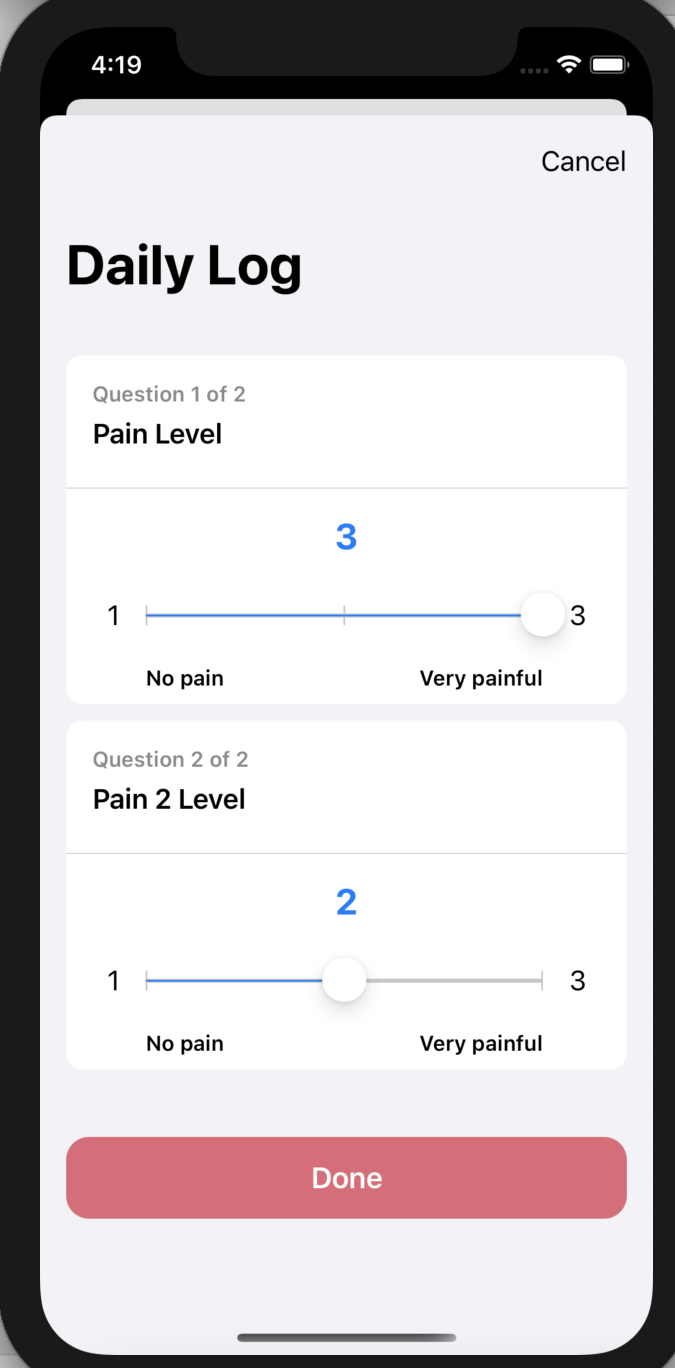
...only the first value (3) gets considered by the system (see results of "print(values2)"):

Am I missing something?
Thanks in advance, Andrea

Andrea,
I suspect the issue is here:
// 4b. Save the result into CareKit's store
controller.appendOutcomeValue(withType: answer, at: IndexPath(item: 0, section: 0), completion: nil)
controller.appendOutcomeValue(withType: answer2, at: IndexPath(item: 0, section: 0), completion: nil)
You might be hitting an error on the 2nd line, but it's tough to tell since the completion closure, where the error would be passed back to you, is set to nil.
The append method you're using is convenient when adding a single outcome value, but it might not behave the way you expect if you call it twice in a row without waiting for the first call to complete before starting the second.
It's a bit more verbose, but the proper way to handle this would be to attach all the outcome values in a single save operation.
// 4b. Attach the outcome values to an outcome and add the outcome to the event.
// (This assumes that no outcome exists already)
if let event = controller.eventFor(indexPath: eventIndexPath) {

    let values = [1, 2, 3].map { OCKOutcomeValue($0) } // Replace 1, 2, 3 with the values from your survey

    let outcome = try! controller.makeOutcomeFor(event: event, withValues: values)

    controller.storeManager.store.addAnyOutcome(outcome, callbackQueue: .main) { result in

        // I recommend not leaving the completion closure nil.
        // Inspecting the result can alert you to problems in your app.
        switch result {

        case let .success(updatedOutcome):
            print("Success: \(updatedOutcome.values)")

        case let .failure(error):
            print("Error: \(error)")
        }
    }
}
Hi @erik-apple, thanks for 4b. above That works well. How should we write the custom aggregator now. The way that it is mentioned above does not seem to print array of two values now. How do we get both values to show on a graph, then?

Hi @erik-apple, the code by @UmairShams does work in combination with the code you provided in 4b. I am able to get an array of two values.
Actually the code is working but I was not able to get the graph to work properly. How would you set-up the graph to show both values?
On Mon, Feb 22, 2021 at 10:53 AM erik-apple [email protected] wrote:
Glad to hear you got it working!
— You are receiving this because you commented. Reply to this email directly, view it on GitHub https://github.com/carekit-apple/CareKit/issues/473#issuecomment-783473121, or unsubscribe https://github.com/notifications/unsubscribe-auth/ADHK7LYOMXK7EJOHTJGPHL3TAJ4XRANCNFSM4OVWK7FQ .
-- Jude Jonassaint, RN Sicklesoft, Inc
Let whoever is in charge keep this simple question in her head (not, how can I always do this right thing myself, but) how can I provide for this right thing to be always done https://everydaypowerblog.com/quotes-by-martin-luther-king-jr/? – Florence Nightingale
Without knowing precisely what effect you're going for, my best guess is that you need two create two different data series configurations, one that looks only at the first value, and one that looks at the second.
Both series will refer to the same taskID, but each will use a different custom event aggregator to extract the value to display on the Y-axis. You'll probably wind up with something that looks something like this.
let answerSeries1 = OCKDataSeriesConfiguration(
    taskID: "survey",
    legendTitle: "Answer 1",
    gradientStartColor: .systemGray2,
    gradientEndColor: .systemGray,
    markerSize: 10,
    eventAggregator: OCKEventAggregator.custom({ events in events.first?.outcome?.values[0].doubleValue ?? 0 })

let answerSeries2 = OCKDataSeriesConfiguration(
    taskID: "survey",
    legendTitle: "Answer 2",
    gradientStartColor: .systemGray2,
    gradientEndColor: .systemGray,
    markerSize: 10,
    eventAggregator: OCKEventAggregator.custom({ events in events.first?.outcome?.values[1].doubleValue ?? 0 })

let insightsCard = OCKCartesianChartViewController(
    plotType: .bar,
    selectedDate: date,
    configurations: [answerSeries1, answerSeries2],
    storeManager: self.storeManager)