
linaria
 linaria copied to clipboard
 callstack
styled.element props not working
Environment
Windows 10, Webpack 5, node 14.18.3,
    "@linaria/babel-preset": "^4.1.2",
    "@linaria/core": "^4.1.1",
    "@linaria/react": "^4.1.2",
    "webpack": "^5.74.0",
    "webpack-bundle-analyzer": "^4.5.0",
    "webpack-cli": "^4.10.0",
    "webpack-closure-compiler": "^2.1.6",
    "webpack-dev-server": "^4.10.0"
    "@babel/core": "^7.18.10",
    "@babel/plugin-syntax-dynamic-import": "^7.8.3",
    "@babel/polyfill": "^7.12.1",
    "@babel/preset-env": "^7.18.10",
    "@babel/preset-react": "^7.18.6",
    "@babel/preset-stage-0": "^7.8.3",
    "@babel/register": "^7.18.9",
    "@linaria/webpack-loader": "^4.1.2",
Description
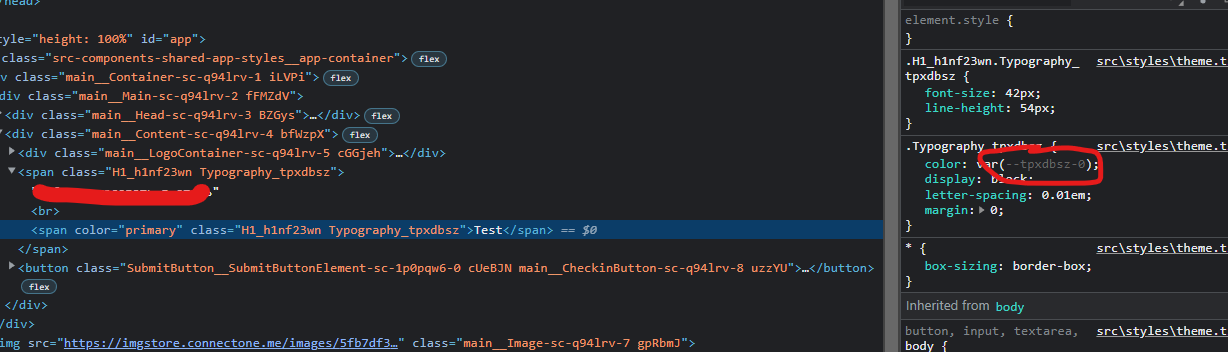
I create simplest component Typography with prop color which transformed into css variable via prop fn, but I've got problem that component received css class name (as I guess) but expect to be received (prop string value which I send to component as prop)
code
const FONT_WEIGHT = {
  normal: 500,
  bold: 600,
  bolder: 700,
};

const Typography = styled.span<{
  color?: Colors;
  weight?: keyof typeof FONT_WEIGHT;
  align?: CSSProperties['textAlign'];
}>`
  color: ${(props) => `var(--${props.color})`};
  display: block;
  letter-spacing: 0.01em;
  margin: 0;
`;

export const H1 = styled(Typography)`
  font-size: 42px;
  line-height: 54px;
`;
H1 usage
         <H1 color={'primary'}>
              example
            </H1>
postcss.config.js
/* eslint-disable @typescript-eslint/no-var-requires */

const autoprefixer = require('autoprefixer');
const cssnano = require('cssnano');
const sorting = require('postcss-sorting');

const isProd = process.env.NODE_ENV === 'production';

module.exports = {
  syntax: 'postcss-scss',
  plugins: [
    sorting(),
    autoprefixer,
    isProd &&
      cssnano({
        preset: [
          'default',
          {
            discardComments: {
              removeAll: true,
            },
          },
        ],
      }),
  ].filter(Boolean),
};
linaria.config.js
/* eslint-disable @typescript-eslint/no-var-requires */
const stylis = require('stylis');

const isProd = process.env.NODE_ENV === 'production';

stylis.set({ prefix: false, compress: isProd });

// https://github.com/callstack/linaria/blob/master/docs/CONFIGURATION.md
module.exports = {
  evaluate: true,
  displayName: !isProd,
};
MiniCssExtractPlugin
 new MiniCssExtractPlugin({
      filename: isProd ? 'styles-[contenthash].css' : 'styles.css',
      chunkFilename: "styles/[id].css",
      ignoreOrder: false,
    }),
css webpack rules
{
        test: /\.css$/,
        use: [
          {
            loader: MiniCssExtractPlugin.loader,
          },
          {
            loader: 'css-loader',
            options: { sourceMap: !isProd },
          },
          {
            loader: "postcss-loader",
            options: {
              postcssOptions: {
                config: path.resolve(__dirname, "postcss.config.js")
              }
            }
          }
        ],
      }
ts webpack rules
{
        test: /\.tsx?$/,
        exclude: /node_modules/,
        use: [
          {
            loader: 'babel-loader',
          },
          {
            loader: '@linaria/webpack-loader',
            options: {
              sourceMap: !isProd,
            },
          },
          {
            loader: "ts-loader",
            options: {
              transpileOnly: false,
            },
          },
        ],
      }
babel.config.js
module.exports = function (api) {
  api.cache.never();

  return {
    sourceMaps: true,
    presets: [
      "@babel/react",
      [
        "@babel/env",
        {
          useBuiltIns: "usage",
          corejs: {
            version: 3,
          },
        },
      ],
      "@linaria"
    ],
    plugins: [
      "babel-plugin-styled-components",
      "react-hot-loader/babel",
      [
        "babel-plugin-module-resolver",
        {
          alias: {
            "effector": "./src/store/__internal__/domain",
            "@origin-effector": "./node_modules/effector/effector.cjs.js",
            ...(process.env.NODE_ENV === "production" ? {
              "effector-logger": "./src/store/__internal__/effector-logger",
            } : {}),
          }
        }
      ],
      process.env.NODE_ENV === "development" && [
        "effector-logger/babel-plugin",
        {
          inspector: false,
          effector: {
            addLoc: true,
            addNames: true
          }
        }
      ],
    ].filter(Boolean),
    env: {
      development: {
        plugins: process.env.DEV_SERVER ? ["react-refresh/babel"] : [],
      },
    },
  };
};

I'm guessing you need to specify the configFile option to the babel-loader and as babelOptions to the Linaria webpack loader. See my comment here: https://github.com/callstack/linaria/issues/589#issuecomment-1224287054

Hi @js2me
For property based interpolations Linaria uses css variables. In your case, var(--${props.color}) will be compiled as var(--var(--some-generated-name)) that is just an invalid CSS syntax. There are at least two ways to address you problem:
- interpolate not a variable name, but a color:
color: ${(props) => NameToValue[props.color]};; - use cx to add a class name with the specific color https://tsplay.dev/ND2eOW
