
qBittorrent-Enhanced-Edition
 qBittorrent-Enhanced-Edition copied to clipboard
 c0re100
host192.168.1.1 The speed limit is invalid
Please provide the following information
qBittorrent version and Operating System
qBittorrent :4.3.5.10 win 21h1
If on linux, libtorrent-rasterbar and Qt version
(type here)
What is the problem
There have been many Host:192.168.1.1.
What is the expected behavior
Uploaded and downloaded
Steps to reproduce


I set up 200KB restrictions on the upload speed. The speed limit of 192.168.x.x is invalid
You can disable Local Peer Discovery, it makes confusions.
The speed limit of 192.168.x.x is invalid
Apply limits settings, to uTP and to peers on LAN.

You can disable Local Peer Discovery, it makes confusions.
The speed limit of 192.168.x.x is invalid
Apply limits settings, to uTP and to peers on LAN.
Amazing is that there are some resource downloads to find the speed of the LAN IP is also very fast. Disable local will affect the download speed of the resource?
I don't have the specific time, but don’t have 192.168.x.x before at least April,and these hosts do not exist in the actual network

I did not read source codes, and guess that the Local Peer Discovery is a implement of BEP 14 (Local Service Discovery), but the local range has been enlarged?
Do you enabled DNS resolve feature(Resolve peer host names)?
Do you mean to set it up in this place?
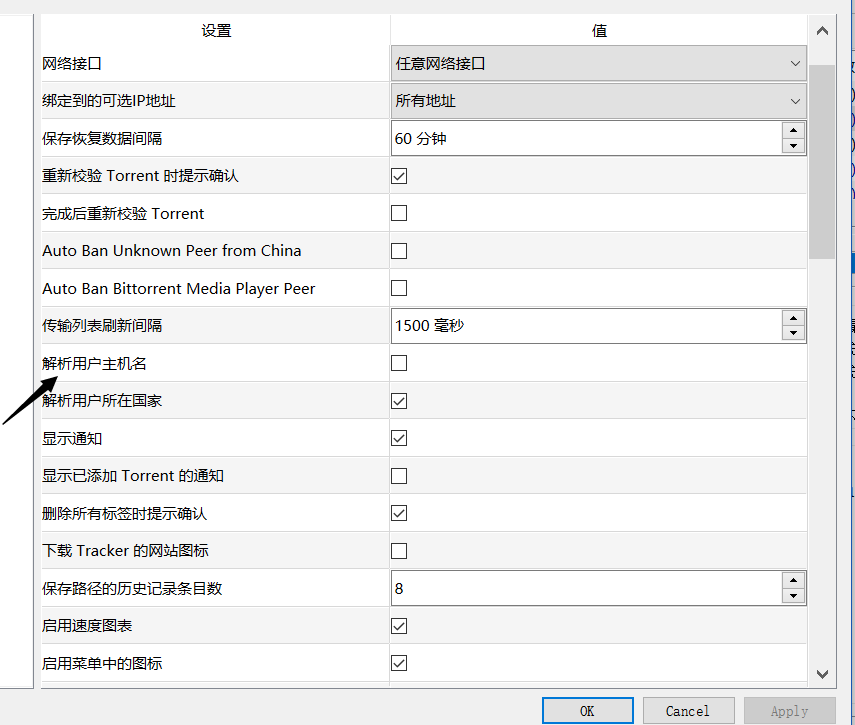
I didn't open this feature as shown.
When I open this feature
 pandoraBox_6979.lan The actual address after copying the IP port address by right-clicking
get 192.168.1.1:1232
But 192.168.1.1 This host is my router LAN address and my router never installed qbit
pandoraBox_6979.lan The actual address after copying the IP port address by right-clicking
get 192.168.1.1:1232
But 192.168.1.1 This host is my router LAN address and my router never installed qbit
They are not in your LAN, and be found from other LANs (on CAN/MAN) by LPD. As I told, it makes confusions.
If you want know more informations of LPD, go to the official repo.