
burp-send-to
 burp-send-to copied to clipboard
 bytebutcher
Feature: Specify Working Directory
Thanks for making this extension!
In my current use case, I would like to be able to specify the current working directory so that I can quickly save tool output without having to make changes to each Context Menu Entry.
So far I've experimented with the following workarounds within Terminal Options which didn't work unfortunately:
Setting an environment variable upfront:
WORKDIR=/tmp xterm -fa 'Monospace' -fs 10 -hold -e %C
Slipping in a cheeky cd beforehand:
xterm -fa 'Monospace' -fs 10 -hold -e cd /tmp && %C
I almost managed to get what I wanted with
xterm -fa 'Monospace' -fs 10 -hold -ls -e /bin/bash -c %C
but the cd command was causing lots of issues here as well...
No such luck with gnome-terminal too, especially its default behavior is to kill the window after command execution finishes
gnome-terminal -- "env" -x bash
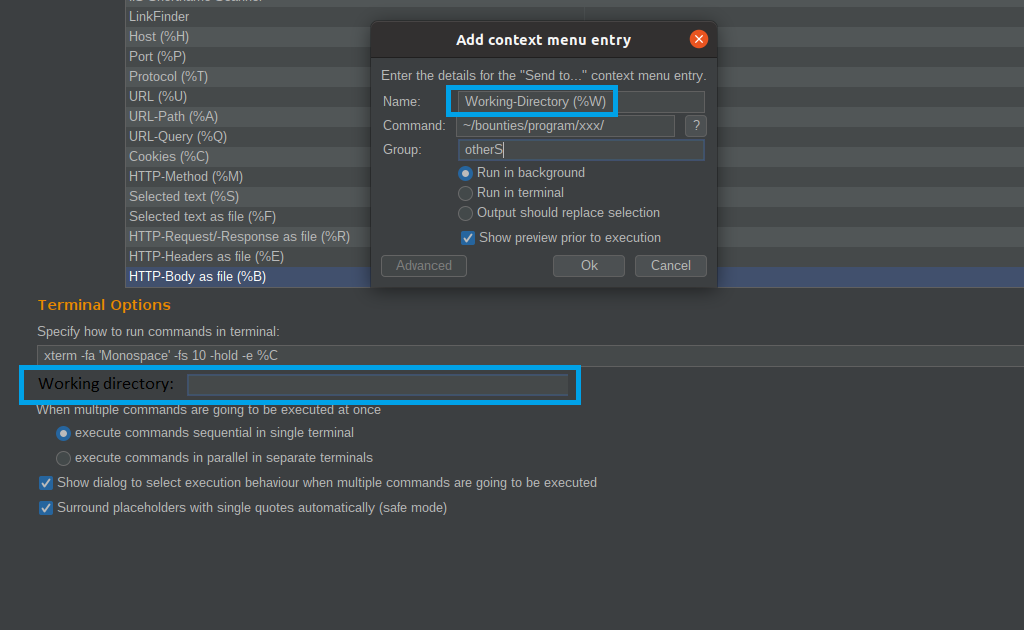
Would it be possible to implement:
- An additional placeholder (%W) for specified working directory
- An input field for this global value

Hi @kawing-ho, thanks for your message and sorry for my late response. Maybe you can try specifying a wrapper script like this: run.sh
#!/bin/bash
WORKING_DIR="/tmp" # Specify your working directory here!
ARGUMENTS=()
for arg in ${@}; do
	arg="$(echo "${arg}" | sed -e "s@§WORKDIR§@${WORKING_DIR}@g")"
	ARGUMENTS+=(${arg})
done
eval ${ARGUMENTS[@]}
Context Menu Entry
Name: nmap
Command: "/path/to/run.sh nmap -sS -p- -oA '§WORKDIR§/%H' %H"
Try to run the script a few times with different inputs to get an idea how it is working (e.g. ./run.sh ls -la §WORKDIR§/../). You may replace the 'eval' in the last line with an 'echo' to get an better idea what is going on.
However, this approach is a bit clunky. I think an better idea would be to use an extra placeholder like you suggested. I'll definitely look into it and add it in the near future!
