
build
 build copied to clipboard
 boostorg
build boost1.72 on windows10 with msvc14.2(vs2019) failed
it will always occur the error as below: "failed to write output file 'build\boost\architecture\msvc-14.2\debug\threading-multi\32.obj.rsp'!" i searched the error on the net, some people suggest adding some options such as "cxxflags=/FS" "pch=off", but these didn't work for my case. and here is all my cmd: "b2 -j32^ headers^ --layout=versioned^ --build-dir=.\build^ --with-system^ --with-date_time^ --with-filesystem^ --with-python^ --project-config=project-config.jam^ -d 1^ architecture=x86^ address-model=64^ toolset=msvc-14.2^ variant=release^ link=static^ threading=multi^ runtime-link=shared^ --prefix="C:\Users\szx3gg\Downloads\boost_1_72_0"^ --libdir="C:\Users\szx3gg\Downloads\boost_1_72_0\lib"^ --includedir="C:\Users\szx3gg\Downloads\boost_1_72_0"^ install " i also have tried to test remove some options in the cmdline or just keep them like "threading=multi^" , but still failed with the error.

Try adding either --abbreviated-paths or --hash options (https://boostorg.github.io/build/manual/master/index.html#bbv2.reference.buildprocess.targetpath). If that works it means your setup is creating long paths. Depending on which version of Windows you have it might be possible to enable long path support in the OS.

Try adding either
--abbreviated-pathsor--hashoptions (https://boostorg.github.io/build/manual/master/index.html#bbv2.reference.buildprocess.targetpath). If that works it means your setup is creating long paths. Depending on which version of Windows you have it might be possible to enable long path support in the OS.
hi @grafikrobot , thanks for your answer, but it seems that doesn't work for me either. i now really wonder what .rsp file is, and why the .obj file needs to be transformed or something like to the .rsp file format.
The RSP files are "response" files. They contain the arguments tot he compiler for building that particular source file. They get used to work around compiler command invocation argument length limits.
Not sure what else, other than the path length, could be going wrong here :-(
hi @grafikrobot , i also tried the simple example in the b2 folder to build a project and built it with b2.exe. the project is as below:

however it still fails with the same error.
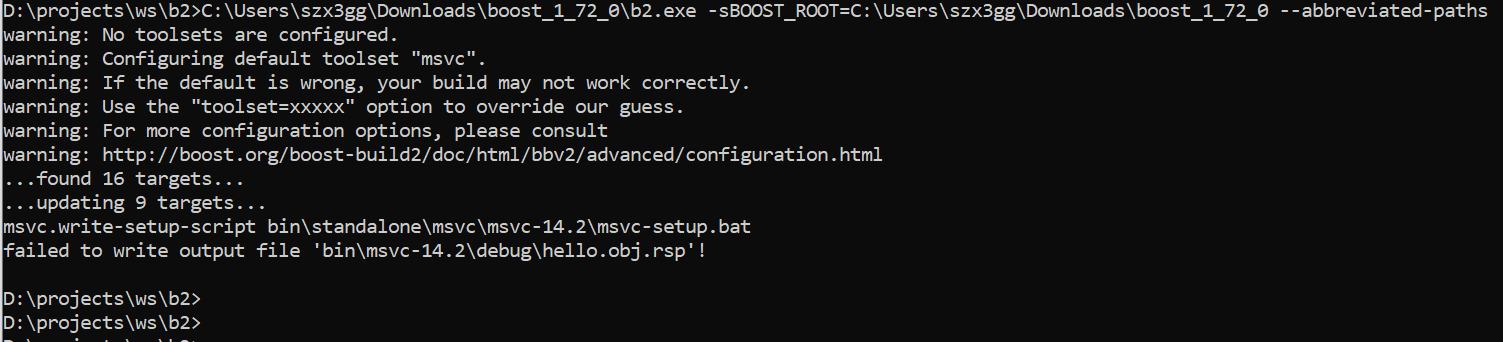
i don't think the path is too long....
Thank you for your contributions. Main development of B2 has moved to https://github.com/bfgroup/b2 This issue has been automatically marked as "transition" to indicate the potential for needing transition to the new B2 development project.
![stale[bot] avatar](https://avatars.githubusercontent.com/in/1724?v=4 "Published by a pub.dev verified publisher")