
RNPulseButton
 RNPulseButton copied to clipboard
 bluelocate
Esay to use pulse animation Button
RNPulseButton


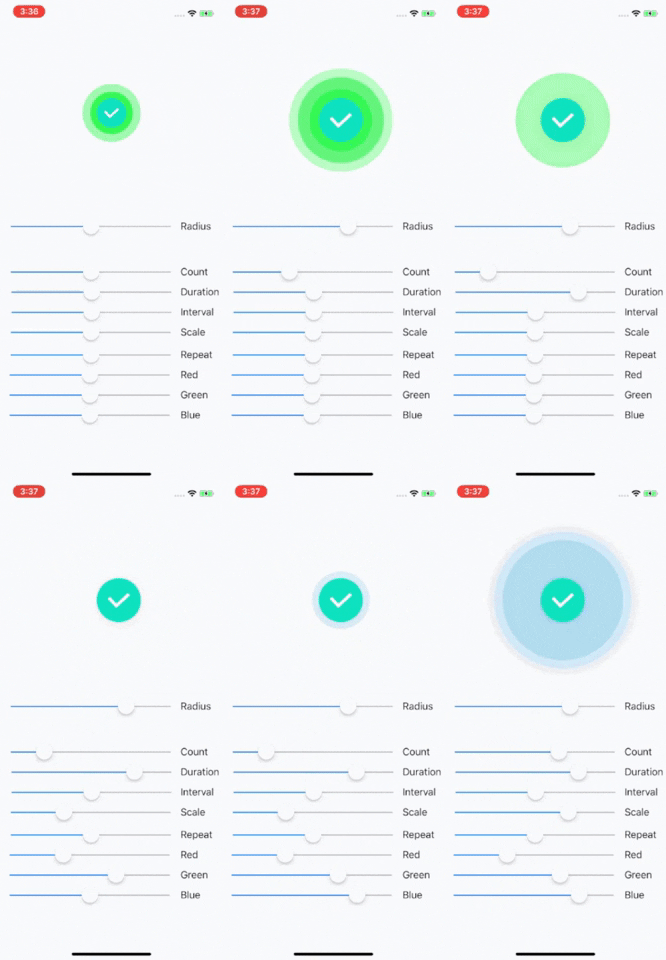
Easy and Customizable iOS Pulse Animation Effect. You can connect Action(TouchUpInside) in storyboard(Like UIButton).
Demo
Installation
RNPulseButton is available through CocoaPods. To install it, simply add the following line to your Podfile:
pod 'RNPulseButton'
At a Glance
Create Cusom Pulse
StoryBoard : Just make it! Adjust property from storyboard inspector
Programmatically
let pulse2 = RNPulseButton(frame: CGRect(x: 150, y: 300, width: 100, height: 100),
                           pulseRadius: 100,
                           pulseCount: 4,
                           pulseDuration: 3,
                           intervalTime: 0.4,
                           scaleFactor: 3,
                           repeatCount: 100,
                           pulseColor: UIColor.red,
                           normalImage: nil, selectedImage: nil)
Animation Start
pulse2.start()
Animation Stop
pulse2.stop()
Customizable Property
    pulseRadius: Double     // Pulse Radius
    pulseCount: Int         // Number of Pulse
    pulseDuration: Double   // Pulse Animation Duration
    intervalTime: Double    // Interval between Pulse
    scaleFactor: CGFloat    // Pulse Radius Scale Factor
    repeatCount: Int        // Animation Repeat Count
    pulseColor: UIColor     // Set Pulse Color
    normalImage: UIImage?   // (Optional) Set Normal State Image
    selectedImage: UIImage? // (Optional) Set Selected State Image
Author
Rodo, [email protected]
License
RNPulseButton is available under the MIT license. See the LICENSE file for more info.
 bluelocate