
bladecoder-adventure-engine
 bladecoder-adventure-engine copied to clipboard
 bladecoder
I can't run the projects
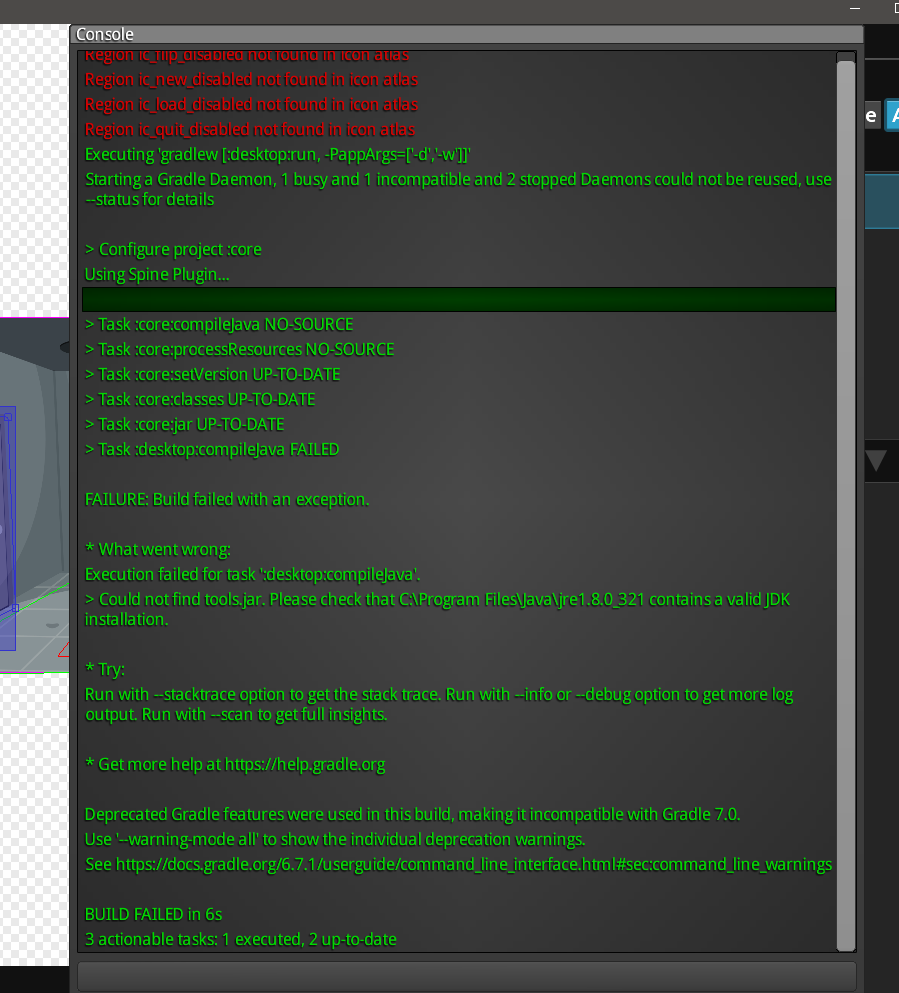
No puedo ejecutar los juegos de prueba, es extraño el año pasado funcionaba bien con la anterior versión, ahora no arranca ni en la 4.0.2. o 4.1.0.

Please check that C:\Program Files\Java\jre1.8.0_321 contains a valid JDK installation.
Sounds like you're trying to build with a JRE instead of a JDK? I haven't used Bladecoder, but your JAVA_HOME may be messed up or IDE settings are pointing to the wrong path if applicable. If you use Adoptium, or most non-Oracle JDKs, it should offer to set it for you during installation. Note that Gradle 6.7.1 requires Java 15 or older (if you wanted to use 17, you could probably change it to Gradle 7.4.2 - or whatever the latest is at the time of reading - somehow).

As @Frosty-J said, you have installed a JRE instead of a JDK. You need to uninstall the JRE and install the JDK. JDK 1.8 should works well.
