
react-native-twilio-video-webrtc
 react-native-twilio-video-webrtc copied to clipboard
Published
20 hours ago •
 blackuy
blackuy
Duplicate remote video tracks causing remote video not to display
Steps to reproduce
- Connect to twilio room
- Enable remote video
Expected behaviour
The users should connect and be able to see the remote video properly
Actual behaviour
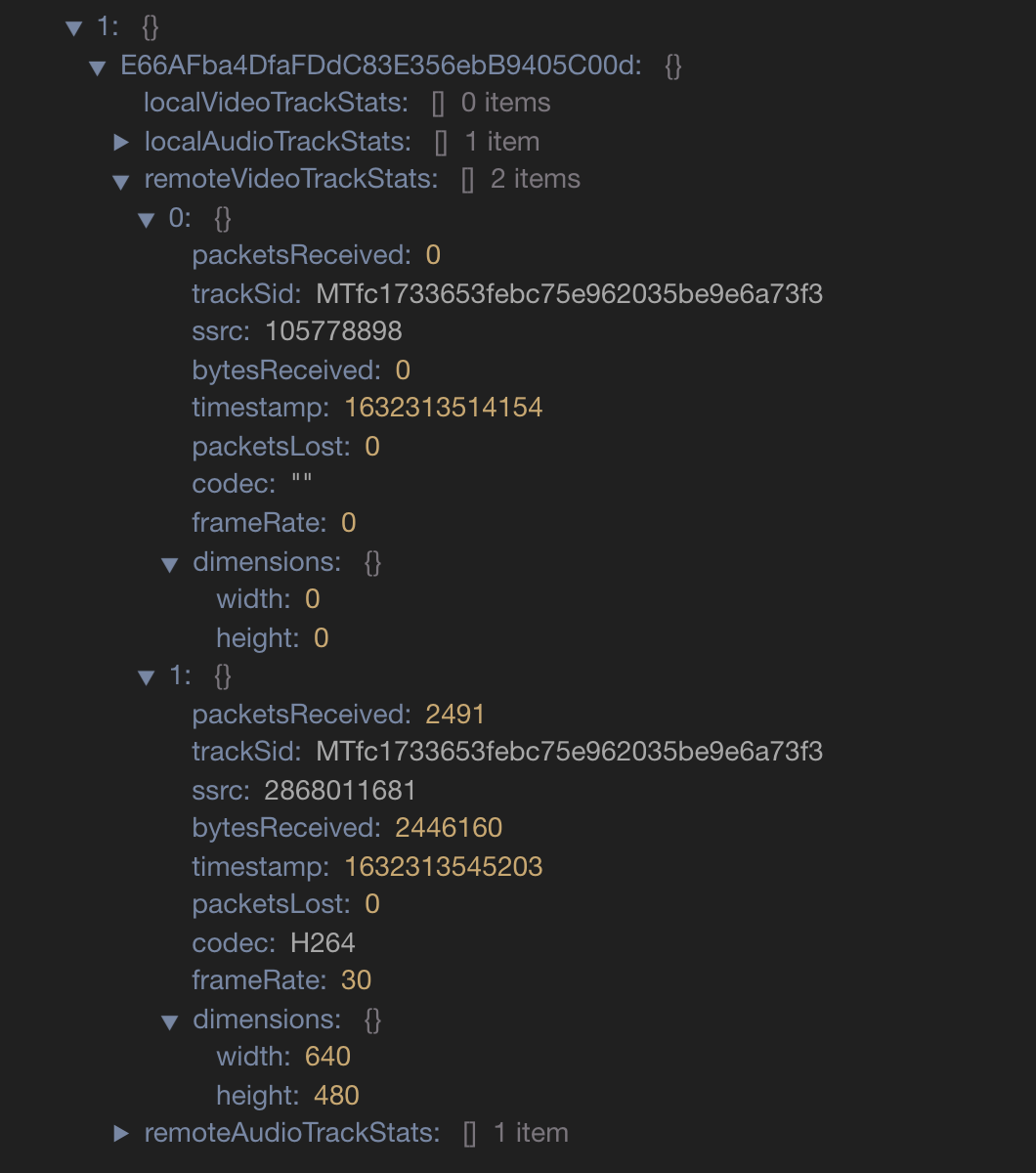
Sometimes this does work but pretty consistently I will get a (black screen on android, white screen on ios). You can see that i'm getting two remote video trakcs when I should only be getting one. The trackSid are the same but one of them doesn't have dimensions or frameRate or codec, etc.. so its not displaying properly. I need to filter these out or destory teh bad one.
Note: If the remote user toggles their video the problem is fixed but we can't have that happen every time
Environment
- Node.js version: v16.2.0
- React Native version: 0.65.1
- React Native platform + platform version: iOS 14.5.1 / iphoen XR. Sasmung G10 android 11
react-native-twilio-video-webrtc
Version: "master"

That's super weird. Which platform is doing the publishing in each case? Is it just one or the other?
