react-native-actionsheet
 react-native-actionsheet copied to clipboard
 beefe
beefe
how to use in TypeScript

You can use any un-typed module in typescript by either doing
const ActionSheet = require("react-native-actionsheet").default;
or
// @ts-ignore
import ActionSheet from "react-native-actionsheet";
I prefer require as it makes it more obvious when I'm bringing an unsafe object in.

Declare this definition file on your own project
declare module 'react-native-actionsheet' {
  import { Component } from 'react';

  interface Props {
    options: (string | React.ReactNode)[];
    onPress: (index: number) => void;
    title?: string;
    message?: string;
    tintColor?: string;
    cancelButtonIndex?: number;
    destructiveButtonIndex?: number;
    styles?: object;
  }

  class ActionSheet extends Component<Props> {
    public show: () => void;
  }

  export default ActionSheet;
}

Is there any "how to" for using this library with typescript? (react-native newbie)
this.ActionSheet.show() where ActionSheet is not found!

@JWWon TS complains the module can not be augmented:
Invalid module name in augmentation. Module 'react-native-actionsheet' resolves to an untyped module at 'c:/projects/app/node_modules/react-native-actionsheet/lib/index.js', which cannot be augmented.ts(2665)

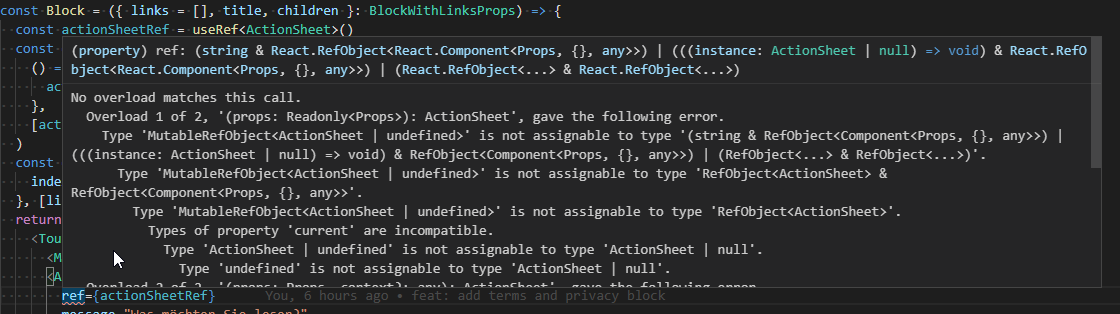
@JWWon your typings are missing the ref prop. I tried it with
ref: RefObject<Component<Props>>;
but it compains when using useRef<ActionSheet> as a ref.