
laravel-dompdf
 laravel-dompdf copied to clipboard
 barryvdh
Generated PDF does not take custom font
HI,
The PDF is getting generated, but it has the default font instead of the custom font (Anitto). The text is rendered in custom font when I print the input HTML on the browser, but the PDF takes the default font. I see that the storage/fonts folder is writeable and the font files and the cache files are getting generated in that folder.
Any thoughts please?
Sreejith C J

HI,
The PDF is getting generated, but it has the default font instead of the custom font (Anitto). The text is rendered in custom font when I print the input HTML on the browser, but the PDF takes the default font. I see that the storage/fonts folder is writeable and the font files and the cache files are getting generated in that folder.
Any thoughts please?
Sreejith C J
++

Hi,
work for me:
put fonts with styles to public folder.
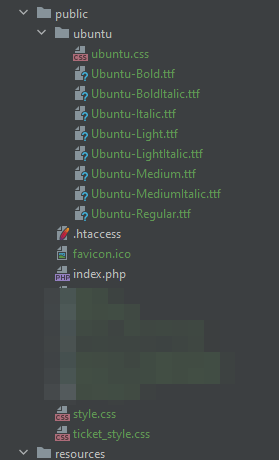
write in style.css
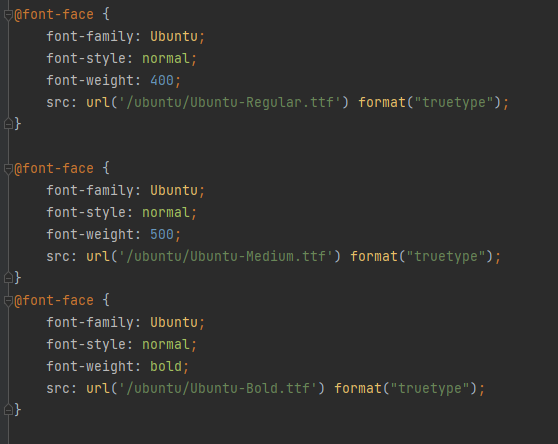
include in .blade.php

after PDF::loadView()->stream() (or some rendering) files are getting generated in that folder and text is rendered in custom fonts.

This is only a wraper for laravel, the real package is https://github.com/dompdf/dompdf https://github.com/barryvdh/laravel-dompdf/blob/f7384cf9af89df4b74559fac9ce3355cd686ede5/config/dompdf.php#L31-L48

Hi,
Thank you very much for the details, but I face the same issue. Please find the details below and please check the screenshots.
- This is a Laravel application and I am trying to generate a PDF file with Anitto font. When I echo the HTML file (just before creating the PDF file), I see the font being applied correctly (seen in the attached file html-output.png. But the PDf file rendered just after the HTML is created has a default font (as seen in the attached file pdf.png)
- The fonts folder is /storage/fonts and the same is being configured in the dom-pdf's config file (as seen in the attached dompdf-config.png)
- When I delete all contents of the /storage/fonts folder and run my application, I see that the files are getting created in that folder (as seen in the fonts-folder.png). This confirms that dom-pdf is able to create files in this folder.
- You can also see the cache file's content (as in dompdf-cachefile.png)
- style.png has the style config
The interesting fact is that I am able to generate the PDF file with Anitto font with the same configuration on our staging server. It does not work on production server alone. Please let me know if you have any thoughts.
Regards Sreejith C J
On Mon, Jul 4, 2022 at 10:14 PM erikn69 @.***> wrote:
This is only a wraper for laravel, the real package is https://github.com/dompdf/dompdf
— Reply to this email directly, view it on GitHub https://github.com/barryvdh/laravel-dompdf/issues/900#issuecomment-1173998103, or unsubscribe https://github.com/notifications/unsubscribe-auth/AAMKDVU4D4J2KQCLBLRWO3LVSMIGDANCNFSM52GBJ4WQ . You are receiving this because you authored the thread.Message ID: @.***>
Hi, Thank you very much for the details, but I face the same issue. Please find the details below and please check the screenshots. 1. This is a Laravel application and I am trying to generate a PDF file with Anitto font. When I echo the HTML file (just before creating the PDF file), I see the font being applied correctly (seen in the attached file html-output.png. But the PDf file rendered just after the HTML is created has a default font (as seen in the attached file pdf.png) 2. The fonts folder is /storage/fonts and the same is being configured in the dom-pdf's config file (as seen in the attached dompdf-config.png) 3. When I delete all contents of the /storage/fonts folder and run my application, I see that the files are getting created in that folder (as seen in the fonts-folder.png). This confirms that dom-pdf is able to create files in this folder. 4. You can also see the cache file's content (as in dompdf-cachefile.png) 5. style.png has the style config The interesting fact is that I am able to generate the PDF file with Anitto font with the same configuration on our staging server. It does not work on production server alone. Please let me know if you have any thoughts. Regards Sreejith C J … On Mon, Jul 4, 2022 at 10:14 PM erikn69 @.> wrote: This is only a wraper for laravel, the real package is https://github.com/dompdf/dompdf — Reply to this email directly, view it on GitHub <#900 (comment)>, or unsubscribe https://github.com/notifications/unsubscribe-auth/AAMKDVU4D4J2KQCLBLRWO3LVSMIGDANCNFSM52GBJ4WQ . You are receiving this because you authored the thread.Message ID: @.>
can't see ur attachments
Whether you could find my attachments or do I need to send them on a separate email? or do I need to upload to Gdrive and share?
Regards Sreejith C J
On Tue, Jul 12, 2022 at 9:31 PM MrAndrewsHere @.***> wrote:
oh, u just ref on my attachments)
— Reply to this email directly, view it on GitHub https://github.com/barryvdh/laravel-dompdf/issues/900#issuecomment-1181947887, or unsubscribe https://github.com/notifications/unsubscribe-auth/AAMKDVXM662EZEQR425ALS3VTWJEFANCNFSM52GBJ4WQ . You are receiving this because you authored the thread.Message ID: @.***>
Hi,
Could you check my scenario? Could you find the attachments that I had sent?
Regards Sreejith C J
On Wed, Jul 13, 2022 at 7:15 AM Sreejith C J @.***> wrote:
Whether you could find my attachments or do I need to send them on a separate email? or do I need to upload to Gdrive and share?
Regards Sreejith C J
On Tue, Jul 12, 2022 at 9:31 PM MrAndrewsHere @.***> wrote:
oh, u just ref on my attachments)
— Reply to this email directly, view it on GitHub https://github.com/barryvdh/laravel-dompdf/issues/900#issuecomment-1181947887, or unsubscribe https://github.com/notifications/unsubscribe-auth/AAMKDVXM662EZEQR425ALS3VTWJEFANCNFSM52GBJ4WQ . You are receiving this because you authored the thread.Message ID: @.***>
This issue has been automatically marked as stale because it has not had recent activity. It will be closed if no further activity occurs. Any issues with PDF rendering itself that are not directly related to this package, should be reported on https://github.com/dompdf/dompdf instead. When having doubts, please try to reproduce the issue with just dompdf. If you believe this is an actual issue with the latest version of laravel-dompdf, please reply to this issue so we can investigate further. Thank you for your contribution! Apologies for any delayed response on our side.
![stale[bot] avatar](https://avatars.githubusercontent.com/in/1724?v=4 "Published by a pub.dev verified publisher")
Hi,
This got resolved after I installed the library again in the server. I am not able to see this issue in Github when I tried to add this comment.
Regards Sreejith C J
On Wed, Sep 21, 2022 at 8:39 AM stale[bot] @.***> wrote:
This issue has been automatically marked as stale because it has not had recent activity. It will be closed if no further activity occurs. Any issues with PDF rendering itself that are not directly related to this package, should be reported on https://github.com/dompdf/dompdf instead. When having doubts, please try to reproduce the issue with just dompdf. If you believe this is an actual issue with the latest version of laravel-dompdf, please reply to this issue so we can investigate further. Thank you for your contribution! Apologies for any delayed response on our side.
— Reply to this email directly, view it on GitHub https://github.com/barryvdh/laravel-dompdf/issues/900#issuecomment-1253150326, or unsubscribe https://github.com/notifications/unsubscribe-auth/AAMKDVURE5UDGCP6YYUH5RDV7J36TANCNFSM52GBJ4WQ . You are receiving this because you authored the thread.Message ID: @.***>
This issue has been automatically marked as stale because it has not had recent activity. It will be closed if no further activity occurs. Any issues with PDF rendering itself that are not directly related to this package, should be reported on https://github.com/dompdf/dompdf instead. When having doubts, please try to reproduce the issue with just dompdf. If you believe this is an actual issue with the latest version of laravel-dompdf, please reply to this issue so we can investigate further. Thank you for your contribution! Apologies for any delayed response on our side.