

 backstage
Gitlab (self-managed) catalog-import Error
Expected Behavior
Allow import catalog from gitlab self-managed
Using: https://gitlab-dev.xxxx.com.br/engenharia/backstage-catalog-example/blob/master/all.yaml
From : http://localhost:3000/catalog-import
And adding in: app-config.local.yaml
    - type: url
      target: https://gitlab-dev.xxxx.com.br/engenharia/backstage-catalog-example/blob/master/all.yaml
Actual Behavior
Error:
{"error":{"name":"InputError","message":"Error: YAML error at url:https://gitlab-dev.xxxx.com.br/engenharia/backstage-catalog-example/blob/master/all.yaml, YAMLParseError: Implicit keys need to be on a single line at line 1, column 1:\n\n<!DOCTYPE html>\n^\n"},"request":{"method":"POST","url":"/locations?dryRun=true"},"response":{"statusCode":400}}
Steps to Reproduce
I tried 3 variants of URL in 'http://localhost:3000/catalog-import'
https://gitlab-dev.xxxx.com.br/engenharia/backstage-catalog-example/all.yaml
{"error":{"name":"InputError","message":"Error: Unable to read url, InputError: Incorrect url: https://gitlab-dev.xxxx.com.br/engenharia/backstage-catalog-example/all.yaml, InputError: Wrong GitLab URL"},"request":{"method":"POST","url":"/locations?dryRun=true"},"response":{"statusCode":400}}
https://gitlab-dev.xxxx.com.br/engenharia/backstage-catalog-example/-/blob/master/all.yaml
{"error":{"name":"InputError","message":"Error: Unable to read url, Error: Could not get GitLab project ID for: https://gitlab-dev.xxxx.com.br/engenharia/backstage-catalog-example/-/blob/master/all.yaml, Error: GitLab Error 'undefined', undefined"},"request":{"method":"POST","url":"/locations?dryRun=true"},"response":{"statusCode":400}}
https://gitlab-dev.xxxx.com.br/engenharia/backstage-catalog-example/blob/master/all.yaml
{"error":{"name":"InputError","message":"Error: YAML error at url:https://gitlab-dev.xxxx.com.br/engenharia/backstage-catalog-example/blob/master/all.yaml, YAMLParseError: Implicit keys need to be on a single line at line 1, column 1:\n\n<!DOCTYPE html>\n^\n"},"request":{"method":"POST","url":"/locations?dryRun=true"},"response":{"statusCode":400}}
In the last error, seems like is downloading a html <!DOCTYPE html>
Context
Your Environment
-
Browser Information: Google Chrome
-
Gitlab:
GitLab: 14.5.2
GitLab Shell13.22.1
GitLab Workhorsev14.5.2
GitLab APIv4

- Output of
yarn backstage-cli info:
yarn backstage-cli info

I found this PR https://github.com/backstage/backstage/pull/12774 , and resolved I downloaded and installed master version and it works ...
How can I force the newest version of the plugin?
tried this way but it didn't work
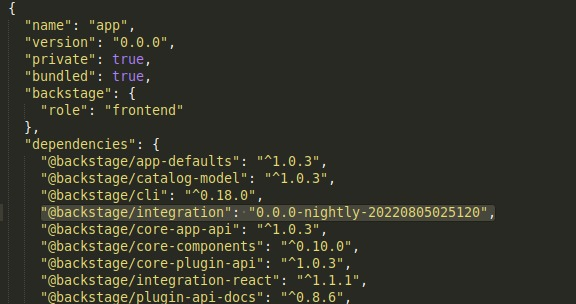
@backstage/integration is generally depended on directly by plugins, so you'll need to use yarn resolutions to force a different version. Or it should work to bump the version of the catalog plugin itself.
This will also be released in the next release tomorrow, which is a bit more stable than the nightly builds.

This issue has been automatically marked as stale because it has not had recent activity. It will be closed if no further activity occurs. Thank you for your contributions.
![github-actions[bot] avatar](https://avatars.githubusercontent.com/in/15368?v=4 "Published by a pub.dev verified publisher")


Same here backstage version 1.14.0 gitlab self hosted: 16.2.4
[1] 2023-08-14T11:25:48.373Z catalog warn Processor PlaceholderProcessor threw an error while preprocessing; caused by Error: Placeholder $text could not read location https://gitlabdomain.my/myservice/myservice-registry/-/blob/master/cfn-templates/async-api.yaml, Error: Could not get GitLab project ID for: https://gitlabdomain.my/myservice/myservice-registry/-/blob/master/cfn-templates/async-api.yaml, Error: GitLab Error 'undefined', undefined type=plugin entity=api:default/myservice-registry-pozyx-get location=url:https://bst-exporter-dev.s3.eu-west-1.amazonaws.com/services/myservice-registry.yaml

I have the same issue... It was working a week ago and now
{"error":{"name":"InputError","message":"Error: Unable to read url, Error: Could not get GitLab project ID for: https://gitlab.com/siddu71/kratix-installation/-/blob/main/StateStore/backstage/dependencies/nginx-promise-backstage/static/dependencies.yaml, Error: GitLab Error 'undefined', undefined","stack":"InputError: Error: Unable to read url, Error: Could not get GitLab project ID for: https://gitlab.com/siddu71/kratix-installation/-/blob/main/StateStore/backstage/dependencies/nginx-promise-backstage/static/dependencies.yaml, Error: GitLab Error 'undefined', undefined\n at DefaultLocationService.processEntities (/app/node_modules/@backstage/plugin-catalog-backend/dist/cjs/CatalogBuilder-21da853f.cjs.js:1961:15)\n at processTicksAndRejections (node:internal/process/task_queues:96:5)\n at async DefaultLocationService.dryRunCreateLocation (/app/node_modules/@backstage/plugin-catalog-backend/dist/cjs/CatalogBuilder-21da853f.cjs.js:1992:22)\n at async /app/node_modules/@backstage/plugin-catalog-backend/dist/cjs/CatalogBuilder-21da853f.cjs.js:3620:22"},"request":{"method":"POST","url":"/locations?dryRun=true"},"response":{"statusCode":400}}

@siddu71 @lpsm-dev @Bastian82 -- Not sure if you guys figured this out already but i thought i'd share. I had this same issue, I solved it by ensuring my token had the correct permissions in Gitlab. I had omitted the token paramater (in my app-config.yaml) at first and backstage can't browse private repos (only public) without a token. Double check that you have a token in your app-config.yaml and that it has sufficient permissions. Hope this helps! Cheers.
