
backdrop-issues
 backdrop-issues copied to clipboard
 backdrop
After upgrading from D7 two internal search menu links lose their parents resulting in wrong page titles
Description of the bug
This popped up in our Zulip chat: after upgrading from Drupal 7, the page titles and primary headings on these two pages are wrong:
- /search/node - "Content"
- /search/user - "User accounts"
This seems to be caused by the parent id plid for both paths get reset to "0" (no parent), although in D7 and in a fresh B install, the parent would be "/search".
Steps To Reproduce
- Upgrade a D7 site, make sure the Search module is enabled
- Go to /search/node and see the heading (h1) and page title is "Content" rather than "Search"
- Similar for /search/user
Additional findings: the "Navigation" menu still exists, with "Search" being the only item. More findings: a lot of "navigation" menu cruft stays in the menu_links table - not sure if that's expected behavior.
Expected behavior
The page titles and headings should stay the same - "Search".
Additional information
In the database shell or phpmyadmin run:
SELECT menu_name,mlid,plid,link_path,link_title,module,hidden FROM `menu_links` WHERE `link_path` LIKE 'search%';
Result:
+------------+------+------+---------------+---------------+--------+--------+
| menu_name  | mlid | plid | link_path     | link_title    | module | hidden |
+------------+------+------+---------------+---------------+--------+--------+
| navigation |    1 |    0 | search        | Search        | system |      1 |
| internal   |    6 |    0 | search/node   | Content       | system |     -1 |
| internal   |   36 |    6 | search/node/% | Content       | system |     -1 |
| internal   |    7 |    0 | search/user   | User accounts | system |     -1 |
| internal   |   64 |    7 | search/user/% | User accounts | system |     -1 |
+------------+------+------+---------------+---------------+--------+--------+
5 rows in set (0.001 sec)
Note that in a "regular" Backdrop install search isn't part of the "navigation" menu (which doesn't exist in B), but an internal menu link - so maybe that's the point where things go wrong.

Steps to fix manually (hackish, not recommended):
- Delete the navigation menu (/admin/structure/menu) - that resets the
searchlink to "internal" - Update both plid (for search/node, search/user) to this internal link in the database directly
- Flush caches
But how can we catch the problem in an update hook?
Related: https://github.com/backdrop/backdrop-issues/issues/1810
Another option (also hackish) is to manually remove all 5 "search"-like items from the menu_links table and flush cashes. This forces Backdrop to create fresh entries in that table for those 5 system paths, this time with the correct plids

From Zulip chat:
(@indigoxela) But there's still the problem with all the other leftover "navigation" items. Like 'node/%'... It doesn't break anything, as these are completely hidden ("hidden" is set to "-1"), but that doesn't seem like a clean approach to me. (Maybe that's just me, though...)
(argiepiano) Sure, not ideal either. But... if you migrate from D7, and you had a navigation menu, you'd expect to see that in Backdrop too. So deleting ALL the items in the navigation menu seems more harmful than removing 5 system paths from menu_links and rebuilding
Having that navigation menu still there in the upgraded site allows you to place that menu somewhere in the layouts. If you remove it you can't do that. The issue is not so much the existence of Navigation, rather the fact that during upgrade we lose the plid for those 4 items
@argiepiano I think, your previous comment is outdated - we figured out what the other one meant (hint "hidden" column value).
Starting to brainstorm here:
Drupal 7 ships with two "suggested" menu items: "search" and "filter/tips".
"search" is the only special case - the base is "suggested", but the children are "internal". That causes the problem that after the update hook has run (system_update_1053), parent and children end up in different menus. Special casing "search/%" is already done in that update hook, but note the slash.
So would special casing (does that mean remove?) just "search" be enough to fix and cause Backdrop to recreate in the internal menu where it can be the parent it was always meant to be to its children?

"Special casing" means, this has to get handled differently compared to other menu items.
I'm still thinking it over: remove that whole db_query("DELETE FROM {menu_links} WHERE link_path LIKE 'search/%'... would keep them all together in the "navigation" menu. EDIT: nope, wouldn't, as search/node/% and search/user/% would still end up in "internal".
I don't think that removing and recreating all "search..." items is the right thing. As a "suggested" menu item, the parent "search" shouldn't be "internal".
Another look at the values of a fresh B install: the search link is internal there. That actually makes no sense, either. The "internal" menu is no actual one (doesn't get handled via UI), so attaching a menu link that "shows up as disabled" is very odd.
I think, the whole concept of MENU_SUGGESTED_ITEM is broken in Backdrop.
Three core modules provide such items: Book, Contact, and Search. But in #1810 the default menu, where such suggested items are placed has been switched from "main-menu" (note: "navigation" in D7) to "internal" - which is no real menu. So these items never show up anywhere. How I "love" such rabbit holes.
I think, bringing back MENU_SUGGESTED_ITEM is possible by setting the menu_name to 'main-menu' in _menu_link_build.
But we also need update hooks to handle:
- Upgrade from Drupal (and their "navigation" menu)
- Currently "suggested" items, that are still in "internal" dummy menu
I don't think this can be a follow-up, as we first need to settle on a concept (which menu should suggested items go to?), and then we can fix existing data.
Looking at the hook_menu() docs again:
"menu_name": Optional. Set this to a custom menu if you don't want your item to be placed in the Main menu.
So the switch of suggested menu items to the dummy "internal" menu was probably never intended - at least, that's how I read it. What sense would it make to "suggest" a menu item, that never shows up anywhere? :wink:
Here's a PR to start the discussion. Note: I didn't test an upgrade with that change, yet.
These "suggested" items show up (again) in the main menu, if the Book, Contact and Search module are enabled.
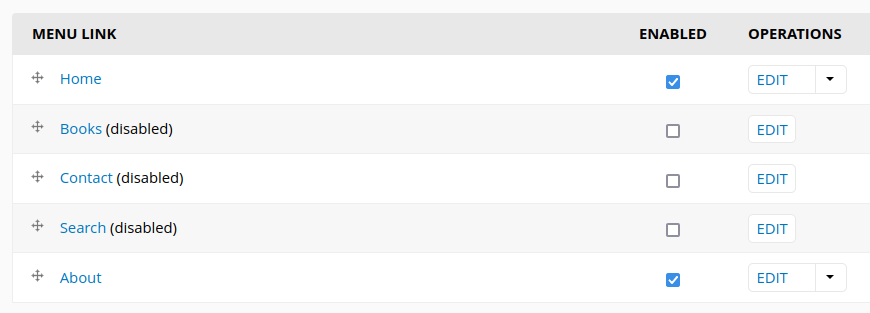
See https://github.com/backdrop/backdrop-issues/issues/4797 where we need to update hook_menu() and I've added a change record for this.
If there are any menu items in core that use MENU_SUGGESTED_ITEM, they need to be updated to explicitly set their menu as 'main-menu'. I'm not sure how to handle D7 upgrades...

@BWPanda many thanks for pointing to the related issue.
If there are any menu items in core that use MENU_SUGGESTED_ITEM, they need to be updated to explicitly set their menu as 'main-menu'
That's the point I'm not really sure of. My PR currently does that, but it bloats the main menu with items, the admin can not delete. Do we really want that?
Other options:
- Create a "Tools" menu in core and always park suggested items there.
- Completely drop the concept of MENU_SUGGESTED_ITEM
I'm not sure how to handle D7 upgrades...
As D7 ships with the Navigation menu for that purpose and the menu will exist, when upgrading and it has items (I belief...), we should just leave the items there. Other ideas?
Although this issue and PR didn't get any feedback in years and I'm pretty sure, in the meantime 5 more issues have been opened for the same problem, I went ahead and rebased my PR. :wink:
Sorry for the delay @indigoxela ...I'm planning to test this, but it will take some additional time/effort (set up a D7 site -> enable the Search module -> try upgrading to Backdrop -> reproduce the problem -> repeat the process with the PR changes to confirm fixed).

More people might be available to help test issues like this if we had a clear set of instructions (maybe even a sample D7 database available) for how to most effeciently test upgrade issues like this one.
Personally, I avoid these issues, because I'm not sure of what all is required and how much time it will take me to go through the process of testing an upgrade issue.

This issue is still languishing. Looking at a plan to test this, as @klonos suggested, will require setting up a D7 site, enabling search, confirming how it looks when going to search/node and search/user. Then enable a backdrop site, apply patch from PR 4129, which is quite small and appears straight forward. Followed by replacing database in Backdrop site with db from D7 and execute update.php. Finally, viewing search/node and search/user. Hopefully, I can find some time in the next few days to try this.

I don't have much to add, but I did spend time testing this today. Doing a fresh D7 install and a fresh BD install followed by inserting the D7 database into BD site and running update.php confirming the problem with no page title. I tried a fresh BD site with a patch from the PR applied and it did not fix the problem. I am not completely sure if my procedure was totally reliable and do not have any more time to spend on this right now. I will try to come back to it and retest in the next few days.
...and a fresh BD install followed by inserting the D7 database into BD site ...
"install" might be the culprit. Backdrop shouldn't be installed, but only be "in place" - the installer of B shouldn't have run. Maybe that's it?
I have to admit, that I don't recall all the details of this PR - it's been some years... :grimacing: I just rebased it this year, but it's already out of date again.
It might be, that this issue has better chances for progress: https://github.com/backdrop/backdrop-issues/issues/5834
Or we might end up with (temporary) workarounds, like for contact: https://github.com/backdrop/backdrop-issues/issues/1572
It's not that we don't have enough issues about MENU_SUGGESTED_ITEM :speak_no_evil:
My apologies for the premature comment as I was testing. I have reviewed my testing and can confirm the patch from the PR does indeed work.
D7 search page:
Update D7 to BD no patch:
Update D7 to BD with patch:
Also during testing today I confirmed that patch had correctly applied to the three files and when I imported the D7 database to BD I truncated all cache tables before running update.php. I don't know if that makes things cleaner or not.
I was wondering about issue #5834 and if there is any reason to hold back this PR since it is a bugfix for D7 updates.
Also, for anyone curious, I used www.drupalforge.org to test the patch, creating both the fresh D7 site and fresh BD site and used the available in browser phpmyadmin and vscode to execute the steps.
My apologies for the premature comment as I was testing.
No need to apologize, I'm always happy, if someone volunteers for testing. :relaxed: Sometimes the path to success is a bit winding - that's normal. :wink:
was wondering about issue https://github.com/backdrop/backdrop-issues/issues/5834 and if there is any reason to hold back this PR since it is a bugfix for D7 updates.
It's a different approach and it might get obsolete, if someone comes up with a better solution. And it also applies to native Backdrop installs, which means, Search, Contact and Book menu items show up in main-menu, but can't get deleted, only disabled or moved to other menus - that's not optimal from admin perspective.
That's why I'm assuming, one of the other approaches has better chances to get accepted. :wink:
I don't think there can be quick progress with the MENU_SUGGESTED_ITEM concept (which additionally has a second issue, anyway). But this is still an annoying bug.
So here's now a different, more lightweight approach:
https://github.com/backdrop/backdrop/pull/4874
It only updates the relevant menu items in menu_links db table in an update hook to get the parent-child connection back. This also means, the "Search" menu item vanishes from the "Navigation" menu, as it's "internal" like the child items are - same as in native Backdrop installs.
Seems to work. Testing's a bit cumbersome, as you need a D7 database from an (otherwise simple) Drupal install and you have to run the whole upgrade process on a clean (means: not installed) Backdrop.
I also rebased the old PR, so you can compare. But that one's very likely obsolete, anyway. Just left it there for discussion.
I have tested https://github.com/backdrop/backdrop/pull/4874 and it works for me. I like the simplicity of the new PR. I do not fully understand the comment:
you have to run the whole upgrade process on a clean (means: not installed) Backdrop.
I have tested on a system where BD is installed and the database is then emptied before importing the D7 database, applied the patch to BD and then proceeded to apply update.php. I did not delete the config json files.
do not fully understand... upgrade process on a clean (means: not installed) Backdrop.
Ah, OK, I'll try to explain better (hopefully): Backdrop should be prepared - core and all modules you need in place, the database connected (via settings.(local.)php), but not the database from a backdrop install, only the Drupal db tables should be in there. If Backdrop were installed, you'll get a config mix - parts of settings or content types or layouts or whatever... would mess the upgrade. That's why the official docs explicitly point out to "NOT install Backdrop". To avoid that config mix.
In our case, for testing this update hook, it should still be OK, as no config's involved here. But again: for real upgrades - do not install Backdrop, just provide the codebase and Drupal db. :wink:
However, thank you so much for testing. :pray:
Thanks for the details and reference. I hadn't really focused on that before. Now I know. Thanks for the PR. Do you think this is a good candidate to push forward?
Thanks for the details and reference.
I hope, it wasn't too much. :wink:
Do you think this is a good candidate to push forward?
I think so, yes. It just aligns upgraded sites with native installs, which won't cause any problem, whatever the decision re "suggested items" may be. I closed the obsolete PR now.