

 aws-quickstart
Failure to create Stack - keep hitting Waitcondition timeouts
We are running this quickstart a number of times and keep getting failures on Timeouts hitting the WaitCondition. Tried with 2019 with option to create new VPC and clean setup, but we cannot seem to get past a successful creation of the SQL Stack.
The main stack fails on the SQLStack with
The folowing resource(s) failed to create: [SSMWaitCondition]
When you review that stack you get the event failure as:
SSMWaitCondition - Received FAILURE signal with UniqueId: ....ec2 instance id
Looking at CloudWatch we can see there was a log group with log stream that contained <instance-id>/aws-runPowerShellScript/stderr this was specific to the EC2 instance mentioned above:
Below is quick summary of output:
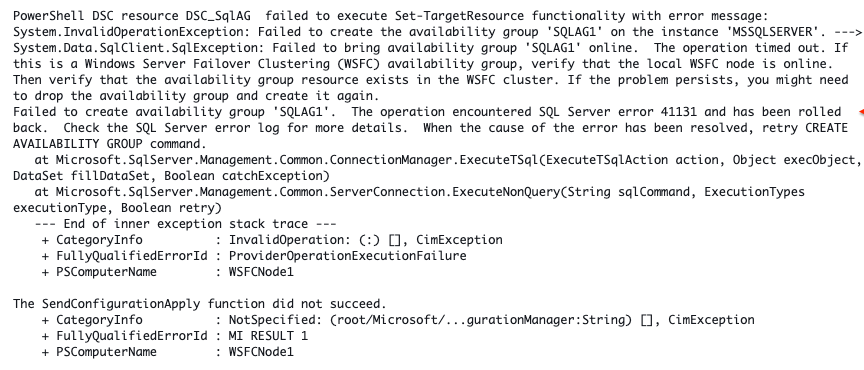
I guess in short just want to confirm the quickstart still works with the AMI images and scripts specified.
We tried with various options in 2019 and cannot get a working stack - after a few hours things time out and roll back initiates.
Any advice on best places to help track down what is happening would be much appreciated.
Tried with 2017 and that did not work either.
Got timeout errors again in Systems Manager Automation scripts -
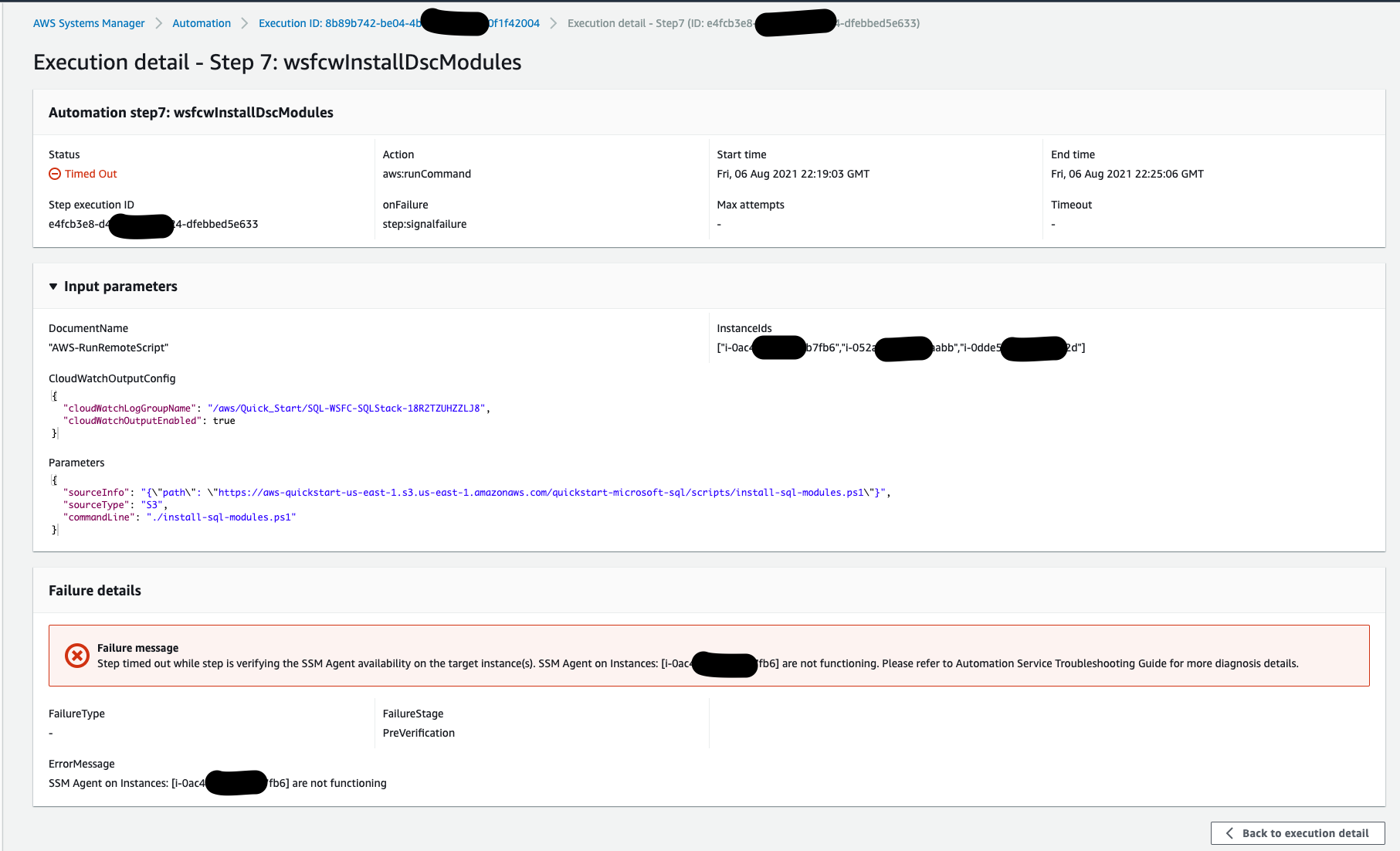


https://aws-quickstart.s3.amazonaws.com/quickstart-microsoft-sql/templates/sql-main.template.yaml
I did reach out to the Advanced AWS Partner Datavail that is listed on the AWS Quick Start both via email and phone with no follow-up and zero assistance or resolution of any issues. Using only the basic template defaults for SQL Server with Always On Replication in AWS even with bigger EC2 instances using SQL 2017 or 2019 there is usually some sort of error and won't complete.
The best I was able to accomplish with the AWS SQL AG template was on the second page before initial creation on the Configure stack options under Stack creation options expand that and check Disabled under Rollback on failure. This will at least allow you to manually pick up where the AWS SQL Availability Group template automation failed. It doesn't fix any of the provided AWS Quick Start issues with the SQL template or underlying scripts but it gets you to a state that has most of the AWS networking and windows OS part completed.
Good luck

The error listed above is a PowerShell Error indicating networking issues. Did you deploy into an existing VPC or did you have a new VPC deployed? Which Active Directory Options did you choose? Currently Looking into this error, and will provide updates and potential resolution. However, the issue seems to be due to privileges according to this Microsoft KB article.

Experiencing the same error message when I try to deploy using the SQL quickstart. I'm deploying into an existing vpc, using a third AZ for the witness, to a self-managed AD that was deployed using the AD quickstart.

Can you try testing the code in the Develop Branch? Currently working to get approvals to merged into main, but would appreciate feedback is it helps resolved the issues.
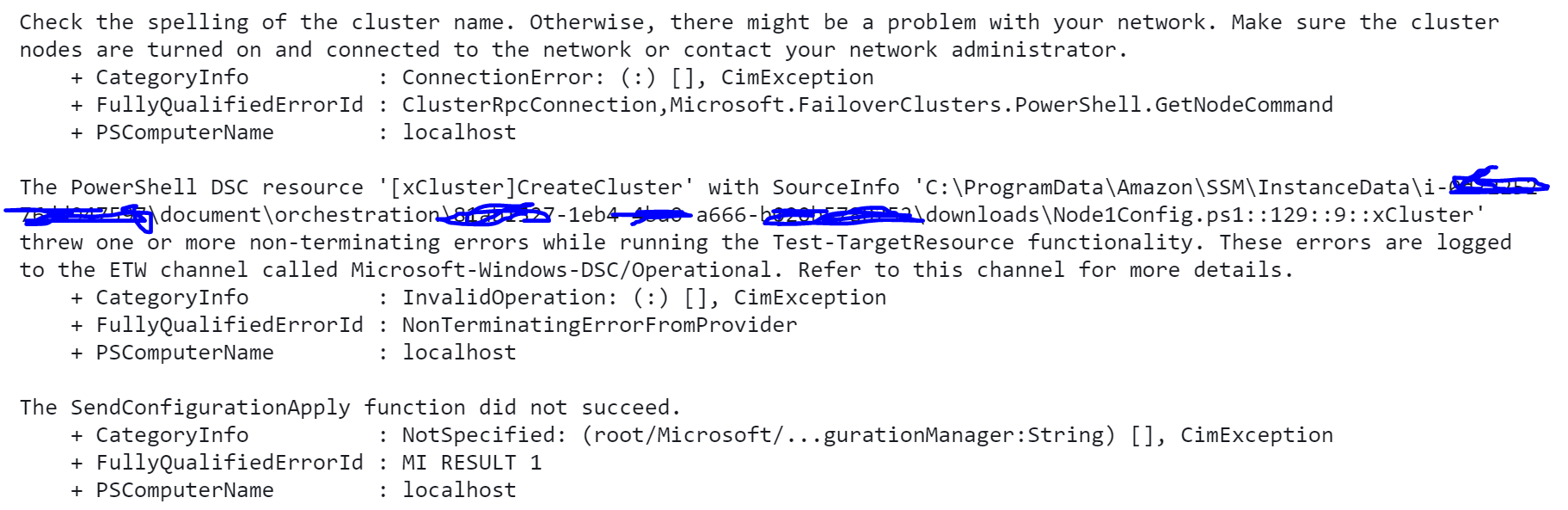 That was the first error I encountered when using the develop branch.
I then rebuilt again and encountered the original error - could be due to me executing 'winrm quickconfig -q' as found here https://social.technet.microsoft.com/wiki/contents/articles/13458.windows-server-troubleshooting-cau-cluster-connectivity-problems.aspx
On the third deployment the cluster deployed and the original issue is displayed
PowerShell DSC resource DSC_SqlAG failed to execute Set-TargetResource functionality with error message: System.InvalidOperationException: Failed to create the availability group 'SQLAG1' on the instance 'MSSQLSERVER'. ---> System.Data.SqlClient.SqlException: Failed to bring availability group 'SQLAG1' online. The operation timed out. If this is a Windows Server Failover Clustering (WSFC) availability group, verify that the local WSFC node is online. Then verify that the availability group resource exists in the WSFC cluster. If the problem persists, you might need to drop the availability group and create it again. Failed to create availability group 'SQLAG1'. The operation encountered SQL Server error 41131 and has been rolled back. Check the SQL Server error log for more details. When the cause of the error has been resolved, retry CREATE AVAILABILITY GROUP command. at Microsoft.SqlServer.Management.Common.ConnectionManager.ExecuteTSql(ExecuteTSqlAction action, Object execObject, DataSet fillDataSet, Boolean catchException) at Microsoft.SqlServer.Management.Common.ServerConnection.ExecuteNonQuery(String sqlCommand, ExecutionTypes executionType, Boolean retry) --- End of inner exception stack trace --- + CategoryInfo : InvalidOperation: (:) [], CimException + FullyQualifiedErrorId : ProviderOperationExecutionFailure + PSComputerName : WSFCNode1
The SendConfigurationApply function did not succeed. + CategoryInfo : NotSpecified: (root/Microsoft/...gurationManager:String) [], CimException + FullyQualifiedErrorId : MI RESULT 1 + PSComputerName : WSFCNode1