quickstart-microsoft-sql
 quickstart-microsoft-sql copied to clipboard
 aws-quickstart
Three Node AG SQL 2017 Fails with SSMWaitCondition and Rolls back entire environment - Will not successfully complete
The selection of a Three nodes AG fails with similar errors below and rolls back the entire environment.
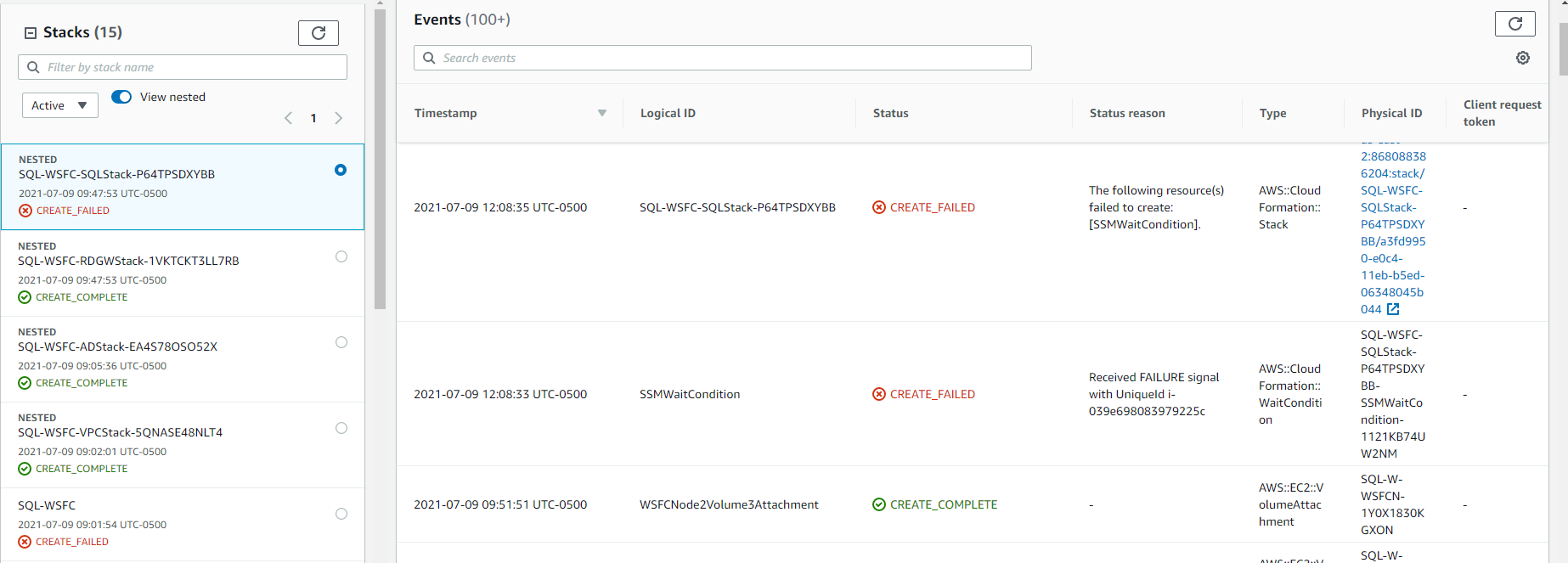
Embedded stack arn:aws:cloudformation:us-east-2:868088386204:stack/SQL-WSFC-SQLStack-P64TPSDXYBB/a3fd9950-e0c4-11eb-b5ed-06348045b044 was not successfully created: The following resource(s) failed to create: [SSMWaitCondition].
I have tried multiple regions using different VM sizes bigger than the default selections using SQL 2017.
Finally, after disabling the full rollback this is failing just after the WSFCNode Volume Attachments. It does not correctly set up or get to creating the Underlying Windows Failover Cluster. Microsoft SQL Server does appear to install correctly.
Template used: SQL Server with Always On Replication on the AWS Cloud confirmed failing 07/05-/09/2021 after 6 attempts with the last known working state that I tested was back on 05/10/2021.
Attached is a picture of the failure step using the basic preconfigured IP and example.com domain that is the default in the template. Steps to replicate are Launch Quick Start with Deploy into a new VPC select any region us-east-1 or us-east-2 will work. Select Next Add three Availability Zones (if you chose three select YES for the Third Availability Zone) all IP info leave as default Add your own newly created key pair or use an existing on Select Microsoft AD on Amazon EC2 add your own Domain admin password add your own CIDR block for RDGW external access add your own Service account password Amazon-provided SQL Server license - NO Everything else is left as the Default (I have upped the VM size without success) Select Next Change Stack Creation option to Disabled for Rollback on failure if you want to see exactly what and where the template fails at (Environment is pretty messed up so enjoy) The Underlying WFC is not created but SQL appears to install fine. You might have to use the local Admin to log into WSFCNode1 as it had domain trust issues the last time I tried before posting this) Check both of the I acknowledge boxes Create Stack
Wait for the stack to FAIL ETA 40-55 minutes.
Please fix and resolve issues with the AWS SQL Server with Always On Replication on AWS quick start template when choosing 3 full node AG and SQL 2017. https://aws.amazon.com/quickstart/architecture/sql/