

 aws-amplify
Stuck at "unconfirmed" during Hosted UI email confirmation with code
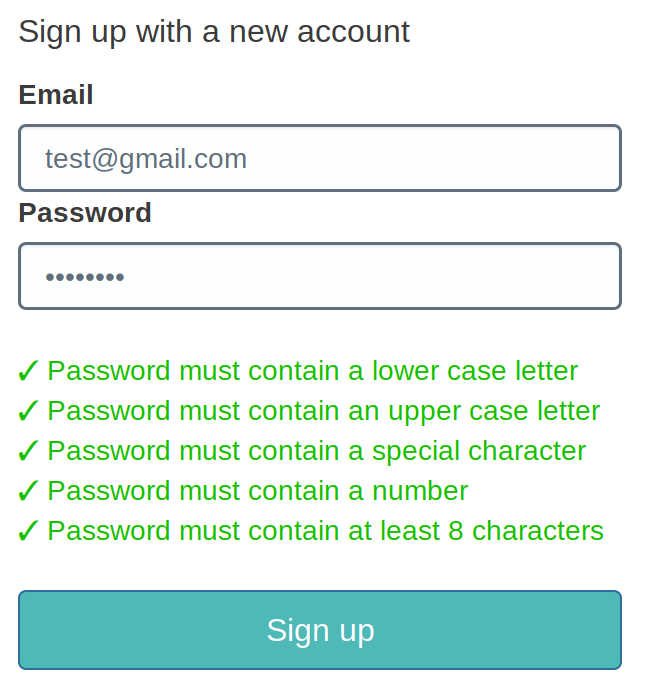
A user is signing up in the Hosted UI using their email address:
Email verification is done by code, so this shows up:
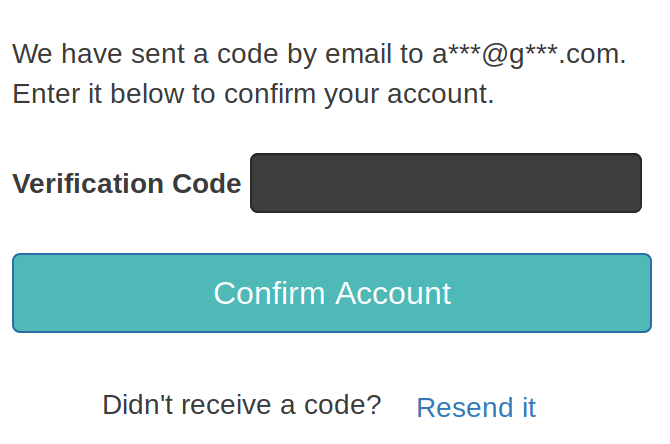
Now the user accidentally closes this window or loses his internet connection or whatever. He will find the email with the code in his inbox and in Cognito his status is "unconfirmed".
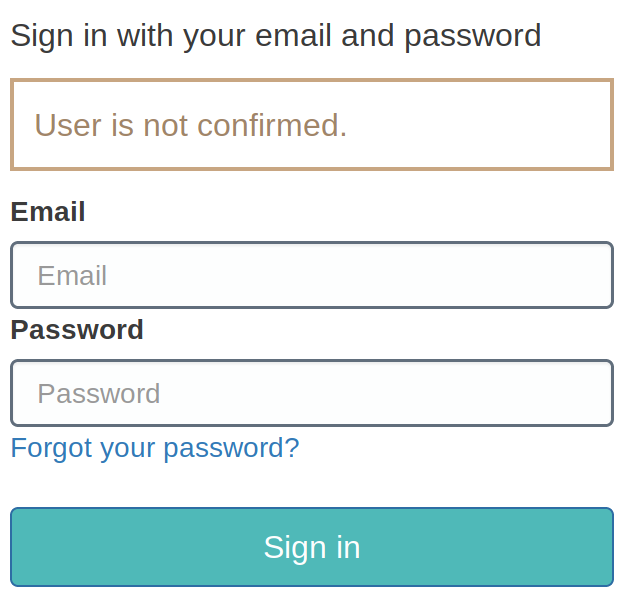
Now he wants to finish activating his account. There is no link in the email (obviously because it's by code), so he returns to the signup page from the beginning. When he tries to sign in using his unconfirmed credentials, this happens:
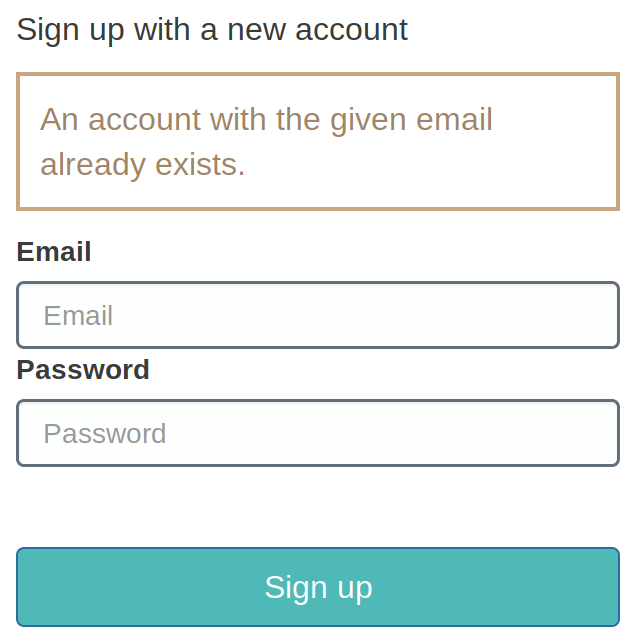
When he tries to sign up again, this (correctly) shows up:
Only thing that remains to be done is click on "Forgot your password?" during singin. But this doesn't work either:
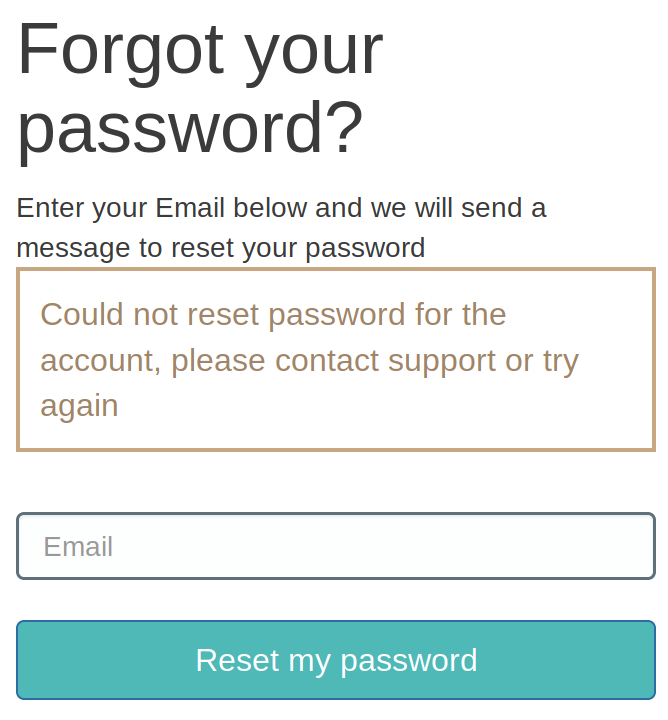
And that's what he's going to do: write me an email and I will have to manually delete him from the User Pool.
Am I missing something? But it doesn't even matter if I'm missing something because if I am missing that, most users will certainly miss it, too. I guess the expected behavior would be to just return to the "enter your code" dialog after signing in.
Please share this with the Cognito team if they are owning the Hosted UI.
Also, the fact that the code flow has this flaw should increase the pressure on properly supportling email verification by link: https://github.com/aws-amplify/amplify-js/issues/539
Thanks!


Encountered the same issue. I'm investigating whether verify with link will solve this issue. Note that amplify doesn't support that configuration (nor does CloudFormation). You have to change to verify using link in cli/SDK.

Have exactly the same issue. I tried to do smth like this on cancel verification dialog
 Auth.currentAuthenticatedUser().then((user) => {
                console.log({ user })
                if (user) {
                  user.deleteUser((err) => console.log({ err }))
                }
              })
but it doesn't work.

Any updates on this? I'm faced with the same issue. What kind of workaround are you guys using?
One less painful way I'm thinking about is in the Pre-Signup trigger, if the user is unconfirmed and email_verified = false, I will first delete the user and then let the signup process flows again. Will this work?

I would also expect that Cognito's Hosted UI would handle this neatly. Now enrolling users are very easily stuck in situation that makes them either leave the service or ask for manual assistance.
Meanwhile I also would need workaround for this issue. @simon10says did get the Pre-Signup trigger to do the unconfirmed user deletion for you?

@iaarnio , no, I did not try out the method I suggested. Instead I've changed the whole sign up flow to not use confirmation code. What I've done are:
- Disable
sign-upin Hosted-UI - Created a Lambda to create new user
- In my Lambda, I will send temporary password to the user
We're routinely have to help our customers with this. Right now our solution is confirming the user manually in the cognito console and then confirming their email with aws cognito-idp admin-update-user-attributes --user-pool-id xxx --username [email protected] --user-attributes Name=email_verified,Value=true
Would be a big help if customers didn't have to ask for support for this.

I have the same issues, the hosted ui authentication is broken. When someone hasn't confirmed his email but tries to login, please display on option the enter the mfa code or resend the email. Thank you.


"aws-amplify-react-native": "^4.2.9"
Perhaps I'm late to the party, I do see there's a button "Confirm a Code" under the registration form.
In any case, I believe you can prompt the user to confirm the code again with Auth.confirmSignUp(username, verification_code).
You can refer to the API here.

Just updated to the latest versions for web "@aws-amplify/ui-components": "0.9.5", "@aws-amplify/ui-react": "0.2.30", Not seeing a 'Confirm a Code' button so guessing it's only available for react native.
Hello, I have a problem. After creating the user, the verification code is not sent to the email. I am using react and the authentication was created through the Amplify Admin UI

have the same problem, it's a long time for such a fundamental flaw to exist

Hello, it seems that the issue raised by the op is still a problem in Spring 2021. e.g. A user doesn't enter their verification code for some reason, and there's no way in the Hosted UI for the user to verify their email later. Their account is stuck in limbo, and I have to delete the account and let them try again. Kinda ridiculous. Any chance this will be fixed in the near future?


Having the same issue with the redirect after the user confirmed their account.
Please can someone from AWS fix it.


Hi all,
We've also been having this issue. In our case, the user refreshed the page on which you enter a validation code, and the refreshed page contained only a message saying "do not refresh this page*," followed by their account entering in the broken state described above.
I've created a ticket in AWS support, and will update the thread with any progress I receive for future readers.
* A bit late

Amazon support was quick to respond. Short summary is "it's not a bug, it's a feature request, and we don't know when the feature will be completed; here's some work-around ideas."
Transcript:
Thank you for reaching out to us at AWS Premium Support. I am <support tech> and will be assiting you on this case today. From your case notes, I understand that you are building a web application using Cognito authentication and are utilising Cognito HOSTED UI for implementing user sign in and sign up functionality. You have mentioned that in the event a user signs up for his account and is unable to verify the specified email address due to any unforeseen circumstances say browser refersh or email delivery failure, the user account exists in 'UNCONFIRMED' status. I duly note the behaviour experienced by the test user. Consequently, I understand that you seek assistance to discuss the discrepancy and possible options to remediate this. Please correct me if I have missed anything or misunderstood any of your requirements.
Addressing your concerns, Please allow me to state that the behaviour pointed out by you is expected and known. When a user signs up with Cognito Hosted UI, the account gets created in an 'UNCONFIRMED' status. The user has successfully signed up, but cannot sign in until the user account is confirmed. The user is enabled but not confirmed in this state. The detailed information about each state of the user possible within the lifecycle of the user inside a Cognito user pool has been documented in the AWS documentation attached here [1]
Now, In order to confirm their user account, the user needs to enter the confirmation code sent to the user via email. I understand that in the event of a disconnectivity or email delivery failure, it is expected that there is a provision of resending the code to the user email or being able to recovering user account. Unfortunately, currently, It is not present. I deeply regret the inconvenience caused and sincerely apologize for the existent limitation with the HostedUI. I have gone through the GitHub issue shared by you and it discusses the same limitation and possible workarounds have been shared by the open source community. Please note that there is an ongoing feature request for handling such cases. I will add your use case to that to add to the impact. Please, note that we in Premium Support do not have access to the Cognito development team’s roadmap/release plans, so unfortunately I cannot give you a timeline regarding feature release but we take customer's feedback seriously, as this allows AWS to better prioritize new features/improvements down the road. I will perform my due diligence in ensuring that your case is used as supporting evidence to escalate this feature. You can keep an eye on new features and announcements using this page. [2][3]. Moving further, Please allow me to share steps on how we can deal with this corner case.
- The administrator can confirm any user accounts existing in 'UNCONFIRMED' status by using the 'Confirm User' option at the AWS management console.
- User accounts can also be confirmed without the confirmation code by the administrator through CLI or any other AWS SDK utilising the AdminConfirmSignUp API. Please feel free to read more about the same in the documentation attached here [4]
As you have pointed out, manually deleting the user will also free the user email for creation of a fresh account, but it is not required as after confirming a user account using any of the above methods will modify the user status to 'CONFIRMED' and the user can begin operations as in an ideal case scenario. Having said that, I trust that the assistance provided was helpful and I was able to address your queries effectively. In case you require any further assistance or have any concerns on the shared information please always feel free to reach out to us. It is always a pleasure to assist you. Thank you for your patience and understanding Wishing you a great day ahead !
[1] https://docs.aws.amazon.com/cognito/latest/developerguide/signing-up-users-in-your-app.html [2] AWS Blogs - https://aws.amazon.com/blogs/ [3] What's new - https://aws.amazon.com/about-aws/whats-new/2021/ [4] https://docs.aws.amazon.com/cognito-user-identity-pools/latest/APIReference/API_AdminConfirmSignUp.html
We responded asking for it to be classed as a bug instead of a feature request, since there's currently a button a user can hit that breaks their account in a way they can't fix without help. The response was, again, "it's a feature," with an additional "you can also write your own UI that can handle users stuck in the 'unconfirmed' state, or use a lambda function to clear out broken accounts occasionally."
Transcript (us):
I appreciate the quick response, and the detailing of workarounds. However, I'm not sure this addresses my problem perfectly, as you note there is a 'feature request' for this situation, when this is a bug. Specifically, there is a button users can press that breaks their account. There is nothing stopping them from pressing the button, and after pressing that button, they receive is a message that says "don't press this button," with no indication in the message that their account is now broken. Once they realize their account is broken, they have no way to fix their account. As long as a "break my account in a way I cannot recover from on my own" button exists for users, I think there's a bug present, not a missing feature. And considering it breaks users' workflows irreparably, and they may not even reach out to the website owners to fix the issue, but may instead not use the website because it's easier than contacting support - I think a bug report should be open at a high priority. I would appreciate if you could open a bug report for this issue for me, so it is categorized correctly.
And their response:
Thank you for appreciating my work. From your case update, I understand your concerns around how the absence of the feature may result in a troublesome user experience for users reaching to your website. Addressing your concerns, Please be assured that I will be relaying your feedback to our internal team working over the ongoing feature request. We prioritize any feedback received by our customers and I will be performing my due diligence in ensuring that your valuable feedback reaches our concerned team as it helps us in improving for our own better down the road. As stated earlier, AWS Premium Support does not have access to the service development team’s roadmap/release plans, so unfortunately I cannot give you any definitive timeline around the work around a bug report/feature release. I sincerely apologise for the inconvenience caused and hope that you can understand the limitation at my end. However, for your website, On best effort basis, I would like to suggest a few ways how you can customise a better user experience for your users interacting with your web application. One solution is to build your own custom UI and utilising Cognito's publically available API endpoints for performing all user authentication operations. Please find attached the link for Cognito API reference attached here [1]. Using this way, you would be able to configure a separate workflow to handle such use cases as you can build a webpage with buttons to 'Resend Confirmation Code' as there is an API available to resend confirmation code to users once the confirmation code has expired. Please find the ResendConfirmationCode API reference attached here [2]. Additionally, even after page is refreshed, in your own custom UI , you can incorporate the change to accept a confirmation code in subsequent attempts and utilise the ConfirmSignUp API [3] in the backend. I am completely aware of the implementation overhead associated with this solution and thus, have thought of other alternative ways too in order to address your concerns in the best way possible. Another way is setting up an Cloudwatch event which triggers a Lambda function periodically to delete unconfirmed users in the pool or confirm their user accounts. You can program the Lambda function in the way you wish to handle the 'UNCONFIRMED' user accounts. This would then happen periodically without any manual intervention and without any user informing you of their broken account. Moreover, you can also integrate SNS/SES [4] [5] with your custom Lambda solution which would be used to notify the users of their account status and inform them to sign in successfully now.
In case you require any further guidance on the implementation of the above custom solution, please feel free to reach out back to me. Having said that, I trust the assistance provided was helpful and I was able to address your queries effectively. In case you require any further assistance or have any concerns related to the shared information, please feel free to reach out to us. It is always a pleasure to assist you. Thank you for your co-operation Wish you a great day ahead !
So, yeah. "It's not a bug, it's a feature (request)", here's some ways you can do things on your own, such as rolling your own.
Hope this helps others!
FWIW, you can use Amplify's Auth.resendSignUp(username); (docs) to "unstick" Hosted UI sign-ups for which verification was not completed.
Followed by submission of the verification code by Auth.confirmSignUp(username, code);



Hi @camhart - did you try using our Authenticator UI component instead of using the hosted UI? It allows you to get a sign in/sign up experience out of the box that is customizable. https://ui.docs.amplify.aws/react/connected-components/authenticator

@abdallahshaban557 I hadn't seen that... though I'm using Vue, not react. The vue package has bugs--first thing I get when I try to use it is console.log errors saying "Object is not a function" (similar to this: https://stackoverflow.com/questions/71954308/object-is-not-a-function-in-amplify-authenticator-in-vue2). That SO post mentions other UI components for amplify. Now I'm all sorts of confused. Why are there so many different amplify ui modules? Which one should I be using?
Update: Looks like those components are only available for Vue 3. I'm using Vue 2.
It is frustrating I completely understand having all these different UI packages - we are planning on deprecating the ones in the Aws-amplify package soon. The new UI packages are the ones in amplify-ui and the ones I shared in that documentation site. Gotcha on using Vue 3 - unfortunately I do not think we have plans to create an authenticator components for Vue 2 at this point.
Following up on this issue.
For clarification, this bug with the Hosted UI is specific to Cognito and exists independent of Amplify, as the Cognito team maintains the Hosted UI page. The Cognito team is currently aware of this and are working to get it resolved, however, I am unable to provide an ETA.
In the meantime, if you are using Amplify, you can use the UI components provided by amplify-ui as @abdallahshaban557 mentioned or use Amplify Auth directly by utilizing Auth.resendsignup() to resend the confirmation code and Auth.confirmSignUpto complete the confirm Sign Up process.

Following up here.
Have there been any updates on resolving this issue from the Cognito team? I'm still facing this issue and will probably be forced to move away from the Hosted UI without a solution in place.

Following up here.
Have there been any updates on resolving this issue from the Cognito team? I'm still facing this issue and will probably be forced to move away from the Hosted UI without a solution in place.
I fixed this by having a support FAQ page like this
 How do I verify my email if I wasn't able to verify it during the sign up process?
 If during the sign up process you accidentally closed the browser and can no longer sign up or sign in with your email, then click <Link className={"text-blue-300"} href={'/verify-email'}>here</Link> to go to a page where you can verify your email.
And on the page /verify-email, I write a form where they put in their email and when they click submit, it calls await resendSignUpCode({username: email}) then they get a confirmation code in their email, so I then show another form where they put in their code and click submit, which calls await confirmSignUp({username: email, confirmationCode: code});
I use next.js so I handle the state using react useState hook

That's more of a band-aid than a fix. None of us actually read what's on the page in front of us--we just expect sites to "work" as most other sites do. Cognito team still needs to fix this.
On Wed, Nov 29, 2023 at 11:51 AM Meags27 @.***> wrote:
Following up here.
Have there been any updates on resolving this issue from the Cognito team? I'm still facing this issue and will probably be forced to move away from the Hosted UI without a solution in place.
I fixed this by having a support FAQ page like this
How do I verify my email if I wasn't able to verify it during the sign up process? If during the sign up process you accidentally closed the browser and can no longer sign up or sign in with your email, then click <Link className={"text-blue-300"} href={'/verify-email'}>here</Link> to go to a page where you can verify your email.
And on the page /verify-email, I write a form where they put in their email and when they click submit, it calls await resendSignUpCode({username: email}) then they get a confirmation code in their email, so I then show another form where they put in their code and click submit, which calls await confirmSignUp({username: email, confirmationCode: code});
I use next.js so I handle the state using react useState hook
— Reply to this email directly, view it on GitHub https://github.com/aws-amplify/amplify-js/issues/3184#issuecomment-1832426032, or unsubscribe https://github.com/notifications/unsubscribe-auth/AAXF4WJPJRQDAUZIJBPVCWTYG5Y3XAVCNFSM4HI7AIW2U5DIOJSWCZC7NNSXTN2JONZXKZKDN5WW2ZLOOQ5TCOBTGI2DENRQGMZA . You are receiving this because you were mentioned.Message ID: @.***>