
amplify-hosting
 amplify-hosting copied to clipboard
 aws-amplify
Using regex matches in redirects
** Please describe which feature you have a question about? ** Rewrites and redirects
** Provide additional details** I have a SPA that does client side routing. However I've been working on my SEO and want to get good 301s and 404s. I am also pre-rendering my routes to static html files, which to some degree makes the routing not behave as a SPA from a server perspective.
So I want to have: 301 "/something/" -> "/something" 301 "/something/index.html" -> "/something" 200 "/something" -> "/something/index.html"
However I also need to handle some static files that are present in the root directory, like the favicon and robots.txt etc.
I also have a "static" directory with some other assets in it that I want to exclude from the rewrites and behave like normal 200/404s.
So in my config I have:
[
    {
        "source": "/static/<*>",
        "target": "/static/<*>",
        "status": "200"
    },
    {
        "source": "/",
        "target": "/index.html",
        "status": "200"
    },
    {
        "source": "/index.html",
        "target": "/",
        "status": "301"
    },
    {
        "source": "/<slug>/index.html",
        "target": "/<slug>",
        "status": "301"
    },
    {
        "source": "/<slug>/",
        "target": "/<slug>",
        "status": "301"
    },
    {
        "source": "</(^[^.]+\\.(?=(css|gif|ico|jpg|jpeg|js|png|txt|svg|woff|woff2|ttf|map|json|xml|webmanifest)$)([^.]+$))/>",
        "target": "<$1>",
        "status": "200"
    },
    {
        "source": "/<slug>",
        "target": "/<slug>/index.html",
        "status": "200"
    },
    {
        "source": "/<*>",
        "target": "/404.html",
        "status": "404-200"
    }
]
This ALMOST works, except for the regex rule which is matching the static files in the root. The regex code is correct and is matching to the files I want. However the target location is not correct (results in a 404 response). What I want it to do is much like the rule I have for the "static" directory where it gives an accurate respose for if the file exists or not (200/404). Which means the target of that rule needs to be the regex match.
I have tried using "<*>", "<$1>", and "<1>" with no joy. Can you tell me the correct way to use the match from the regex? Or if not, what would be a better way to configure this?

Hi @timothy-bailey-redbox , It seems like
Source: "</(^[^.]+\.(?=(css|gif|ico|jpg|jpeg|js|png|txt|svg|woff|woff2|ttf|map|json|xml|webmanifest)$)([^.]+$))/>" Target: "<*>" Status: "200"
should work. Would you mind paste a screen shot of 404 response? ref: https://docs.aws.amazon.com/amplify/latest/userguide/redirects.html

Hi @Joycehao19 ,
I have set the rule to target: "<*>" and below is my page load in the browser console with that change. You can see the favicons return 404s.
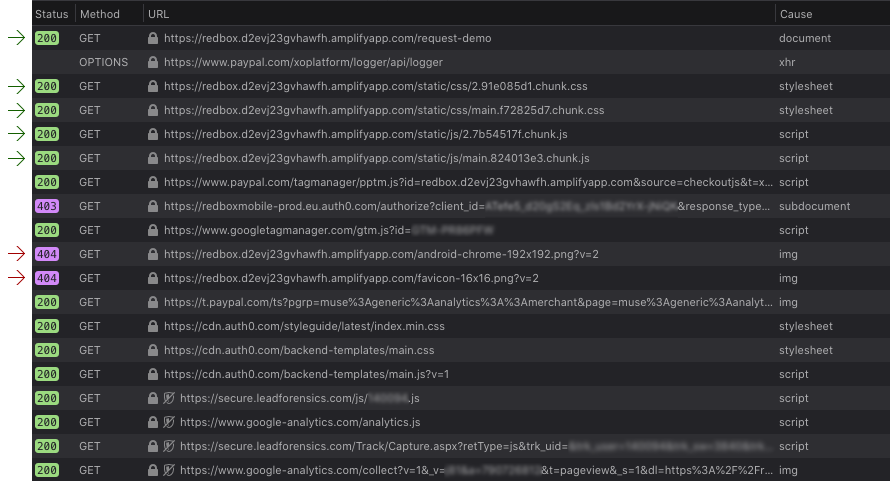
I have also checked those links with and without the query string and it makes no difference. I also get 404 on my robots.txt for example.
I'm having the exact same problem and also tried "<*>", "<$1>", and "<1>", </\0/>, <\0>.
I'm trying to do a reverse proxy so: Source: </^[^.]+$|.(?!(css|gif|ico|jpg|js|png|txt|svg|woff|ttf|map|json)$)([^.]+$)/> Target: https://somedomain.com/<*> Status: 200
No luck. Any update on this?

Hey @connorford2,
I was never able to get the regex to work and as I had to go live I ended up writing out a seperate rule for every static file in my root directory. Which is a pain as it needs to be maintained whenever a file is added or removed.
    {
        "source": "/favicon-16x16.png",
        "target": "/favicon-16x16.png",
        "status": "200"
    },
    {
        "source": "/favicon-32x32.png",
        "target": "/favicon-32x32.png",
        "status": "200"
    },
    {
        "source": "/favicon.ico",
        "target": "/favicon.ico",
        "status": "200"
    },
    // etc...
I suspect this approach won't work for you if you are dealing with more than a limited set of files, or files that frequently change.
Would be good if we could get some further help from the maintainers on this.
Thanks for that @timothy-bailey-redbox
Yes, unfortunately I have a lot of static files and would like to avoid updating them every time! Lol - that definitely sounds like a pain. I just pinged AWS premium support who said they'll give the team a nudge. Hopefully that'll help and we should hear back soon.
Connor
@connorford2 Did you ever get a resolution to this? It seems to me like regular expressions just do not work as advertised in the documentation. This has also been duplicated in #816.

@WolfyUK unfortunately not. They said the only way to get support from amplify is through here (which seems a little ridiculous for a product offering from such a large company)


+1 bump
for the time being, I have done some root image rewrites for each image type:
{ "source": "/<*>.png", "target": "https://www.example.com/<*>.png", "status": "200" }
At least for me I only have to 5-7 different image file extensions rather than by the exact file name

+1
  {
    "source": "</^\\/(hire-).*$/>",
    "status": "200",
    "target": "/build-team<*>"
  }
This does not work.
However regex works if target is static:
  {
    "source": "</^\\/(hire-).*$/>",
    "status": "200",
    "target": "/build-team-xyz"
  }
