
jiofi-cli
 jiofi-cli copied to clipboard
 athul
athul
JioFi URL is not working
I git cloned the repo and ran python3 jiofi.py devices inside jiofi-cli/jiofi folder but it throws error, here is the traceback,
Traceback (most recent call last):
  File "jiofi.py", line 121, in <module>
    main()
  File "jiofi.py", line 117, in main
    'device':deviceDetails
  File "/Users/unmetric/Library/Python/3.7/lib/python/site-packages/fire/core.py", line 138, in Fire
    component_trace = _Fire(component, args, parsed_flag_args, context, name)
  File "/Users/unmetric/Library/Python/3.7/lib/python/site-packages/fire/core.py", line 468, in _Fire
    target=component.__name__)
  File "/Users/unmetric/Library/Python/3.7/lib/python/site-packages/fire/core.py", line 672, in _CallAndUpdateTrace
    component = fn(*varargs, **kwargs)
  File "jiofi.py", line 24, in getDevices
    data = res.json()
  File "/usr/local/lib/python3.7/site-packages/requests/models.py", line 896, in json
    return complexjson.loads(self.text, **kwargs)
  File "/usr/local/Cellar/python/3.7.7/Frameworks/Python.framework/Versions/3.7/lib/python3.7/json/__init__.py", line 348, in loads
    return _default_decoder.decode(s)
  File "/usr/local/Cellar/python/3.7.7/Frameworks/Python.framework/Versions/3.7/lib/python3.7/json/decoder.py", line 337, in decode
    obj, end = self.raw_decode(s, idx=_w(s, 0).end())
  File "/usr/local/Cellar/python/3.7.7/Frameworks/Python.framework/Versions/3.7/lib/python3.7/json/decoder.py", line 355, in raw_decode
    raise JSONDecodeError("Expecting value", s, err.value) from None
json.decoder.JSONDecodeError: Expecting value: line 1 column 5 (char 4)
On digging deeper I found out that the script is making post request to the URL http://jiofi.local.html/cgi-bin/qcmap_web_cgi with form-data Page: GetLANInfo so I tried to replicate the same in postman and it's throwing 404 error,
 I am able to access all my JioFi device details at http://jiofi.local.html/ and the product id is JMR540

Hey, Thanks for opening the issue.
I knew that this would be an issue since I couldn't test it on any other Jiofi models, and could test it on my Jiofi4.
The way I received the URL is via the following screenshot
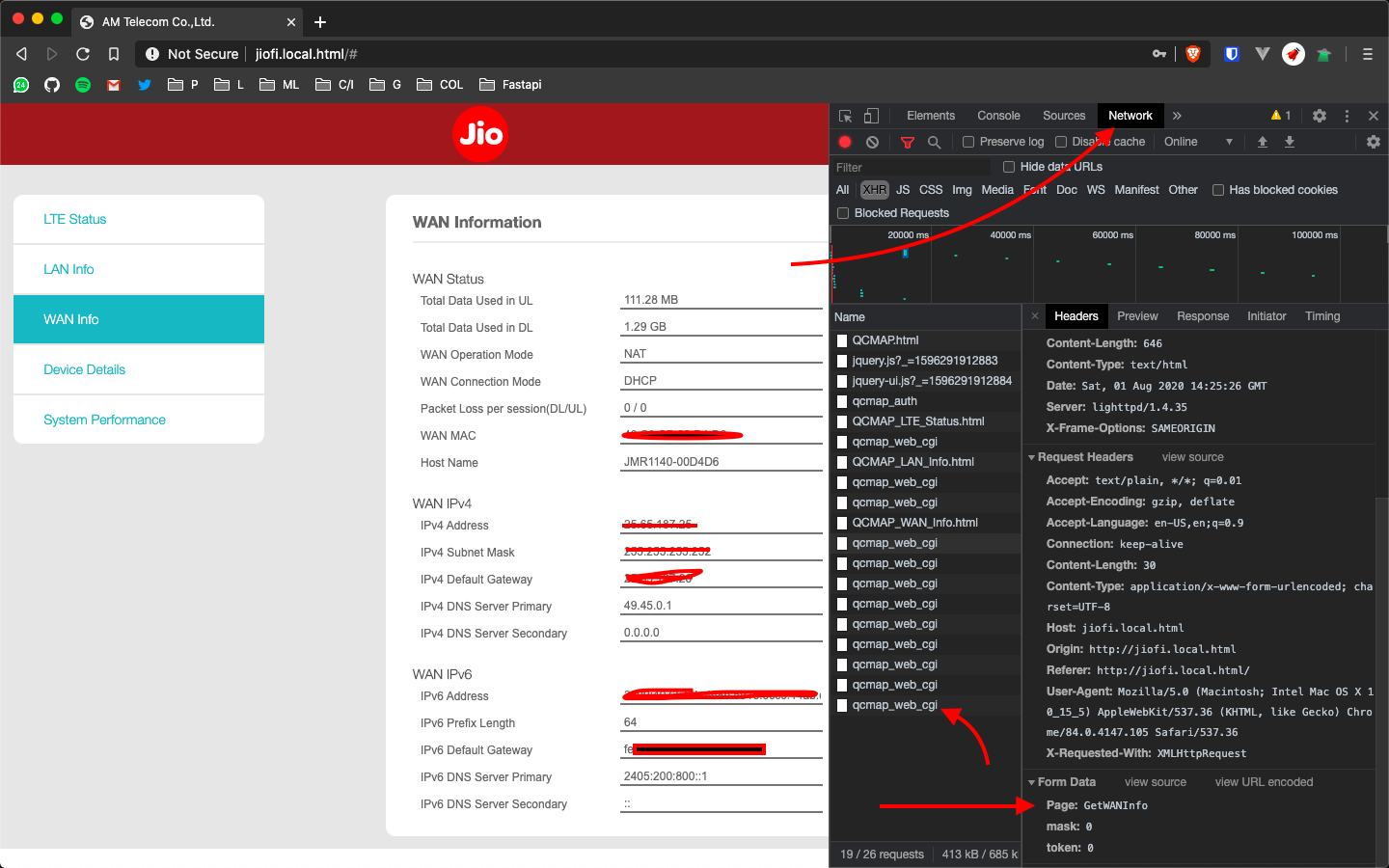
If you could try this this and get the correct URL for the post request, we maybe able to find a workaround and support more devices

It seems like JioFi 6 internal API is entirely different from the above one. I am getting all the device info from the URL http://jiofi.local.html/cgi-bin/en-jio/mStatus.html.
 This is the exact request send by my browser(I have just modified the cookie),
curl 'http://jiofi.local.html/cgi-bin/en-jio/mStatus.html' \
  -H 'Connection: keep-alive' \
  -H 'Cache-Control: max-age=0' \
  -H 'Upgrade-Insecure-Requests: 1' \
  -H 'User-Agent: Mozilla/5.0 (Macintosh; Intel Mac OS X 10_15_5) AppleWebKit/537.36 (KHTML, like Gecko) Chrome/83.0.4103.116 Safari/537.36' \
  -H 'Accept: text/html,application/xhtml+xml,application/xml;q=0.9,image/webp,image/apng,*/*;q=0.8,application/signed-exchange;v=b3;q=0.9' \
  -H 'Referer: http://jiofi.local.html/cgi-bin/en-jio/mStatus.html' \
  -H 'Accept-Language: en-GB,en-US;q=0.9,en;q=0.8' \
  -H 'Cookie: QSESSIONID=E1kPQK507mRjRtxg' \
  --compressed \
  --insecure
I am not sure what is the purpose of the cookie here because it's working fine even without it
curl 'http://jiofi.local.html/cgi-bin/en-jio/mStatus.html' gives all the device info in HTML format.
Maybe setting up a scraper will do the trick. If the 1st request Fails, we can use the scraped content as a callback for it. But I really do think that there will be an internal API since, for displaying bandwidth and usage, it should be updated regularly and in HTML, this is a nasty business without an API or related(jsonrpc but who knows 😜).
It doesn't have any internal API, instead the server is directly sending the HTML code to the client. Infact, the http://jiofi.local.html/cgi-bin/en-jio/mStatus.html is loading into the main page as an iFrame.
so scrapping is the only way here to get the data. I will try to find some pattern from HTML source code to scrape the data.