
gijgo
 gijgo copied to clipboard
Published
20 hours ago •
 atatanasov
atatanasov
Timepicker in 24h mode not working correct
When the timepicker works in 24h mode, clicking on "00h" correctly puts "00:00" in the input box, but in the upper field of the widget where the complete time is, there is (not correct) "12:00". Clicking on "12h" correctly puts "12:00" in the input box, and in the upper field of the widget where the complete time is, there is also (correctly) "12:00".
edit:
Actually, inner circle in 24h mode have to start with "12", not with "00", and outer circle have to start with "00"!
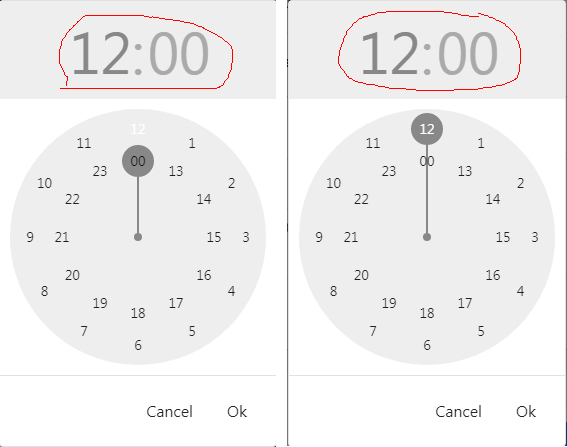

I fix this problem.
- In gijgo.js change (line: 15934)
// update the numbers visualHour = (data.mode === 'ampm' && hour > 12 ? hour - 12 : (hour == 0 ? 12 : hour));to// update the numbers visualHour = (data.mode === 'ampm' && hour > 12 ? hour - 12 : (hour)); - To lead zero need update (line: 15948)
$header.find('[role="hour"]').text(visualHour);to$header.find('[role="hour"]').text(parseInt(visualHour) < 10 ? "0" + visualHour: visualHour);I was create fixed.min.js file if some one needed https://drive.google.com/file/d/1oJO0ZwoECW4GJBM5sJYPlwQRKEHe1aLr/view?usp=sharing
