
selenium-shutterbug
 selenium-shutterbug copied to clipboard
 assertthat
Java library to create customized full page/frame/elements screenshots using Selenium WebDriver and Java AWT, screenshots and images comparison and many more cool stuff

When I use this line of code with safari `Shutterbug.shootElement(driver, elementLocator, CaptureElement.VIEWPORT, true);` the result is the below exception whereas I chose a VIEWPORT image that should have no scrolling...

1、 first invoke was successful Shutterbug.wait(getExpectedCondition(screenshotElement),60) .shootElement(webDriver, getWebElement(webDriver, screenshotElement), CaptureElement.FULL_SCROLL) .withName(fileName) .save("/Users/evan/Documents/test"); 2、second invoke not with wait() method; NoSuchMethodError PageSnapshot snapshot = Shutterbug.shootPage(webDriver, Capture.FULL_SCROLL) .snapshot.withName(fileName) .save("/Users/evan/Documents/test"); EXCEPTIONG: Handler dispatch failed;...

I used to use version `0.9.3` of the `selenium-shutterbug`. I did the whole page screenshot as follows: ``` Shutterbug.shootPage(webDriver, ScrollStrategy.WHOLE_PAGE).withName(name).save(path) ``` Recently, I have updated the dependency to version `1.5`....

I would want to propose possible fix for https://github.com/assertthat/selenium-shutterbug/issues/70 and enchantment feature that I would want to see. It it ability to resize screenshot that we took. It's pros are:...

Screenshot is not proper in safari(macbook) while using Capture.FULL if the page has sticky elements and screenshot not taken completely. `PageSnapshot image = Shutterbug.shootPage(driver, Capture.FULL, 500, true);` 

Here is couple of concerns: 1. Setting headless property by default. On the one hand we let users to not write `headless()` each time they face the issue `Could not...


Use [this fiddle ](https://jsfiddle.net/roboaks/eh1ubpan/)to confirm. My unit test activates the `result` `iframe` and then uses `shootElement` for `#VerticallyScrollableDiv`. Here is the result: 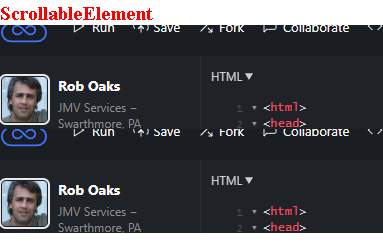

Need to account for element border when shooting the element to allow seamless stitching e.g ```java Shutterbug.shootElement(driver, webElement, CaptureElement.HORIZONTAL_SCROLL).withBorders(1,1,1,0)save(); ```
Metadata
Owner
Metadata
Java library to create customized full page/frame/elements screenshots using Selenium WebDriver and Java AWT, screenshots and images comparison and many more cool stuff