
dejavu
 dejavu copied to clipboard
 appbaseio
Calendar widget for date field filters
using: Docker version: 1.5.0
Context
When filtering columns with date data, the user is expected to input the filter string manually (e.g. > or <).
Feature request
When defining a filter for ES date fields, it would be helpful if the user could select date value(s) from a calendar widget.

This is a good point @brylie. We can show a calendar from / to widget to filter on the dates. I am adding this as an enhancement.
We will also add some pointers on how to implement this, so if someone is interested in seeing this sooner - they can pick it up.

We're using react-datetime for editing date fields. It should be possible to extend this for use in the filters. This may require refactoring of existing components.

Here's a more detailed explanation if someone wishes to take this up:
- The
DataTablecomponent attable/DataTable.jspasses themappingObjto theColumncomponent attable/Column.js. - The
Columncomponent filters out the datatype for the current column in thedatatypevariable. - The
Columncomponent renders aFilterDropdowncomponent passing it thedatatype. - The
FilterDropdowncomponent renders a componentSingleMenuItemwhich picks the filter value from the dropdown directly via DOM. - It would probably be best to create a new component and use it instead of
SingleMenuItemsince it's hard to refactor. Also reading values from the DOM is not a good idea especially here. - One thing to keep in mind is to make the logic work for all formats. I'm handling this in the
Cellcomponent attable/Cell.jsin thehandleDatetimeChangemethod. - Check the usage of
DateTimecomponent inCellsince a similar approach can be utilized for selecting dates via the filter dropdown.
<Datetime
	defaultValue={moment(this.state.data, getMomentDate(this.props.datatype.format))}
	dateFormat={
		this.props.datatype.format === 'basic_time' || this.props.datatype.format === 'basic_time_no_millis' ?
		false :
		getMomentDate(this.props.datatype.format)
	}
	timeFormat={
		!(this.props.datatype.format === 'YYYY/MM/DD' || this.props.datatype.format === 'basic_date' || this.props.datatype.format === 'date')
	}
	onBlur={(e) => {
		this.handleDatetimeChange(e);
		this.setState({ active: false });
	}}
	inputProps={{
		ref: (node) => { this.select = node; }
	}}
/>
- For selecting a date range check the docs on react-datetime.
- Once the filter is applied it would execute the
applyFiltermethod inHomePagecomponent. This component uses some global variables to run the filtered query fromfeed.js. If the query gets applied correctly, the data should get updated in the view.

I got the react datetime to work with FilterDropdown, however, I can't seem to find a workaround to retrieve the calendars value and apply it. Right now it seems like were using onKeyUp to retrieve the input tags value but this doesn't really work when the user clicks a date with react datetime. When I manually type in the date input tag it works and I can apply the date filter but it isn't really practical for production.
Is there a way to grab input field values when the user clicks apply? I think this may work better than using onKeyUp to grab the value.
Thanks @divyanshu013 for the great explanation.
Example
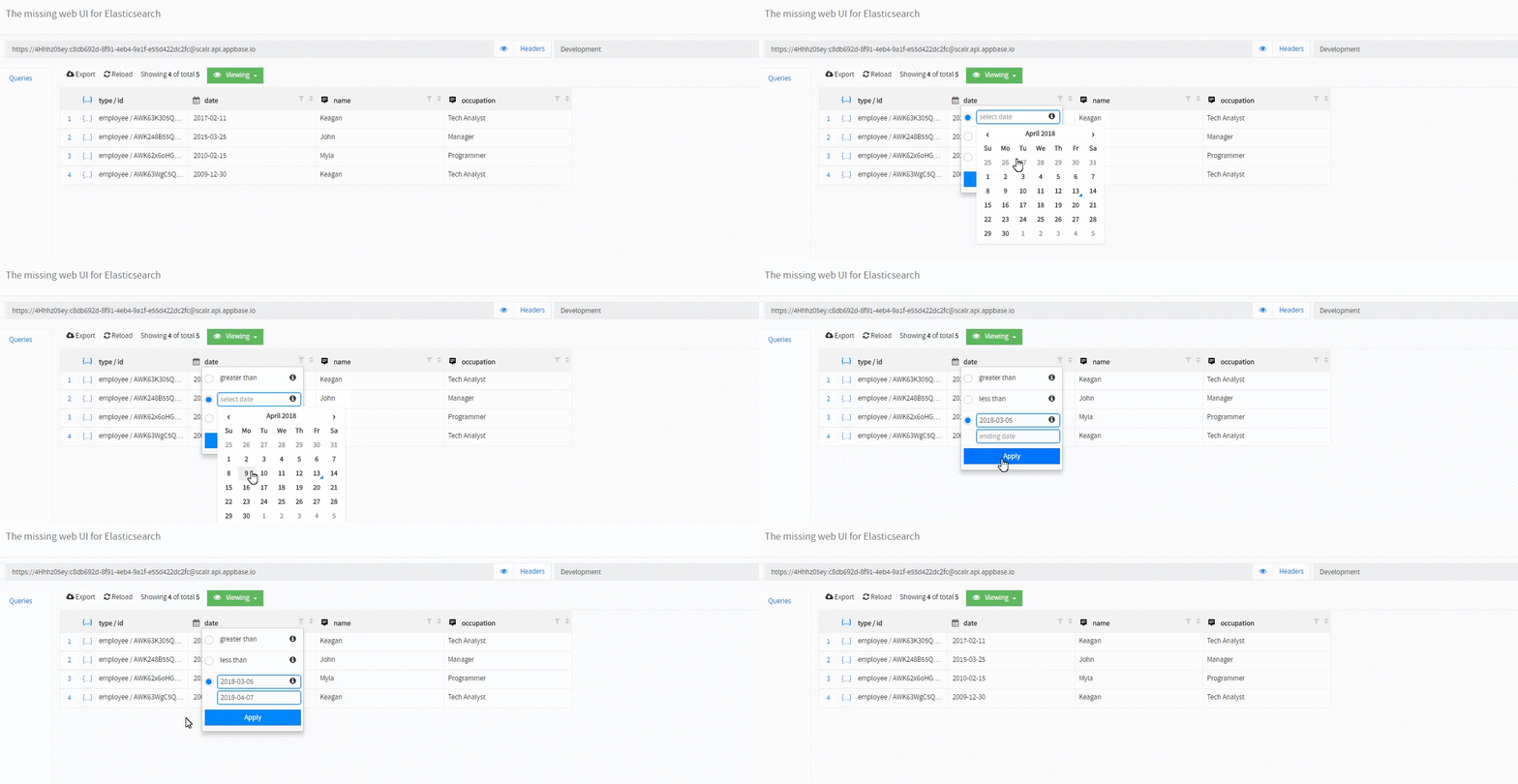
Code for React Datetime
<DateTime dateFormat='YYYY-MM-DD' closeOnSelect= {true} timeFormat= {false} inputProps={{ placeholder: 'select date', id: keyInput, className: 'form-control' }} />
Hey @MPierre9, great work, I think you're quite close 😸
The onKeyUp isn't a good approach (I didn't notice we were using it). I think you should try onValueChange which should cover all usecases. Just a heads up, you might need some changes in the rangeChange method to make it work. Also when you're done making the changes, can you also test and see if it's working for other fields (besides date) too.
