
apollo-client-devtools
 apollo-client-devtools copied to clipboard
 apollographql
GCP Console crash
Intended outcome: Being able to open Google Cloud Console on chrome while the extension enabled.
Actual outcome: The GCP Console produce error messages on console and prevent any page to be shown.
How to reproduce the issue: Having the extension enabled, login to https://console.cloud.google.com/ and navigate to any menu. Recent support from reddit with further screenshots can be found here.
Desktop (please complete the following information):
- OS: Windows
- Browser chrome
- Browser version 100.0.4896.127
- Extension version 4.0.0

@itsnotrisky 👋 just to confirm, are you saying that until you disabled The Apollo Extension, you couldn't access the GCP console? I'm curious what happens if you try to re-enable it. Also I assume this was your Reddit comment (sponge bob consistency) 😄 so I'm just adding it for context as we are taking a look at this issue soon.
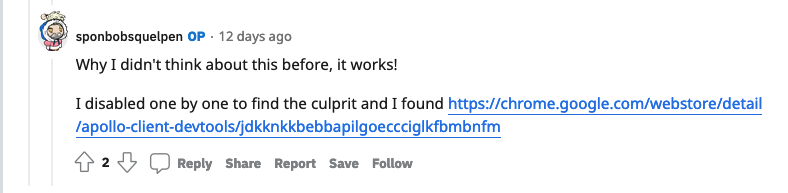

Correct, once I disabled the extension I can access GCP pages and as soon as I toggle it on from the extensions menu and refresh the same page on GCP Console it broke again. Similar note I have mentioned on the Reddit post is opening the GCP homepage/dashboard works fine but once I go to any sub menu i.e. to access Compute Engine that's when the error page shows up.
And yeah I'm the OP there :D happy to add any details if you need to.

@jeremiah-snee-openx thanks for bringing this to my attention! I'll dig in here soon to see if I can figure out which version broke the page.

This should be fixed in 4.8.2, which should land in the extension stores sometime soon.

Do you have any feedback for the maintainers? Please tell us by taking a one-minute survey. Your responses will help us understand Apollo Client usage and allow us to serve you better.
![github-actions[bot] avatar](https://avatars.githubusercontent.com/in/15368?v=4 "Published by a pub.dev verified publisher")