

 angular
autocomplete: add support for displaying md-char-counter when md-input-maxlength is used
In order to show the md-char-counter on the autocomplete input when using min/maxlength validators, we should switch from using ng-min/maxlength to their md-* counterparts. I see a very simple code change on the directive's templates.
What would need further discussion is how to update the md-char-counter after an item selection, as well as how will this impact the md-item-text attribute or vice-versa.
Angular Versions:
Angular Version: 1.5.7Angular Material Version: 1.1.0
Additional Information:
Browser Type: *Browser Version: *OS: *

I'm not sure I completely understand, why we should automatically transform the ng-min/maxlength attributes to a md- prefixed attribute?
General info about ng-min/maxlength on the autocomplete directive itself
- The reason why we use the
md-prefix here, because when using theng-prefix, the actual Angular Directive will try to find an associated input on the autocomplete.
This means an error will be thrown.

The main purpose for this is to show the md-char-counter on the autocomplete input when having max/min length validators.
I created a CodePen demo for investigating this. I also verified locally that a simple change to MdAutocomplete to change ng-maxlength="inputMaxlength" to md-maxlength="{{inputMaxlength}}" causes the autocomplete to show the md-char-counter.

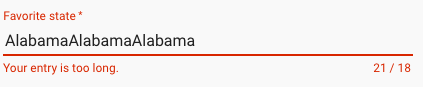
I did the easy parts of this in https://github.com/DevIntent/material/commit/056e5ff2cc5f4527a3fa763bd0601d730f9c53d6, but as mentioned in the OP, the md-char-counter is not updated when a selection is made.