
RaspberryPiPkg
 RaspberryPiPkg copied to clipboard
 andreiw
The MEGA Windows on Arm thread
So i've gotten pretty close to getting windows 10 arm to boot. But for some reason after selecting the boot device it wont no longer detect the keyboard, when the press any key to continue prompt arrives. The numlock light will turn on but no matter what button i press nothing happens. Also since it doesnt detect a keyboard input it will go back to the last screen and the system seems to lock up at that point.
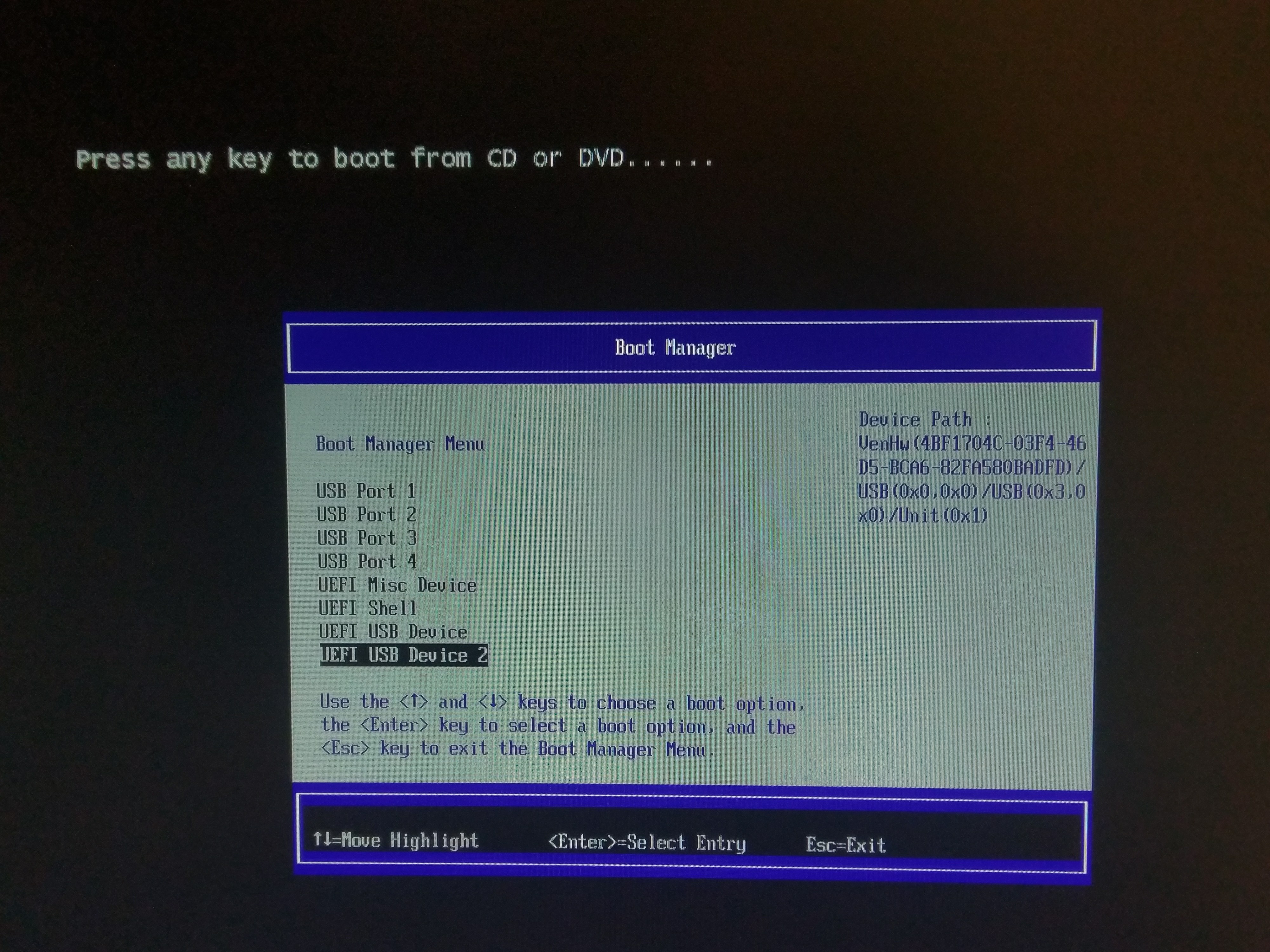

I've also tried two different keyboards both seem to not have an effect.
Do me a favor and repeat your experiment with the input being done over the serial input instead of USB. I bet you’ll discover similar behavior.
Actually, please send me a serial log of your experiments produced by a debug build of the UEFI firmware. That should help immensly.
I’ve seen something similar with winload.efi - it draws the pretty “uh-oh” blue screen, but the keys to reboot or exit to firmware don’t work - almost as if the code is waiting for a debugger or if interrupts are disabled. With a debug edk2 build I saw periodic UEFI messages stop printing as well.

You can try applying the wim file manually,make two partitions on your sdcard or USB,one FAT and one NTFS,then use dism to apply the image and bcdboot to create boot files.

AFAIK,using the latest firmware Windows still hang at the boot screen,there seems no sign of loading and no 0xc0000225
Sadly i don't have a serial cable to hook up to the pi, tho im not too sure how to communicate with it that way my guess is a serial to usb and putty on my pc. I've seen people posting images of the 0xc0000225 blue screen and i have no idea how they are even getting that far.
Folks, I've updated the readme.md file with the steps required to build arm64 WinPE USB media. You should be able to follow them provided you have a Windows 10 machine (any will do, x86, amd64 or arm64).
Also, see https://github.com/andreiw/RaspberryPiPkg/tree/master/Binary/prebuilt/2018Apr21-GCC49, which should make it more obvious what is happening. See screenshot. You should be able to repeat my "success" (for lack of a better term, given that we're crashing somewhere in NT after UEFI exits).

Since the current version (Apr 21st) and latest WoA WinPE bits seem to act much more reasonably than this ticket implies, I'm closing it as resolved.
Guys, take a look at https://github.com/andreiw/RaspberryPiPkg/tree/master/Binary/prebuilt/2018Apr22-GCC49 and the latest notes in readme.md. Everything you need to repeat is in there.
I can get WinPE booting. If it wasn't for https://twitter.com/ntauthority 's helpful hint, wouldn't be anywhere close.


I'll see if I can make any progress on SMP.
It would be nice to figure out where the MCCI (https://twitter.com/NTAuthority/status/957886027594641409) USB driver for DWC_OTC can be found.
The rest of the RPi3 drivers are open source and could be hypothetically build with the EWDK (https://github.com/ms-iot/bsp/tree/master/drivers) - untried, but it seems like @NTAuthority built some.
Wow you guys got pretty far, I'm gonna try this in a bit and see what happens.
wow That's amazing! Is it possible to use PSCI to get SMP?WOA needs either mppp or psci to get multicore. According to https://zhuanlan.zhihu.com/p/34572676 Windows has built in support for BCM interrupts,and what's the problem that prevents windows from starting up?
This firmware already exposes PSCI support (go boot Linux and see ;-)), but the ACPI tables are as-is from MS-IoT and thus still report MPPP and no PSCI in FADT.
In the earlier versions there were acpi tables for psci ,I wonder whether adding only dsdt ,csrt,dbg2 could help or not.
As far as RPi3 support there appears to be a check in Hal validating PIC is not a BCM PIC. That’s why you need a debugger attached to patch out the ‘bls’ following the subtraction and compare.
Would it be possible to use the usb driver from the windows IoT? Cause im trying to get my hands on the file for it.
You need a 64-bit driver. IoT core is 32-bit. Hypothetically, if I understood @NTAuthority correctly, the driver might have shipped as part of the NT-based 64-bit Wndows Mobile. I don’t know much about the later, in terms of which version first had AArch64 support (8.1 or 10...).
@andreiw I see, i guess the does beg the question how do we get hold of it.
Oh, also trying to make the pe disk but i keep running into errors. https://puu.sh/A8iYa/2f307aa6a4.png
Well you can try to grab uup and make an installtion media,keeping only the efi and boot.wim under sources
http://tieba.baidu.com/p/5650553455?share=9105&fr=share&see_lz=0&sfc=copy&client_type=2&client_version=9.4.8.4&st=1524405579&unique=17AB6B5F22E960726FBC25BC1894B03E Here's my only known win10m aarch64 .(Don't worry as English translation is done below.I don't know whether it helps or not
I dont know if we can even get the drivers from the backup. Also i just placed an order for a serial adapter so that should be a big help.
Yeah you pretty much need the serial adapter today to have that windbg connection, until I figure out how to hot-patch the Hal... That’s probably where most of my current interest around WoA, after I resolve the PSCI issue. So if someone wants to focus on locating and validating the USB controller driver (https://docs.microsoft.com/en-us/windows-hardware/manufacture/desktop/add-and-remove-drivers-to-an-offline-windows-image), that would be fantastic.
@daveb778 until I add high-speed support to the SD host controller UEFI driver, I recommend you use USB keys for your OSes (Linux, FreeBSD, WoA), unless you really like waiting. USB is much faster. Your SD card should pretty much just contain UEFI.
@andreiw Ahh kk, i've been mostly doing just this. But yea im basically stuck waiting for a serial adapter from amazon for now. Also im not too sure how to track down the usb driver, ive been looking with no luck so far.
The original USB driver was built for ARM32 only and therefore wouldn't work on ARMv8 Windows, I should probably open-source my hacky attempt at an UCX-based USB driver since I've not had time to work on it for a while now.
Windows Phone devices used a Synopsys DesignWare USB controller as well, however this was the USB3 variant, which is pretty much distinct from the USB2 one used by Broadcom.
Also, yeah, I've noticed that the current SD UEFI driver is slow when booting Windows from the SD card, other than that, wonderful work on the project in general, @andreiw. 🙂
