
fullPage.js
 fullPage.js copied to clipboard
 alvarotrigo
Page height miscalculated in ios15
Description
In Safari in ios15, the url bar was moved to the bottom of the page. I'm now seeing that the page height for a full page "section" is miscalculated. When the url bar minimizes itself, page heights are miscalculated and are no longer full viewport.
Link to isolated reproduction with no external CSS / JS
This can be reproduced on the library's demo page: https://alvarotrigo.com/fullPage
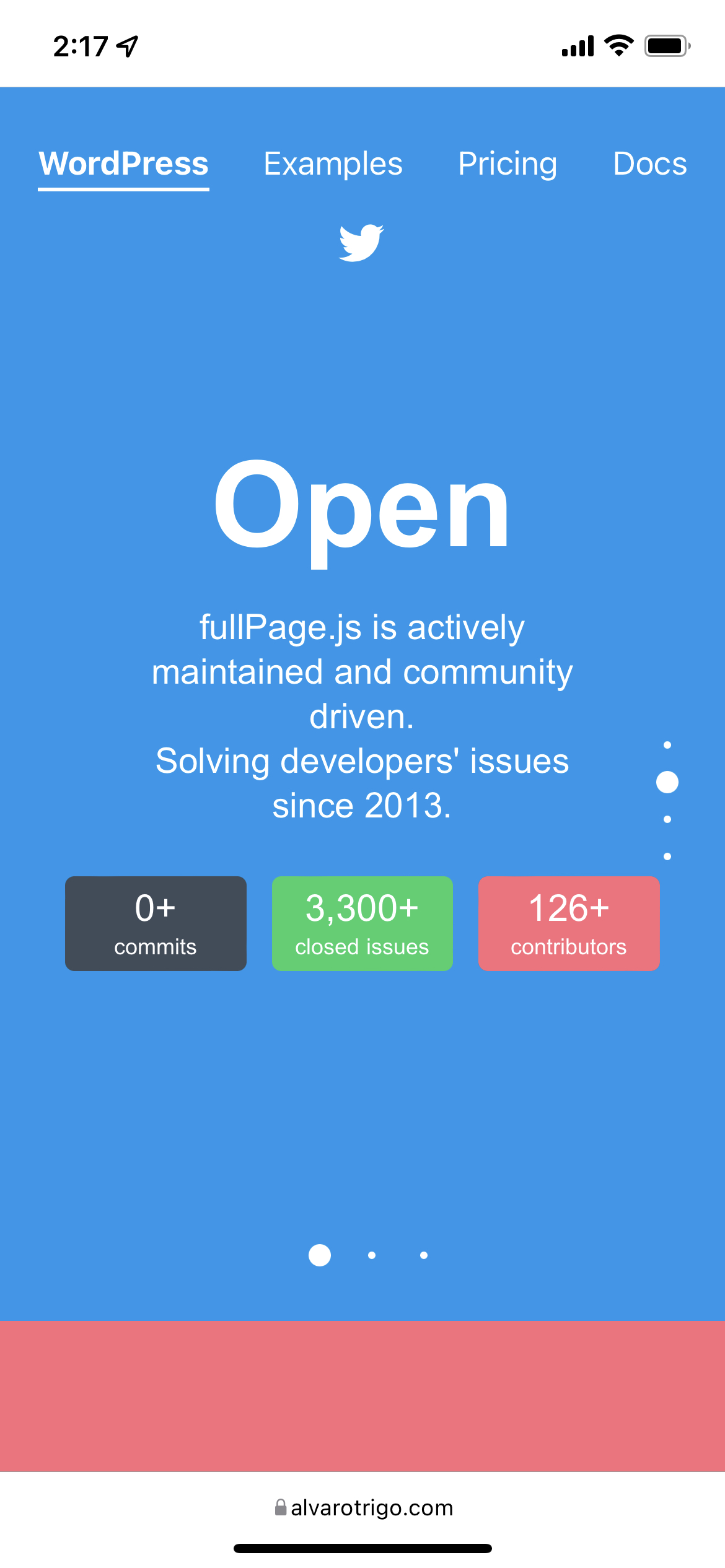

Steps to reproduce it
- Open the demo page on an iPhone running ios 15
- Scroll so that the tool bar minimizes itself (you may need to select "Hide toolbar" from the menu to see this on the demo page. In my project, the toolbar hides itself on a scroll)
- Observe the bottom space resulting from the page height calculation being too short
Versions
Safari, ios15, iPhone


Mmm I haven't tested it yet as I need to update my iPhone, but it seems like Apple changed the way they deal with toolbars... on the previous version the toolbar wouldn't hide unless the scroll bar was enabled on fullPage.js. (Which is not on the demo page unless using a very small viewport size)

I should note that my project does have the scroll bar enabled, which auto hides the toolbar and makes the miscalculated height extra apparent as soon as someone scrolls.
I should note that my project does have the scroll bar enabled,
Yeah, that's actually the surprising part. Without scrollbar, iOS didn't hide or reduce the toolbars before.
Previously, in the event that the scroll bar is enabled and therefore the toolbar comes and goes, what is the preferred way of dealing with the height miscalculation?
@callihiggins iOS didn't hide or minify the toolbars when not using a scroll bar. They stayed the same size all the time, as fullPage.js doesn't really "scroll" the page but simulates the scroll by using translate3d CSS properties.
Hello Álvaro, I got the same issue, setting fullPage with scrollBar true or false doesn't change much. I tried to use the "afterResize" call back, but it looks like our "beloved" Safari does not trigger that callback when hiding the bottom navbar. Also tried to force resizing the sections height both on afterLoad and onLeave but it messes up everything.


This is still an issue has someone discovered a workaround for this?
Update:
In my case, it was my own error. I had some leftover styling on the interior divs with heigh: 100vh, which was interfering.

This is still an issue has someone discovered a workaround for this?
Update: In my case, it was my own error. I had some leftover styling on the interior divs with
heigh: 100vh, which was interfering.
This worked for me. Changing height: 100vh to height: 100% did the trick.

This is still an issue has someone discovered a workaround for this? Update: In my case, it was my own error. I had some leftover styling on the interior divs with
heigh: 100vh, which was interfering.This worked for me. Changing
height: 100vhtoheight: 100%did the trick.
I assume you were using fullPage.js version 3.
Version 4 already uses 100vh so probably this issue doesn't take place any more. I just haven't closed the issue as I haven't tested it out yet.
Hi, i'm using fullPage for Elementor and i have the same issue with Safari. Like this issue creator, i also can confirm the same error happens with the examples on the Demo library of the plugin's website. This error does not happen on Chrome, though.
Any ideas how to correct this? Thanks.
~~EDIT: by disabling the anchors on the plugin's settings, i was able to solve this.~~

The issue is very probably solved in fullPage.js version 4. Try the latest version 4.0.11.
The issue is very probably solved in fullPage.js version 4. Try the latest version 4.0.11.
Hi, thank you for that. I don't exactly understand what happened, but it seems the solution i mentioned above (disabling the anchors) stopped working, I am back at the same as before. I am using, as i said, the Elementor plugin. The version i'm using is Version 1.9.0 - seems to be the latest.
Any thoughts on this? Thanks.
I am using, as i said, the Elementor plugin. The version i'm using is Version 1.9.0 - seems to be the latest.
An update is coming soon that will update the Elementor plugin to fullPage.js v4. Wait a week or so and update then :)
An update is coming soon that will update the Elementor plugin to fullPage.js v4. Wait a week or so and update then :)
Thanks, Alvaro. Unfortunately this website should be launched in a couple of days. Hope the wait will not be long...
All the best.