
altair
 altair copied to clipboard
Published
20 hours ago •
 altair-viz
altair-viz
Boxplot whiskers incorrect when reading data from csv file on disk
I seem to be getting two different boxplots when creating the chart from local data vs. data on disk. The box itself seems fine, but the upper whisker value is not correct in the version created from the dataset on disk. I'm using altair v4.1.0, vega v2.6.0, and pandas v0.25.0
import pandas as pd
import altair as alt

data = pd.DataFrame([
    ["one", 1385],
    ["one", 1162],
    ["one", 2827],
    ["one", 2138],
    ["one", 1847],
    ["one", 1477],
    ["one", 883],
    ["one", 9071],
    ["one", 835],
    ["one", 2104],
], columns=['a', 'b'])
data.to_csv('data.csv')

alt.hconcat(
    alt.Chart(data).mark_boxplot().encode(
        x='a:O',
        y='b:Q',
    ),
    alt.Chart('data.csv').mark_boxplot().encode(
        x='a:O',
        y='b:Q',
    )
)
Output:
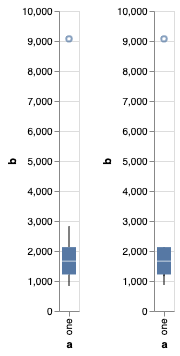
I've been unsuccessful in trying to reproduce the problem in vega. I've tried using the barley dataset URL as "file location" in the Vega Editor, but can't reproduce the problem.

CSV format can behave strangely with Vega-Lite, because unlike JSON there is no inherent numerical type. You can get around that by specifying the parse argument to alt.UrlData:
csv_data = alt.UrlData('data.csv', format={'parse': {'b': 'number'}})
alt.Chart(csv_data).mark_boxplot().encode(
    x='a:O',
    y='b:Q',
)
