allure2
 allure2 copied to clipboard
 allure-framework
Would like better support for embedded video links that contain test runs - bigger and shown at top level
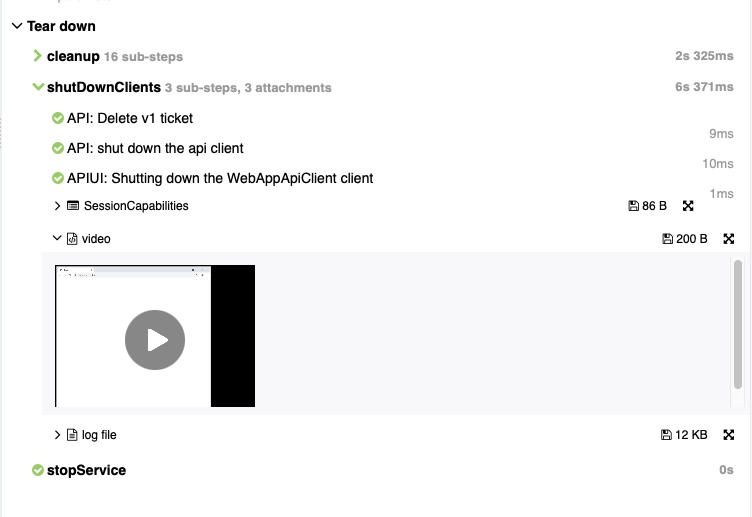
Is your feature request related to a problem? Please describe. A remote video uploaded as an HTML attachment only is shown in a very tiny area without scrolling. It would be better if it could be shown larger. Another improvement would be for it to be shown "outside" the tree structure that is created using Allure with Junit5. Uploads of any kind often happen in the @AfterEach or @AfterAll methods.
NOTE: the videos are hosted on a different server and are NOT uploaded to Allure. Only html
I've posted stackoverflow query to see if someone has a solution without making changes to Allure. https://stackoverflow.com/questions/71001513/how-can-i-improve-display-of-attached-video-link-in-allure-report
Describe the solution you'd like
- I would like to ebed the video in the Allure report per test
- The horizontal area for the html used for the video should not be so short
- I would like to be able to upload the attachment "outside" of the tree structure
- I would like this to be shown without having to "click into" some visual tree structure. It should just appear when the test details are shown in the right side panel
Describe alternatives you've considered I'm making the video very, very small right now to avoid the scroll bar. I've tried some other html code variations to see if I can get a taller area for the video.
Additional context
	@Attachment(value = "video", type = "text/html")
	public String saveVideoUrl(String url) {
		logger.info("**** Embedding video in Allure report ****");
		String html = String.format("<html><body><video width=\"200\" height=\"150\" controls><source src=\"%s\" type=\"video/mp4\">Did the video show up?</video></body></html>", url);
		return html;
	}
This screenshot shows the result of my attachment code above. You can see the small size as well as how deep into the tree structure it is because of execution in the @AfterEach method of the Junit5 test.