
allure2
 allure2 copied to clipboard
 allure-framework
Allure report plugin for Azure devops
In my last project, we were using Jenkins to host our allure reports. Good thing, Allure reports plugin was already there for Jenkins.
Since I and probably high amount of user are now migrating towards Azure devops, can we get a Allure plugin for integrating our test results with Azure devops.
I am a big fan of Allure and would love to see this new feature implemented in Azure pipeline.
Meanwhile, what is the current way to host allure reports in azure devops?

Hi @geekyPiyush, I would like to see such a plugin as well since I switched to AZDO recently. Have you tried a solution with generating the Allure HTML report and publishing it with "Publish HTML" extension for azdo? Or any other workaround since you wrote this post?

Hi @geekyPiyush, I would like to see such a plugin as well since I switched to AZDO recently. Have you tried a solution with generating the Allure HTML report and publishing it with "Publish HTML" extension for azdo? Or any other workaround since you wrote this post?
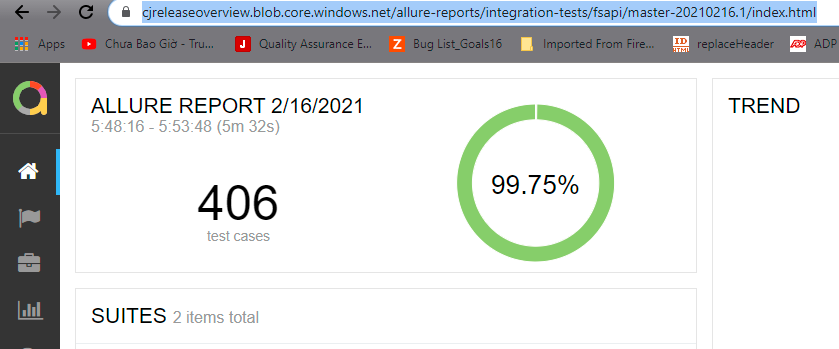
I have not tried that solution. But what I have achieved is that once build completes, I am copying the entire allure-report/ folder to Azure Storage Account as blob data where the index.html gets hosted on a static server. And from there as a post build action, I am fetching the index.html file from the storage account that I copied and send it as Email
In below image, the URL is been generated by storage account static server
Hi @geekyPiyush, I would like to see such a plugin as well since I switched to AZDO recently. Have you tried a solution with generating the Allure HTML report and publishing it with "Publish HTML" extension for azdo? Or any other workaround since you wrote this post?
I have not tried that solution. But what I have achieved is that once build completes, I am copying the entire allure-report/ folder to Azure Storage Account as blob data where the index.html gets hosted on a static server. And from there as a post build action, I am fetching the index.html file from the storage account that I copied and send it as Email
In below image, the URL is been generated by storage account static server
Hey! Could you describe how to do the same? Thanks!

Hi @geekyPiyush Could you show how your task, responsible for email sending, looks like?


hi all generate allure report is pass, but nothing to see i get: Result Attachments will be stored in LogStore Run Attachments will be stored in LogStore ##[warning]Failed to publish test run data: System.ArgumentException: Unknown test runner
Does anybody solution for this issue?

@geekyPiyush @ainomc Could you please explain how you achieved this using storage account and static app please?


@daniavander, @vivuu1989 - I managed to publish Allure report in AZ DO in the following way:
- Tests are run by the job;
- Allure report is generated as a post-run step:
- bash: |
    echo "Using Allure mvn-plgn to generate the report."
    mvn allure:report
  displayName: "Generate Allure report."
  workingDirectory: $(SOURCE_DIR)
  condition: succeededOrFailed()
- Generated report is getting uploaded to AZ DO storage as static web site:
- task: AzureCLI@2
  displayName: "Publishing Allure report to $(ALLURE_REPORT_URL) ."
  condition: succeededOrFailed()
  inputs:
    azureSubscription: 'AZ_DO_SUBSCRIPTION_NAME'
    scriptType: 'bash'
    scriptLocation: 'inlineScript'
    inlineScript: |
      az extension add --name storage-preview --yes
      az storage azcopy blob upload -c '$web/$(Build.BuildId)' --account-name <YOUR_STORAGE_ACCOUNT_NAME> --account-key <YOUR_STORAGE_ACCOUNT_KEY> -s '$(ALLURE_REPORT_DIR)' --recursive
    powerShellErrorActionPreference: 'continue'
    workingDirectory: '$(ALLURE_REPORT_DIR)'
Notes:
- In my case the report's location is like https://<STORAGE_ACCOUNT_NAME>.z1.web.core.windows.net/$(Build.BuildId)/allure-maven-plugin/index.html i.e. I store a report per build
- ALLURE_REPORT_DIR is $(Build.SourcesDirectory)/MY_SRC_ROOT/target/site/allure-maven-plugin
- This post helped me a lot - https://matthewleak.medium.com/deploying-a-static-website-to-azure-storage-using-azure-devops-fa0bed457d07

Just a Question.
This gh actions: https://github.com/simple-elf/allure-report-action deploys to gh pages. Is it possible to use it on AD?
Thanks.

BTW this one has been added to our's team roadmap. Stay tuned for the updates
@baev - any updates on this please.

Official Allure extension for Azure Pipelines are now available https://marketplace.visualstudio.com/items?itemName=qameta.allure-azure-pipelines
History isn't yet supported, but we'll get there! Please submit feedback to our discussions