

 alexed1
*Datatable* - Lightning Web Component - Dates display as the day prior to that on the record
Currently have Version 3.3.2 installed with the current base packs.
I assume this issue is related to UTC time but can not work out a way to ensure local time is defaulted.
Steps to reproduce
Steps to reproduce the behavior:
- Screen Flow with Datatable on a custom object. Click in the Table with Related Tasks are displaying.
- Click in the table with Related Tasks displaying and edit the Start and Due Dates.
- Save the edits
- On refresh of the screen, the date edit is displaying the day prior to the one entered and saved against the actual task record.
Expected behaviour
The day that is entered and saved against the Task is display in the Flow Datatable.
Actual behaviour
Datatable displays a day prior to that entered and on the task record, happens on both the Start Date and the Due Date.
Screenshots
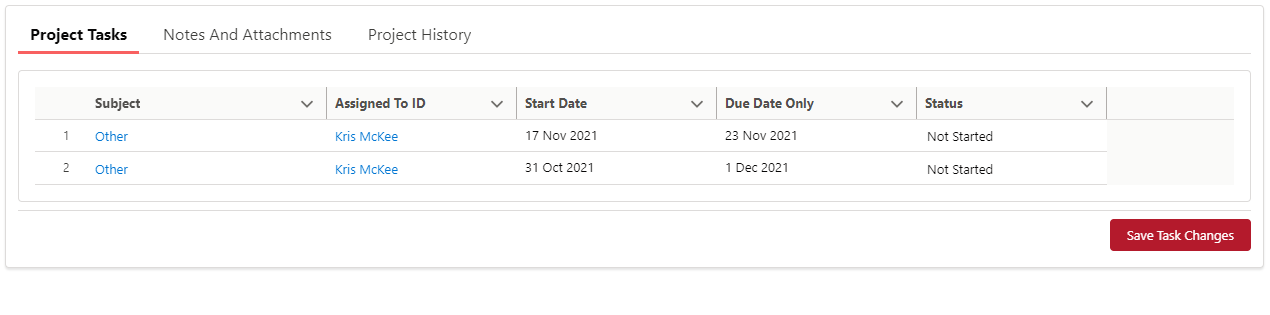


@kjmckee Please try v3.4.5 and see if this has been resolved. https://unofficialsf.com/datatable-lightning-web-component-for-flow-screens-2/#Installation
@ericrsmith35 I'm still seeing this error in v3.4.5 but only with timezones greater than +1.00
-11:00 works fine, +0:00 works fine, +1:00 works fine, +2:00 shows -1 day offset.

@kjmckee I have implemented a bug fix for the Datatable component where dates could sometimes be off by 1 day. This would typically happen when the date being displayed, and the current date had a mismatch with one of them being in Daylight Savings time and the other one was not.
Before publicly publishing this fix, I would like to get feedback from users that had experienced the issue. Please install the current versions of the UnofficialSF Base Packs (https://unofficialsf.com/flow-action-and-screen-component-basepacks/) then install Version 4.0.4 of the Datatable component.
Sandbox (https://test.salesforce.com/packaging/installPackage.apexp?p0=04t5G000003rUxRQAU) Production or Dev (https://login.salesforce.com/packaging/installPackage.apexp?p0=04t5G000003rUxRQAU)
Please let me know if this fixes your issue or if you are still having a problem with dates being off by one day.
Thanks, Eric Smith