

 alexed1
Screen Flow Components - Refresh View and Navigate to Next
Users may use a Quick Action on a record page that calls a screen flow that performs tasks that don't require user intervention (e.g. edit fields or create related records). Without these components, the user has to close the modal (by clicking next, or with the X) and refresh the browser to see the update.
- The "Navigate to Next" screen component automatically "finishes" the flow and closes the modal.
- The "Refresh View" updates the current view without reloading the browser window.
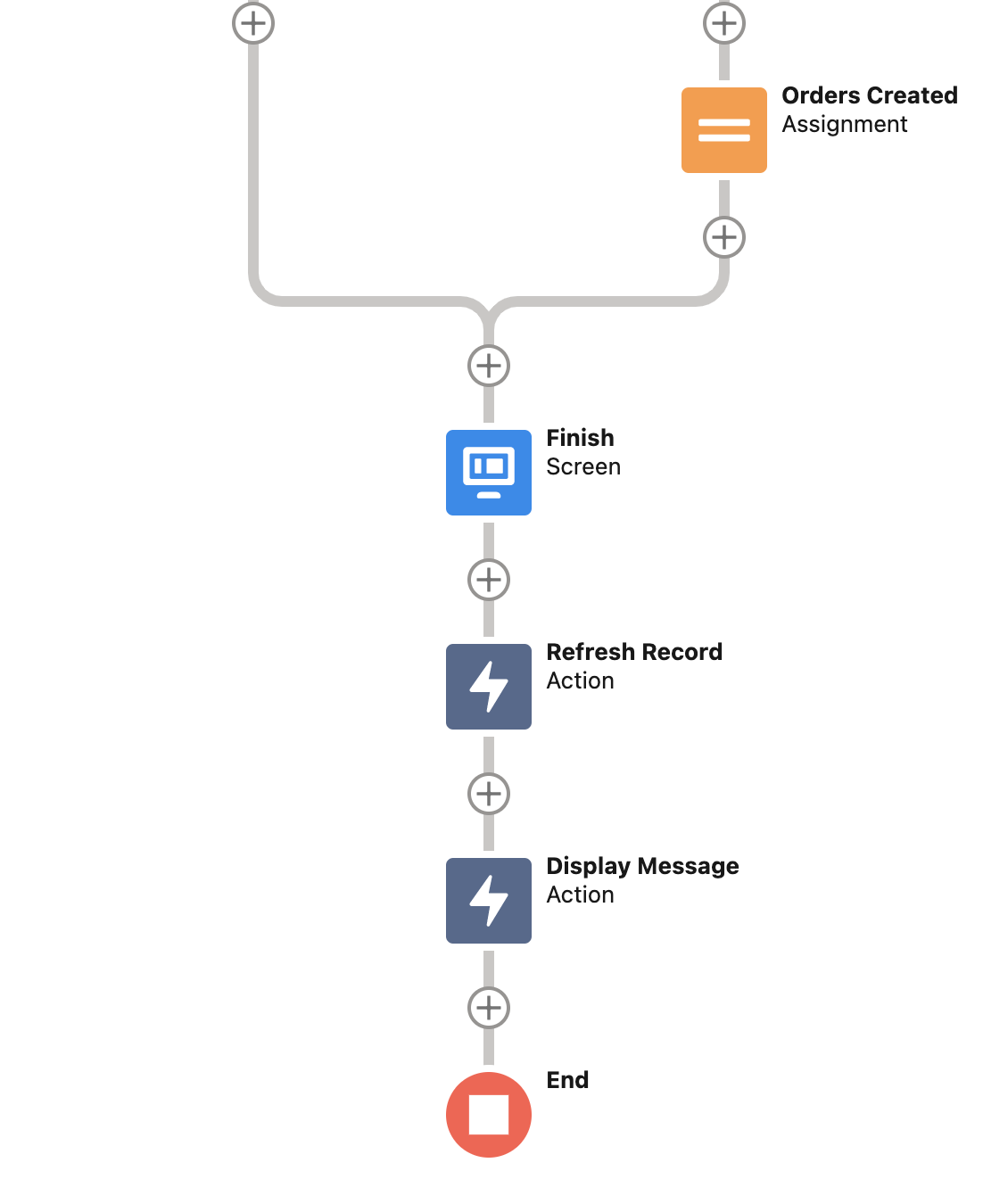
You can get details of the use case and reference material in the readme file of each component. Below is an example of how to combine the two with the Show Toast in a screen flow.

Thanks so much for this contribution, Martin. You've identified a gap and come up with a solution. Really appreciate this.
There will be questions about how your Navigate to Next is different from https://unofficialsf.com/navigate-everywhere-flow-action/...what's your take on that? Could we combine the two into a single navigate solution?
And I'm wondering how the refreshView compares to the update stuff at https://github.com/forcedotcom/LightningFlowComponents/tree/master/flow_local_actions/UpdateScreen. Should we retire the old component? merge it with your new one?

Hi Alex!
Sorry about the late response, it's been a crazy quarter!
With regards to the Navigate Everywhere, I agree that it should be modified to implement 'Next' and 'Previous' actions (the Quick Choice component already uses this).
In terms of the Refresh View, I think this solution is better than Update Screen because it refreshes all components in the Lightning Record Page. I took inspiration from Texei's post
@ericrsmith35 @adwhite75 interested in your thoughts on how to position this useful new functionality from Martin.
let me try one out: Navigate Everywhere is a navigation action that you can add to screen flows to direct the screen flow to a wide range of destinations. Your browser will load the appropriate URL when the flow reaches this action.
NavigateToNext is a screen component that triggers a Next navigation as soon as it loads. If you put this component on a screen and put that screen at the end of your screen flow it will have the effect of closing the flow, instead of leaving the user with the Your Flow Finished screen.
Update Screen is a local action that calls the Salesforce recordData component when it loads, which causes a refresh of that record.
Refresh View is a local action that calls the Salesforce refreshView component. This also causes a refresh. Martin asserts that Update Screen doesn't refresh all of the components. Should we retire Update Screen in favor of Refresh View? I'm happy to do so if it makes sense...
I like what he has done here. I agree with replacing Update Screen with Refresh View.
I am going to test the NavigateToNext to see if it will close my Column Wizard flow that runs in a modal in my Datatable CPE.
Eric
On Fri, Jul 1, 2022 at 3:59 PM Alex Edelstein @.***> wrote:
@ericrsmith35 https://github.com/ericrsmith35 @adwhite75 https://github.com/adwhite75 interested in your thoughts on how to position this useful new functionality from Martin.
let me try one out: Navigate Everywhere is a navigation action that you can add to screen flows to direct the screen flow to a wide range of destinations. Your browser will load the appropriate URL when the flow reaches this action.
NavigateToNext is a screen component that triggers a Next navigation as soon as it loads. If you put this component on a screen and put that screen at the end of your screen flow it will have the effect of closing the flow, instead of leaving the user with the Your Flow Finished screen.
Update Screen is a local action that calls the Salesforce recordData component when it loads, which causes a refresh of that record.
Refresh View is a local action that calls the Salesforce refreshView component. This also causes a refresh. Martin asserts that Update Screen doesn't refresh all of the components. Should we retire Update Screen in favor of Refresh View? I'm happy to do so if it makes sense...
— Reply to this email directly, view it on GitHub https://github.com/alexed1/LightningFlowComponents/pull/1115#issuecomment-1172672407, or unsubscribe https://github.com/notifications/unsubscribe-auth/AF4UHX7UPXDILRAGX3LTP5LVR5EZJANCNFSM5WIXBPVQ . You are receiving this because you were mentioned.Message ID: @.***>

It doesn't look like these components follow standard aura component naming conventions. Is that an issue?
I can't test the navigateToNext component because it is not exposed to flow.
I was able to get the component installed by renaming the .js and .xml code pieces. The navigateToNext failes when added to a screen that is the last element in the flow.

It needs to check first to see what actions are supported before determining which one to issue.
Changing the action to FINISH and testing on my Datatable Configuration Wizard flow, which runs in a modal, the component just causes my flow to restart. It does not close the modal.
Hi @alexed1, really sorry for the delay, I was away on annual leave for the last month-and-a-half.
@ericrsmith35 I think the behaviour makes sense, because the flow you're testing on requires the user to exit the modal with the X button, rather than with a 'Finish' button. The intended purpose of this component was to auto-close screen flows triggered from quick actions and URLs, but not from a CPE.
@alexed1's summary from July 1st is spot on as to why I created these components, as I felt the existing alternatives weren't meeting the requirements I needed.
As Eric pointed out, this code would need to make a distinction between NEXT and FINISH. If you put this component on the last screen of a flow it will throw an error because NEXT is not an allowable option.
So that I can explain it, I want to better understand the difference between the force:recordData (which is what UpdateScreen uses) and florce:refreshView, which is provided here.
I notice that the documentation for refreshView says 'it's preferable to use recordData' down at the bottom of the page (https://developer.salesforce.com/docs/component-library/bundle/force:refreshView/documentation)
I'm happy to have both in the repo if they're not overlapping. What's the advantage as you see it of refreshView?