

 alexed1
*QuickChoice* - Visual Cards - 2 column
Steps to reproduce
Steps to reproduce the behaviour:
- Use Quick Choice componenet within screen flows, configured as visual cards with 2 columns
- Use flow in a Modle (e.g. launched via quick action button in LEX)
- Second column is cropped (rendered out-with the flow's modal)
Expected behaviour
The columns should ideally be resized with the width of the the flow's modal so that the componenet looks neat.
Actual behaviour
Any cards rendered in the second column are cropped to the right - see screenshot for an example. This happens regardless of the width of the modal. I tried resizing my window and the second column is always cropped.
Screenshots
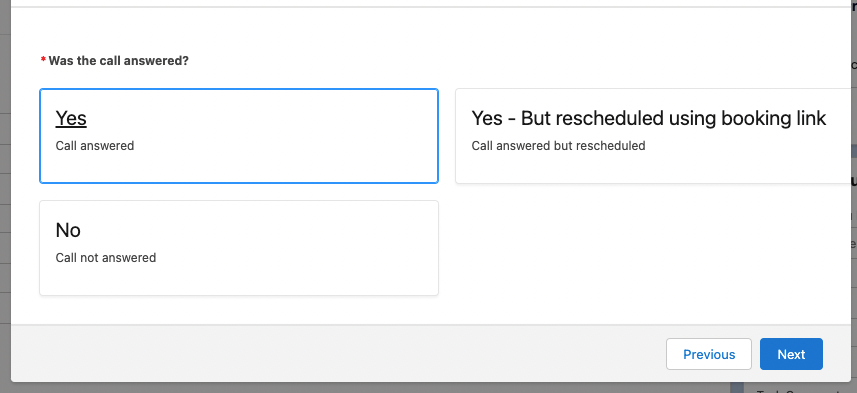

Currently only the single column view is responsive to the container size.

Understood, thank you. Is it possible to log it as a feature request / suggestion?
@JCUK89 This should be resolved. I have recently pushed an update to this within the last week.
