
LightningFlowComponents
 LightningFlowComponents copied to clipboard
 alexed1
*Datatable* - _(Configure Columns)_ - Uncaught error "isDisableSuppressBottomBar" missing setter decorated with@api
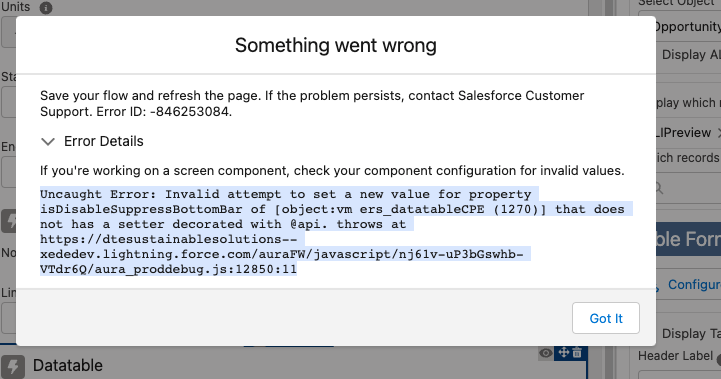
What Using the Configure Columns to add columns to a table (Opportunity Line item). when I close the configure columns modal (after I see the "you can close this window" message, I get a Salesforce "Something went Wrong" message.
Uncaught Error: Invalid attempt to set a new value for property isDisableSuppressBottomBar of [object:vm ers_datatableCPE (1270)] that does not has a setter decorated with @api. throws at https://dtesustainablesolutions--xededev.lightning.force.com/auraFW/javascript/nj61v-uP3bGswhb-VTdr6Q/aura_proddebug.js:12850:11
Steps to reproduce
Steps to reproduce the behavior:
- Go to 'Datatable in Flow'
- Click on Configure Columns
- add columns
- press "Done"
Expected behaviour
Should save the columns.
Actual behaviour
Uncaught Error: Invalid attempt to set a new value for property isDisableSuppressBottomBar of [object:vm ers_datatableCPE (1270)] that does not has a setter decorated with @api. throws at https://dtesustainablesolutions--xededev.lightning.force.com/auraFW/javascript/nj61v-uP3bGswhb-VTdr6Q/aura_proddebug.js:12850:11
Screenshots

What version of Datatable are you running? What happens if you remove the datatable, save the flow, reopen the flow and then add the datatable back in?

Running 3.5.0 just installed yesterday. I have 2 data tables on the same screen not sure if that matters. Also had a section on the screen as well, but with that no data ever got displayed. I could see it in the console log, but not on screen. Once I removed the section the first table shows data. Another update on this, I pulled the metadata for the flow into my viscose, and noticed the second table did not have the columns listed. I manually added that xml with the proper fields, and know it renders. I still get that error if I edit the columns, but the ones I added do appear.
On Mar 23, 2022, at 12:35 PM, Eric Smith @.***> wrote:
What version of Datatable are you running? What happens if you remove the datatable, save the flow, reopen the flow and then add the datatable back in?
— Reply to this email directly, view it on GitHub, or unsubscribe. You are receiving this because you authored the thread.
Try editing the table with the error and uncheck the Suppress Bottom Bar option, save, exit, reload and then recheck that option and save.
On Wed, Mar 23, 2022 at 6:30 PM Jim Rae @.***> wrote:
Running 3.5.0 just installed yesterday. I have 2 data tables on the same screen not sure if that matters. Also had a section on the screen as well, but with that no data ever got displayed. I could see it in the console log, but not on screen. Once I removed the section the first table shows data. Another update on this, I pulled the metadata for the flow into my viscose, and noticed the second table did not have the columns listed. I manually added that xml with the proper fields, and know it renders. I still get that error if I edit the columns, but the ones I added do appear.
On Mar 23, 2022, at 12:35 PM, Eric Smith @.***> wrote:
What version of Datatable are you running? What happens if you remove the datatable, save the flow, reopen the flow and then add the datatable back in?
— Reply to this email directly, view it on GitHub, or unsubscribe. You are receiving this because you authored the thread.
— Reply to this email directly, view it on GitHub https://github.com/alexed1/LightningFlowComponents/issues/1087#issuecomment-1076885178, or unsubscribe https://github.com/notifications/unsubscribe-auth/AF4UHX6WDBFZ6GJKBDDPGLTVBOLRFANCNFSM5ROPPAUA . You are receiving this because you were assigned.Message ID: @.***>
@ericrsmith35 i do not see a suppress bottom bar option to select or unselect.
I am having the same error also running version 3.5. However I am unable to select the checkbox for "Hide Cancel/Save buttons" - it is greyed out

The Hide Cancel/Save buttons will be greyed out if no columns are selected for editing.
The Hide Cancel/Save buttons will be greyed out if no columns are selected for editing.
This error is preventing me from saving my column selections, so I'm in a bit of a double bind.

Can you temporarily select one column for editing, make the change and then reset the editing attribute?
On Tue, Jun 7, 2022 at 6:11 PM davidbingham @.***> wrote:
The Hide Cancel/Save buttons will be greyed out if no columns are selected for editing.
This error is preventing me from saving my column selections.
— Reply to this email directly, view it on GitHub https://github.com/alexed1/LightningFlowComponents/issues/1087#issuecomment-1149223802, or unsubscribe https://github.com/notifications/unsubscribe-auth/AF4UHX2LWX3E4RVEUOVJOMLVN7CHNANCNFSM5ROPPAUA . You are receiving this because you were mentioned.Message ID: @.***>
No. Whichever method is responsible for saving my column selections is being interrupted by this error.
Try removing the datatable from the flow, save the flow, refresh and add a datatable back into the flow.
On Thu, Jun 9, 2022 at 2:50 PM davidbingham @.***> wrote:
No. Whichever method is responsible for saving my column selections is being interrupted by this error.
— Reply to this email directly, view it on GitHub https://github.com/alexed1/LightningFlowComponents/issues/1087#issuecomment-1151482566, or unsubscribe https://github.com/notifications/unsubscribe-auth/AF4UHX2JZACNOXTKGQGLDMTVOI4IPANCNFSM5ROPPAUA . You are receiving this because you were mentioned.Message ID: @.***>
Done that a few times. Ended up commenting out some methods in the js controller, configuring my datatable, and then restoring the methods.
Still get the error when I try to modify the table but no longer blocked.
I'm getting the same thing across multiple flows. It is making the component unusable. The only workaround is to extract the flow in VS code, add the Tags for columnFields and redeploy.
Version is [4.0.8] Looks like FlowComponentBase Pack is 3.0.6 and I cant upgrade to the latest with an error FlowTableViewDefinition__c.Alignments__c) Cannot change type due to existing data

I was able to workaround this issue by commenting out the following lines: https://github.com/alexed1/LightningFlowComponents/blob/2772da904513167296c3676d0d8f886f98c5ba38/flow_screen_components/datatable/force-app/main/default/lwc/ers_datatableCPE/ers_datatableCPE.js#L1120
and
https://github.com/alexed1/LightningFlowComponents/blob/2772da904513167296c3676d0d8f886f98c5ba38/flow_screen_components/datatable/force-app/main/default/lwc/ers_datatableCPE/ers_datatableCPE.js#L1120
As these props have no @api setter.

I'm now using the managed package version of Flow Screen Components so I can't use @eclarke12 's workaround.
This should be fixed in v4.0.9
On Tue, Aug 9, 2022 at 5:22 PM errational @.***> wrote:
I was able to bypass this issue by commenting the following lines:
https://github.com/alexed1/LightningFlowComponents/blob/2772da904513167296c3676d0d8f886f98c5ba38/flow_screen_components/datatable/force-app/main/default/lwc/ers_datatableCPE/ers_datatableCPE.js#L1120
and
https://github.com/alexed1/LightningFlowComponents/blob/2772da904513167296c3676d0d8f886f98c5ba38/flow_screen_components/datatable/force-app/main/default/lwc/ers_datatableCPE/ers_datatableCPE.js#L1120
As these props have no @api setter.
— Reply to this email directly, view it on GitHub https://github.com/alexed1/LightningFlowComponents/issues/1087#issuecomment-1209909253, or unsubscribe https://github.com/notifications/unsubscribe-auth/AF4UHX2SL26TKOLT32F7MKDVYLD2VANCNFSM5ROPPAUA . You are receiving this because you were mentioned.Message ID: @.***>