

 alexed1
**Datatable** - _ers_customLightningDatatable_ - Long Text Columns cells blank
How to use GitHub
- Please use the 👍 reaction to show that you are affected by the same issue.
- Please don't comment if you have no relevant information to add. It's just extra noise for everyone subscribed to this issue.
- Subscribe to receive notifications on status change and new comments.
Steps to reproduce
Steps to reproduce the behavior:
- Add Datatable component to a screen flow.
- Configure for Product2 SObject.
- Add standard fields to columns: Name, ProductCode, Description, etc.
- Configure columns for no edit, no filter, wrap text.
- Configure rest of settings as desired.
- Save Flow.
- Run Flow in Lightning experience.
Expected behaviour
Product Description column should show description text.
Actual behaviour
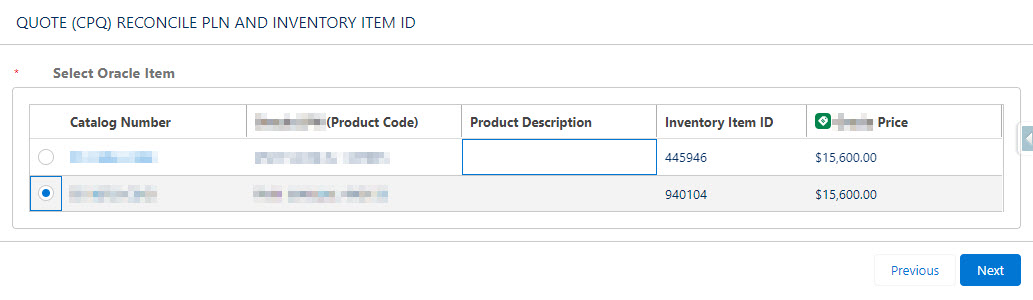
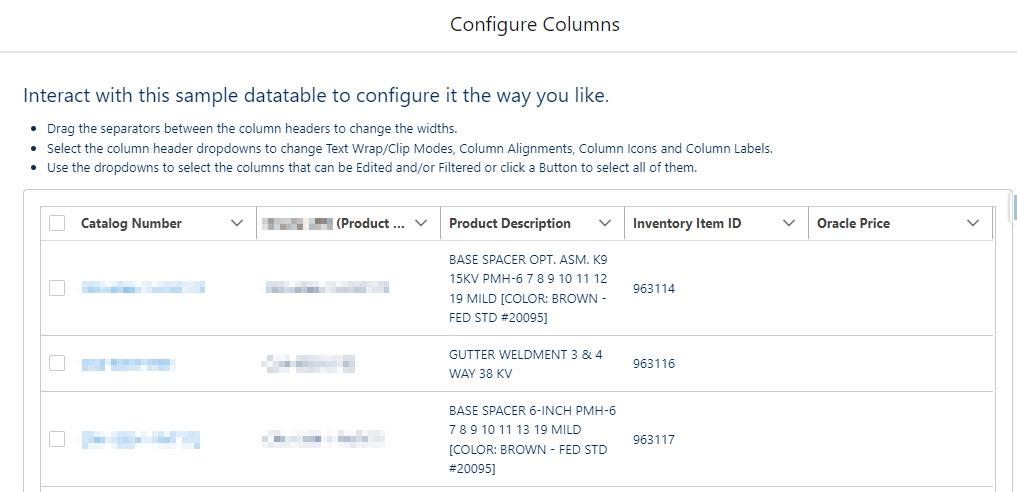
In the 'Configure Columns' review mode, Product Description text is displayed as expected. In any live run of the flow, the Product Description cells of the table are blank. (see first screenshot) The other columns for the record collection are being populated. Confirmed that the tested Product records all have a value for Description field. I also tried to add a formula field that takes a limited number of characters from the Product Description; Description is a Text Area field (up to 4000 characters), Product_Description_Shortened is a Formula Text field (max of 50 characters). This field also showed values in preview but blank cells in live test. Perhaps related: in Configure Columns preview, the Price field shows blank cells, but these show correctly in a live test. (see second screenshot)
Thanks in advance for your help resolving this!
Screenshots
Debug Logs
If applicable, please insert debug logs here
Debug Log Information
Paste the output of the logs here.

The records shown in the preview are the first few records from the object. It's possible they do not have a value for the price. Please confirm field level security for the Product Description field and that the displayed records actually have a value for the records being displayed.
On Thu, Mar 10, 2022 at 11:55 PM Sara @.***> wrote:
How to use GitHub
- Please use the 👍 reaction https://blog.github.com/2016-03-10-add-reactions-to-pull-requests-issues-and-comments/ to show that you are affected by the same issue.
- Please don't comment if you have no relevant information to add. It's just extra noise for everyone subscribed to this issue.
- Subscribe to receive notifications on status change and new comments.
Steps to reproduce
Steps to reproduce the behavior:
- Add Datatable component to a screen flow.
- Configure for Product2 SObject.
- Add standard fields to columns: Name, ProductCode, Description, etc.
- Configure columns for no edit, no filter, wrap text.
- Configure rest of settings as desired.
- Save Flow.
- Run Flow in Lightning experience.
Expected behaviour
Product Description column should show description text. Actual behaviour
In the 'Configure Columns' review mode, Product Description text is displayed as expected. In any live run of the flow, the Product Description cells of the table are blank. (see first screenshot) The other columns for the record collection are being populated. Confirmed that the tested Product records all have a value for Description field. I also tried to add a formula field that takes a limited number of characters from the Product Description; Description is a Text Area field (up to 4000 characters), Product_Description_Shortened is a Formula Text field (max of 50 characters). This field also showed values in preview but blank cells in live test. Perhaps related: in Configure Columns preview, the Price field shows blank cells, but these show correctly in a live test. (see second screenshot)
Thanks in advance for your help resolving this! Screenshots
[image: Datatable_DescriptionBlank_2022-03-10] https://user-images.githubusercontent.com/23529588/157802467-ea19dbdf-53bf-4649-8685-9894d2e148da.jpg [image: Datatable_DescriptionBlankConfigureColumns_2022-03-10] https://user-images.githubusercontent.com/23529588/157804479-a2a0a668-0c87-4ef0-b5bc-5dcd91a0a358.jpg Debug Logs
If applicable, please insert debug logs here Debug Log Information
Paste the output of the logs here.
— Reply to this email directly, view it on GitHub https://github.com/alexed1/LightningFlowComponents/issues/1080, or unsubscribe https://github.com/notifications/unsubscribe-auth/AF4UHX5ARBQVVQPEKZJMC23U7LG5VANCNFSM5QOSQHYQ . Triage notifications on the go with GitHub Mobile for iOS https://apps.apple.com/app/apple-store/id1477376905?ct=notification-email&mt=8&pt=524675 or Android https://play.google.com/store/apps/details?id=com.github.android&referrer=utm_campaign%3Dnotification-email%26utm_medium%3Demail%26utm_source%3Dgithub.
You are receiving this because you are subscribed to this thread.Message ID: @.***>
