
LightningFlowComponents

LightningFlowComponents copied to clipboard
 alexed1
*inputRichTextFSC* - Text is lost on pause/resume flow
How to use GitHub
- Please use the 👍 reaction to show that you are affected by the same issue.
- Please don't comment if you have no relevant information to add. It's just extra noise for everyone subscribed to this issue.
- Subscribe to receive notifications on status change and new comments.
Steps to reproduce
- Create and activate a screen flow with 1 screen that contains an inputRichTextFSC component.
- Run the flow and input some text into the component.
- Pause the flow.
- Resume the flow. The inputted text is lost.
Expected behaviour
The inputted text should be saved and displayed.
Actual behaviour
The inputted text is lost when we pause the flow.

@jeremyjpalmer
You will need to have the Rich Text Value filled in with a variable, and you will need to have the "Revisited Screen" set to Use values from when the user last visited this screen.
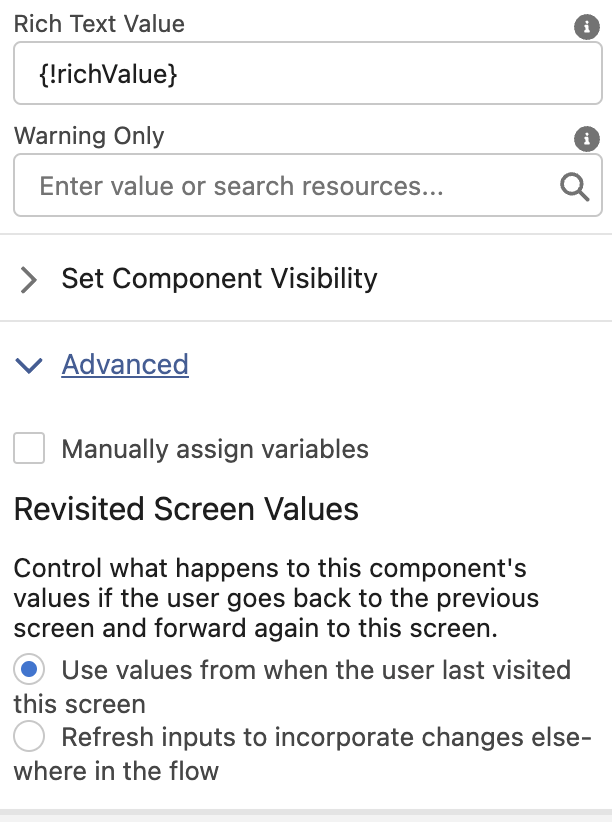
Once configured, the values will still be set when the user establishes a value and clicks previous. And no, you do not need the assignment component to set the value.
