
magento2-connector-community
 magento2-connector-community copied to clipboard
 akeneo
Tax Class of Product is overwritten after Import
My Magento implementation has its tax class set manually. After I execute an Akeneo Import, the tax class is overwritten to be "None". I've made no configuration to the Default Tax Class settings - I've left them blank.

Environment and configuration
- Akeneo Connector version 101.3.6
Steps to reproduce
- Set a Product's tax class Manually
- Run the Akeneo Import
- Review the example Product's tax class afterward
Expected result
- The example product's tax class should remain the same
Actual result
- The example product's tax class has been overwritten to "None"

Our integration partner suggested this change: https://github.com/akeneo/magento2-connector-community/blob/v101.3.6/Job/Product.php#L1675
        /** @var mixed[] $taxClasses */
        $taxClasses = $this->configHelper->getProductTaxClasses();
        if (count($taxClasses)) {
            foreach ($taxClasses as $storeId => $taxClassId) {
                $values[$storeId]['tax_class_id'] = new Expr($taxClassId);
            }
-       }
+       } else {
+           unset($values[0]['tax_class_id']);
+       }
If someone here can confirm this fixes the bug, is it possible to get a patch to the 101.3.x branch (101.3.7) as we are currently pinned to this version in production. Thanks!
Same issue, manually set tax class is overwritten with configured default tax class after import.


We needed to change this for a client of ours, so I temporarily changed myself.
I made the changes via composer patches, but for convenience I forked and made a commit for this change, see: https://github.com/rbouma/magento2-connector-community/commit/0eaa4badbb209dde53c0a9dd607c73f3524a4cb3
Don't use this repository because it won't be updated when the main project is updated, but take the commit as a reference.
I am going to make pull request soon but need to do some other stuff this week.
stores -> configuration -> catalog -> Akeneo Connector -> products
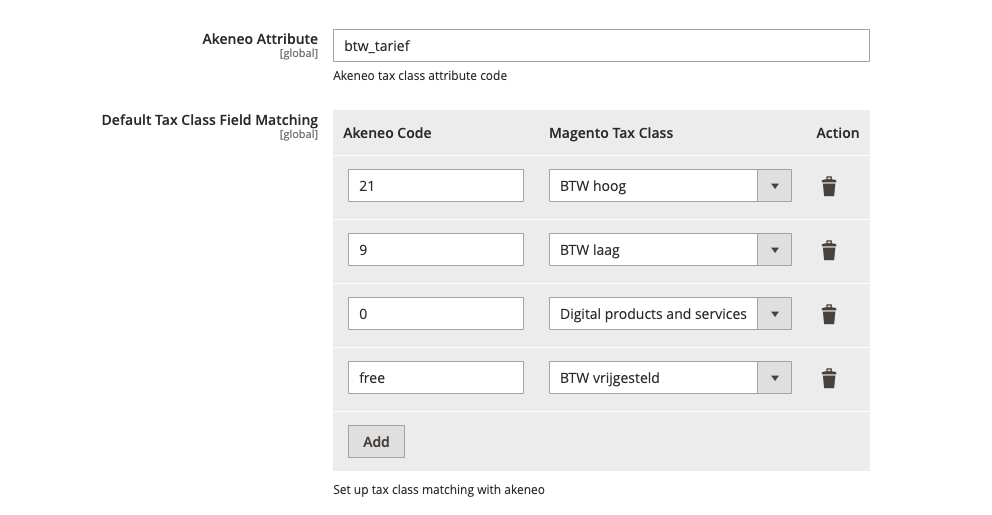
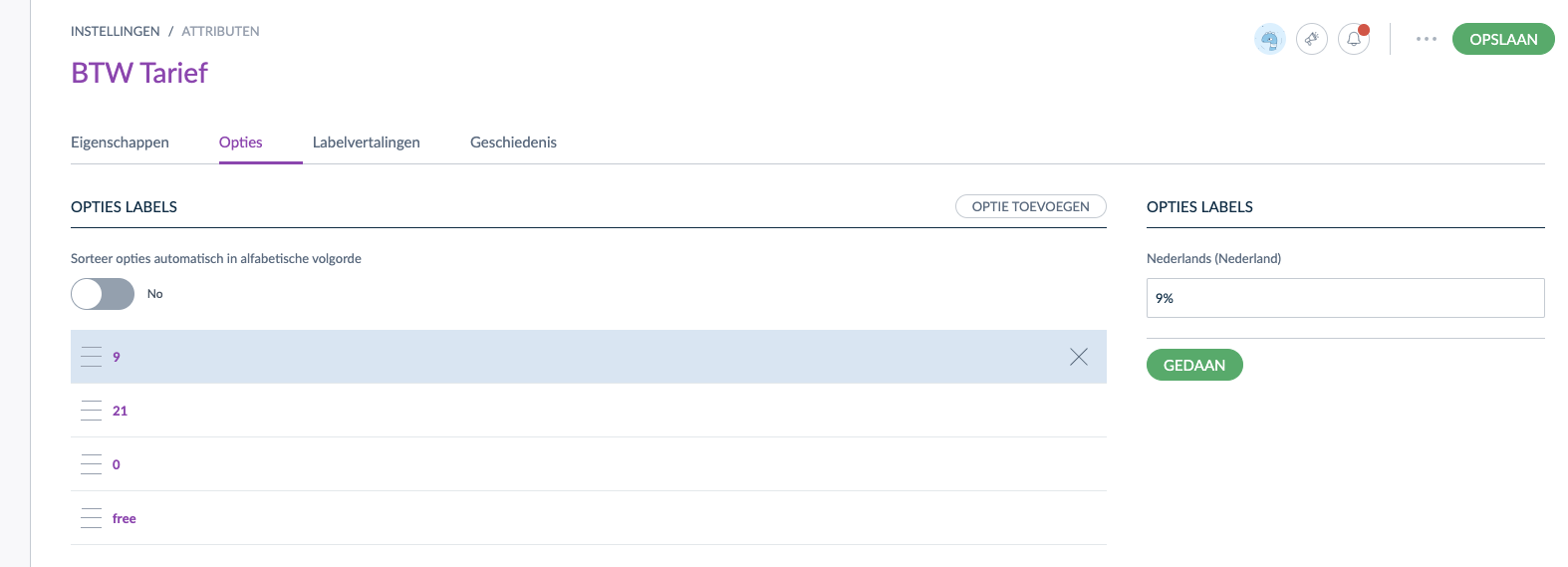
Akeneo attribute single select with the options for tax classes.
I have different problem. I don't have VAT in Akeneo, but Tax Class is always set to None after import (if I manualy set tax it is overwriten after import).
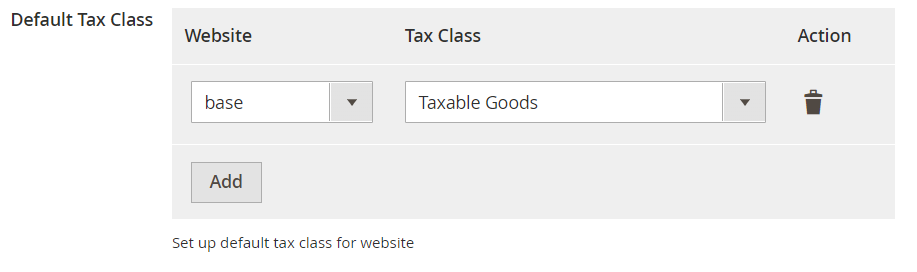 I try with settings from picture but it is same with or without Default Tax Class
I have different problem. I don't have VAT in Akeneo, but Tax Class is always set to None after import (if I manualy set tax it is overwriten after import).
As far as I can tell, this only happens when running the job from admin (which schedules a cron job), and not from the command-line.
The reason for this happening is because of the way the Magento cron jobs are run - when \Magento\Framework\App\Cron runs, it creates a new ObjectManager instance that loads the crontab area. The Magento_Store module has a plugin in the adminhtml and frontend areas to set the current store to the default (i.e. is_default = 1 in the database), but the same functionality does not exist in the crontab area. As such, the "default" (admin) store is loaded, meaning that \Akeneo\Connector\Helper\Config->getDefaultWebsiteId() returns 0, instead of the id of the default website.
Then, because there is no option to set a default tax class for the admin website in the connector config, \Akeneo\Connector\Helper\Config->getProductTaxClasses() never returns an entry for 0, and so all entries in catalog_product_entity_int for store 0 are set to 0 for the tax_class_id attribute.
I think there's potentially a couple of solutions:
- Allow the admin website to be selected in the config settings. This would probably be the most robust solution, as it allows for a specific value to be chosen in the default scope.
- Change
getDefaultWebsiteIdfunction to actually load the default website using\Magento\Store\Api\WebsiteRepositoryInterface->getDefault()and then return its id, instead of just returning the website id of the current store.

@aligent-lturner You're right. now i checked and really, the problem is starting from the admin panel. How to do "Allow the admin website to be selected in the config settings"?
@aligent-lturner You're right. now i checked and really, the problem is starting from the admin panel. How to do "Allow the admin website to be selected in the config settings"?
Adding true as a parameter to the function call here: https://github.com/akeneo/magento2-connector-community/blob/b74a40cdc1e8c71811835205c21a7e8a969d4751/Block/Adminhtml/System/Config/Form/Field/Tax.php#L91
This will include the admin website in the drop-down for tax config.
We needed to change this for a client of ours, so I temporarily changed myself.
I made the changes via composer patches, but for convenience I forked and made a commit for this change, see: rbouma@0eaa4ba
Don't use this repository because it won't be updated when the main project is updated, but take the commit as a reference.
I am going to make pull request soon but need to do some other stuff this week.
stores -> configuration -> catalog -> Akeneo Connector -> products
Akeneo attribute single select with the options for tax classes.
Hi did you make a PR for this?

Possible fix here I think: https://github.com/akeneo/magento2-connector-community/pull/643
Maybe somebody can confirm?
