react-spectrum
 react-spectrum copied to clipboard
 adobe
adobe
Table component randomly fails to render provided items.
Provide a general summary of the issue here
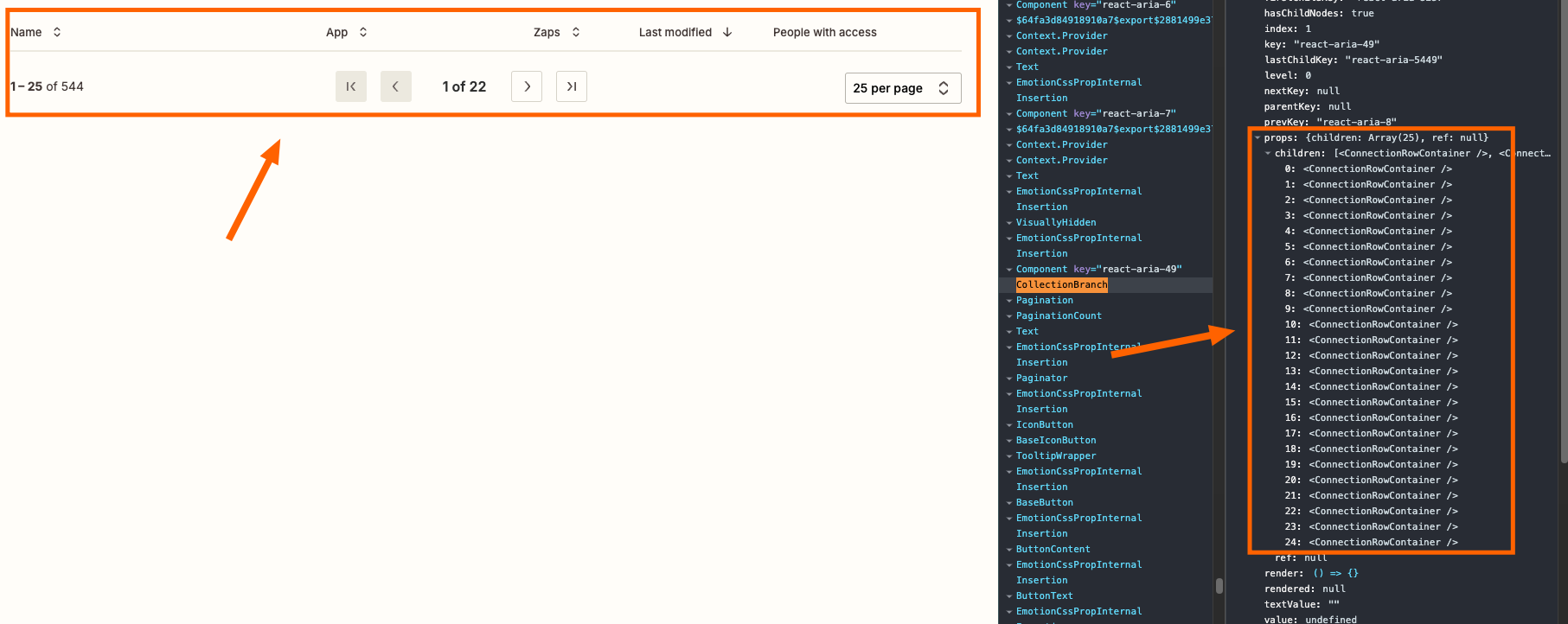
I'm using Table component in my Remix js application. Table items are provided by the loader function. Table sorting, search, pagination is handled with the URL query parameters. When user interacting with the table sorting, pagination or search for some time, the table component randomly stop showing content and renders empty state fallback component instead. I checked the items array, it contains data, but when I use React dev tools and check TableBody component, it shows that collection is empty, while props have items.
Here is my code
      <Table onSortChange={handleSorting} sortDescriptor={getSortDescriptor()}>
        <TableHeader columns={columns}>
          {(column) => (
            <Column isRowHeader={column.isRowHeader}>{column.name}</Column>
          )}
        </TableHeader>
        <TableBody items={tableRows} renderEmptyState={() => "no results"}>
          {(item) => (
            <Row aria-label="Table Row" columns={customerTableColumns}>
              {(column) => (
                <Cell aria-label="Table Cell">{item[column.id]}</Cell>
              )}
            </Row>
          )}
        </TableBody>
      </Table>
🤔 Expected Behavior?
Table should render items if provided.
😯 Current Behavior
Sometimes table does not render items.
💁 Possible Solution
Unfortunately I don't have solution.
🔦 Context
Items are dynamic, provided by the Remix loader with the help of useLoaderData hook.
🖥️ Steps to Reproduce
Unable to reproduce it in sandbox. Might be SSR related.
Version
1.1.1
What browsers are you seeing the problem on?
Chrome
If other, please specify.
Remix js
What operating system are you using?
Mac OS
🧢 Your Company/Team
Arbonics
🕷 Tracking Issue
No response

Thanks for the issue!
If you can't reproduce in a codesandbox, you could try stackblitz, they have a bit more flexibility for things like SSR. Or you can create a public git repo with an example project in it.
Unfortunately, I don't have any ideas off the top of my head. We'll need a reproduction to investigate further.

@SerhiiArbonics @snowystinger I am also seeing this quite consistently. Also, seeing it in other components like Breadcrumbs that use collections. I have managed to recreate it in this stackblitz repro: https://stackblitz.com/edit/github-eveodx-hxa463?file=app/routes/_index.tsx. However, it does not happen as often. Essentially if you click the 1-3 links enough the table content eventually disappears.

@AndrewLeedham Thank you for the StackBlitz example. It's unfortunate to hear that you've encountered similar issues with other aria components. I'll continue to monitor them and report any additional findings.
I suspect the issue might be related to hydration, as my table component functions correctly in Storybook, even with the same filtering and searching logic. Debugging this could be challenging since there are no error logs or other clues when the issue occurs.
Let's see if anyone else has suggestions for identifying the source of the problem.
@snowystinger @AndrewLeedham
FYI, I discovered that using an array index as the item ID, instead of a unique identifier like UUID4, prevents the issue. It seems that during sorting and searching, the IDs of the rows change, whereas the index remains constant. This can serve as a temporary workaround for now.
@SerhiiArbonics I am seeing this when building the site statically as well. So it seems not to be related to hydration for me, there will still be hydration but the Remix SPA HTML is just a shell so not hydrating the table itself, that is a fresh render.
Thanks for the workaround, that does seem to work. Although, I am surprised because the ID will then be the same every time the pagination changes, because the length is always 1. So, would expect React to see them as the same thing and not re-render.
Unfortunately I do not have time to investigate the issue further. I will leave it for now, let's see if there are any negative consequences of using the workaround.
I have a use-case where key's as indexes won't work (breadcrumbs because the first few are often the same and the last changes as you navigate).
I found a potential bundling issue, which might be related to this:
In the built output isConnected is returning true for the document, whereas it should be returning this.isMounted, which relies on a useLayoutEffect.
Built output: https://unpkg.com/browse/[email protected]/dist/Collection.mjs#:~:text=349-,get%20isConnected(),-%7B Source: https://github.com/adobe/react-spectrum/blob/b46d23b9919eaec8ab1f621b52beced82e88b6ca/packages/react-aria-components/src/Collection.tsx#L528
Has anyone managed to recreate this with the repro I provided? cc @snowystinger
That was changed very recently so isn't in the published version yet. You could try installing the nightly version and see if it fixes your problem.

That was changed very recently so isn't in the published version yet. You could try installing the nightly version and see if it fixes your problem.
Looks like that was a red herring. Tried the nightly, also manually added the tree-shaken code back on the last version. But still seeing the same symptoms.
Had a look at that stackblitz, I'm unable to reproduce it in there.
I did notice you're specifying both a key and an id, you should only need the id on items. Also the import path for useLoader seems wrong, I don't think you're meant to import from dist.
Otherwise, all I can think of so far is that you have, unintentionally, duplicate id's in your list of items somewhere. For instance, the screenshot in the description, all the items have uuid's, except the footer, which has an id. Should it also have a uuid or do the others all have ids? I also noticed that they are not placed as props on the items in the description example.
The other common issue we see which can have hard to predict results is duplicate or multiple copies of our packages installed into your node_modules. Typically seen as a node_modules directory inside a package already in your node_modules. You could check if you have any of those. Or you can read the lockfile or query through the package manager for installed versions. A good starting point is checking if you have multiple copies of @react-aria/utils.
Feel free to use this script to check for duplicate packages https://gist.github.com/jluyau/9024db3527788030312332075745469b as well, though we are aware now that it didn't catch a couple, so don't rely exclusively on it.
We are having a similar issue in our next.js app.
I was able to deterministically reproduce it using a combination of the following:
The full reproduction is at https://github.com/joshuajaco/react-aria-table-nextjs-bug

I'm having the same issue. Combination with react-aria table and react-query. Rows are correctly added to table initially, but the table removes all rows after click on one of the rows or sortable header... Stumped why this is happening since using a simple html table works fine.

Thanks for getting a reproduction going. Here's a brain dump of things I've noticed so far. Nothing yet leading to a solution.
The collection key map appears to double in size, even though the table changes to display nothing because collection.size claims to be 0. The renderProps also declares that the Table is data-empty which supports that. I checked the constructor for BaseCollection, it gets called an alarming number of times, I'm not sure what's going on there, could be a red herring, it should only be invoked once in a lazy useState instantiation.
Clicking the column headers doesn't cause the issue. I see no event handlers, so this should just be a collection rerender due to interactions, which should be fine since this is already a hydrated component.
This can be reproduced by tabbing to the Table as well, so it's not restricted to mouse. Might just be generically a re-render
There is no error message.
Sharing my findings here.
Background for those not familiar with RAC architecture (like myself):
- Perhaps due to some memoization, the bug is not visible unless some action is made to cause the component to re-render, hence the need of clicking a row to reproduce the issue. But underneath, the bug is cooking :cook:
- To render rows, you need a populated collection. If the collection is empty - rows are missing.
- collection is updated by
collection.addNodefollowed bycollection.commitcall. - In this case, it's done by
Document.updateCollection. Document.updateCollectionis called byDocument.updateCollectionand byuseSSRCollectionNodewhich might be the key to this, because it makes the last successful call that updates the collection.
Findings:
- The flow of building a (valid) collection is similar on the server and the client:
Document.updateCollectionis called several times, which updates the collection as described above. - BUT THEN, on the client, in
Document, I can see a long series ofthis.mutatedNodes.addcalls, followed byTableCollection.addNodecall, as if the collection was being re-created from scratch for some reason. After this long series of calls though,Document.updateCollectionnever gets called byuseSSRCollectionNodeagain (!), so the collection is never updated with all the added rows! So the next time the component renders, collection has a size of 0. - Quick, horrible, workaround I was able to find was to add this at the end of
Document.addNodeimplementation:
        clearTimeout(this.__timeout);
        this.__timeout = setTimeout(() => {
            this.updateCollection();
        }, 0);
- This workaround definitely does not fix the underlying issue. The underlying issue is that
Document.updateCollectiondoes not get called OR that the collection is being needlessly re-created after first render (and it shouldn't need yet anotherDocument.updateCollectionin the first place). It might go deeper than that, I ran out of time.
Ready-to-use patch: @react-aria-collections-npm-3.0.0-alpha.3-04c359b98f.patch

We're seeing a similar problem as well where the rows/table content disappears if a user rapidly tries to load the table (eg. switching between the column sorts or paginating the table) with dynamic content. The CollectionBranch component seems to contain the props/components needed to render the rows/items but does not render any of the items