

 WebFreak001
printf() statement, the result is not immediately displayed on the screen.
If submitting a bug please make sure
- [*] If you are using gdb
- [*]
gdb --version>= 7.7.1 - [*] it works on the command line with
gdb - [*]
cwdandtargetare properly set
- [*]
- [ ] If you are using lldb
- [ ]
lldb --version>= 3.7.1 - [ ] it works on the command line with
lldb-mi - [ ]
cwdandtargetare properly set
- [ ]
Screenshots are helpful but not required
When debugging a printf() statement, the result is not immediately displayed on the screen. There is a problem that is displayed in batches after debugging is finished.
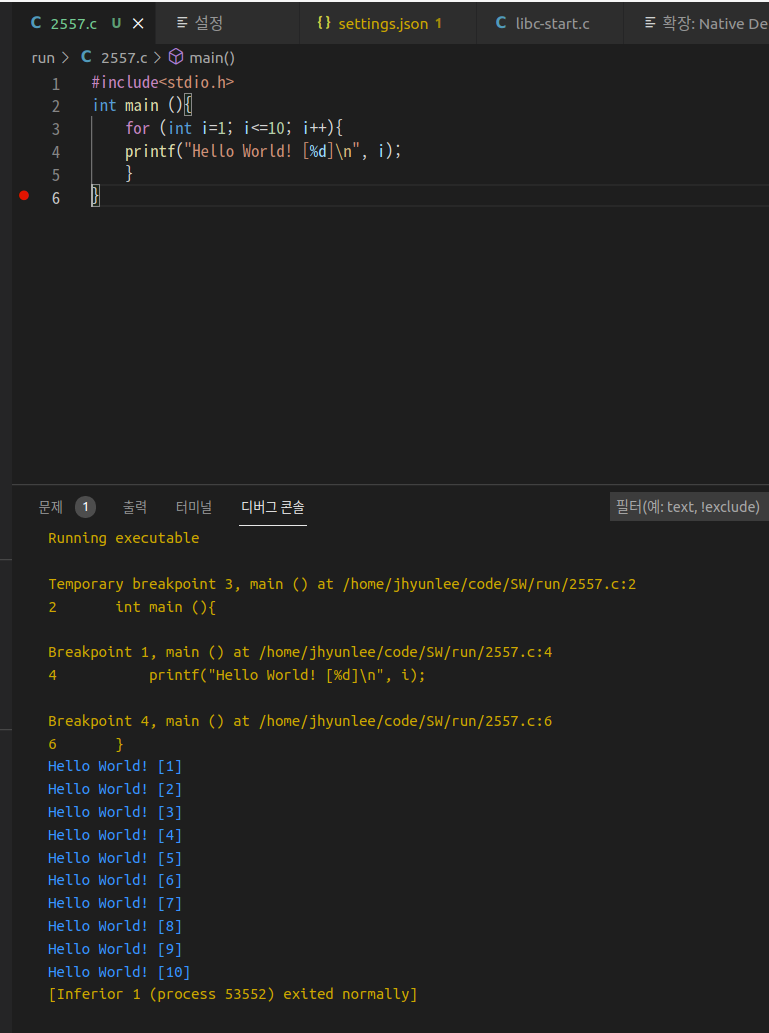

The main issue is possibly the shared pane of the debugger and the terminal, ideally those would be separate...

Hi @jhyunleehi, have you tried using the terminal attribute as part of your launch configuration to create a separate terminal for the application? This should allow you to see the output, as it is generated (instead of when your application exits), in that terminal window.
"terminal": ""
