
universal-data-tool
 universal-data-tool copied to clipboard
 UniversalDataTool
Some CSV Files don't import all rows
I am unable to import more than 11 records at a time when I am using a CSV file with a single column as present in the file attached (convert excel to CSV for use) herewith. It always adds first 11 records from the file. It is very shocking to see an open-source project with 1.2k+ stars having such a naive issue/bug. @hysios @beru @pgrimaud @seveibar @miguelcarvalho13 Note: This file contains 14 rows and 1 header row and having a total number of lines 33.

@pranav70 can you provide a CSV file? The CSV format has a lot of variations. It could be your converter

No, I was using the very same file but CSV of the same and I used it on my windows desktop application, online and docker. Everywhere issue is same. You can also convert the xlsx file in to csv using Microsoft Excel and use it.
I used text snippets to import as well and it worked but it didn't used quote character and imported all the 33 lines as a record instead of 14 records.
Also, what is the input format for Json to import because I wasn't able to import a list of dictionary as json or a single json file not even a jsonl file.
On Mon, 2 Nov, 2020, 8:11 pm Severin Ibarluzea, [email protected] wrote:
@pranav70 https://github.com/pranav70 it seems like you have a xlsx file, were you using the CSV import?
— You are receiving this because you were mentioned. Reply to this email directly, view it on GitHub https://github.com/UniversalDataTool/universal-data-tool/issues/366#issuecomment-720512669, or unsubscribe https://github.com/notifications/unsubscribe-auth/AFJHAD4KTGBAZWCOCDXBINTSN3AIDANCNFSM4THIMZ2A .


Hi,
This is the sample file that I was using. You can use this file for your use just remember that a CSV file can have multiple multiline records within quote characters just like this one. Here "text" is the header in this file.
I also requested you to give me an input format for JSON file apart from .udt.json format. Does this support JSONL, or list of dictionaries as JSON or a simple JSON file.
I hope you will resolve this issue soon.
Thanks and Regards, Pranav
On Mon, Nov 2, 2020 at 8:46 PM hysios [email protected] wrote:
Test.xlsx is a badly format in my excel, below is screenshot in my pc [image: image] https://user-images.githubusercontent.com/103227/97884646-4b762800-1d61-11eb-8873-900a19d0ddf7.png
— You are receiving this because you were mentioned. Reply to this email directly, view it on GitHub https://github.com/UniversalDataTool/universal-data-tool/issues/366#issuecomment-720533919, or unsubscribe https://github.com/notifications/unsubscribe-auth/AFJHAD66Q6TAHSJWLC6ISVLSN3EL3ANCNFSM4THIMZ2A .
@pranav70 for me to help you, you'll need to provide the CSV file you're using here. I don't have Microsoft Excel and don't use Windows. It seems @hysios wasn't able to open it- so you may have an invalid file.
The CSV needs to be RFC4180 compatible, which is the standard we use (and most CSV parsing libraries AFAIK)
As for JSON, check https://github.com/UniversalDataTool/udt-format
JSONL is not currently supported, but is planned.
I think importing a CSV could be more clear (created a new issue and linked).
(The txt file I'm uploading is actually a CSV, CSV evidently isn't supported by github)


The file imports correctly but has the wrong number of samples (according to the number of rows in LibreOffice).
I'm able to reproduce the bug. There are 15 rows in the CSV as shown below, but the UDT only displays 11 samples after importing.
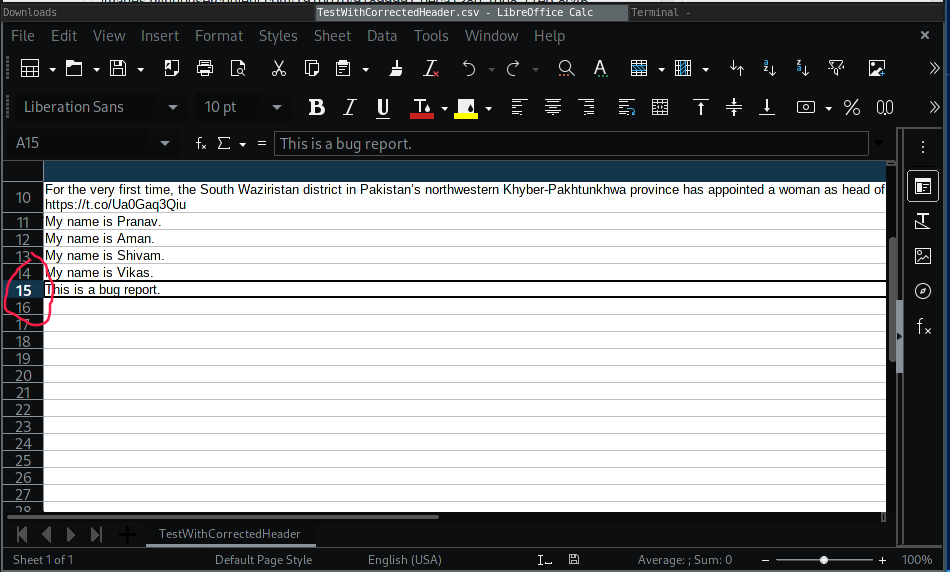
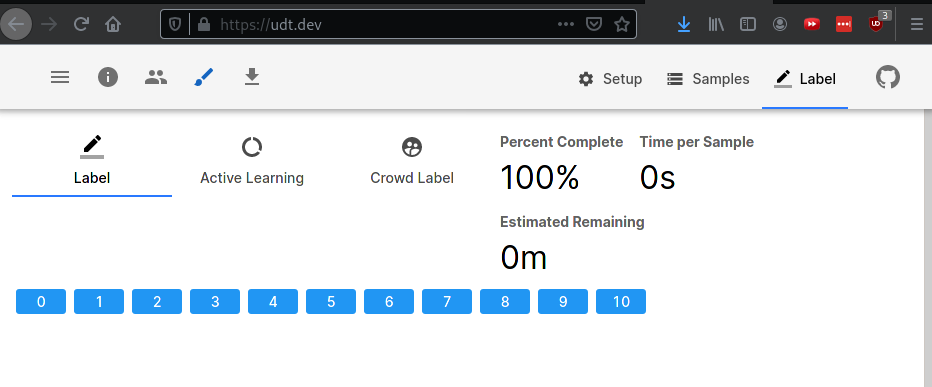
I'm able to reproduce the bug. There are 15 rows in the CSV as shown below, but the UDT only displays 11 samples after importing.
Yes, that's exacty my issue. Also, the header should be "document" is nowhere documented in the docs.
Hey @hysios :) wanna take a stab at the fix? It's been a while since I gave you a video update shout out!
Could be a parameter we're passing to the CSV parsing library or something
If I want to tag "@yourrightscamp" in the text which is like "@ajplus @Kaepernick7 @yourrightscamp", then you can't tag it properly but you can tag "7 @yourrightscamp". You can tag I think it is due to improper tokenization as you are considering continous special characters as a single token.


@pranav70 yep you need custom tokenization for that. Issue #342 is about custom tokenization being provided as an interface parameter. Are you interested in code contribution? Both of these issues are good introductory issues if you are. Otherwise I'm guessing someone will get them soon.
@pranav70 yep you need custom tokenization for that. Issue #342 is about custom tokenization being provided as an interface parameter. Are you interested in code contribution? Both of these issues are good introductory issues if you are. Otherwise I'm guessing someone will get them soon.
Yes, absolutely I would love to contribute. I have good experience in regular expressions that I can help you with. I have other issues/suggestions to improve this product that we can discuss further.
Feel free to hit me up on Slack! There's also a contribution guide. We're trying to get a lot better at NLP so any help is appreciated :)