
CuraEngine
 CuraEngine copied to clipboard
 Ultimaker
[4.9.1] Seemingly non-optimal print order
Application Version
4.9.1 (though I suspect this isn't version specific)
Platform
Fedora 34
Qt
Not sure how to see this. I'm using the version of Cura in the Fedora repos
PyQt
Not sure how to see this. I'm using the version of Cura in the Fedora repos
Display Driver
I don't think this is relevant, but I can check if need be.
Steps to Reproduce
Attempt to slice something. In this case the 120mm_honeycomb_reduced_fan_cover from https://www.thingiverse.com/thing:2802474/files
Actual Results
The print order for the hexagonal shells seems very arbitrary and non-optimal.
Expected results
The shells print without a bunch of unnecessary travel moves.
Additional Information
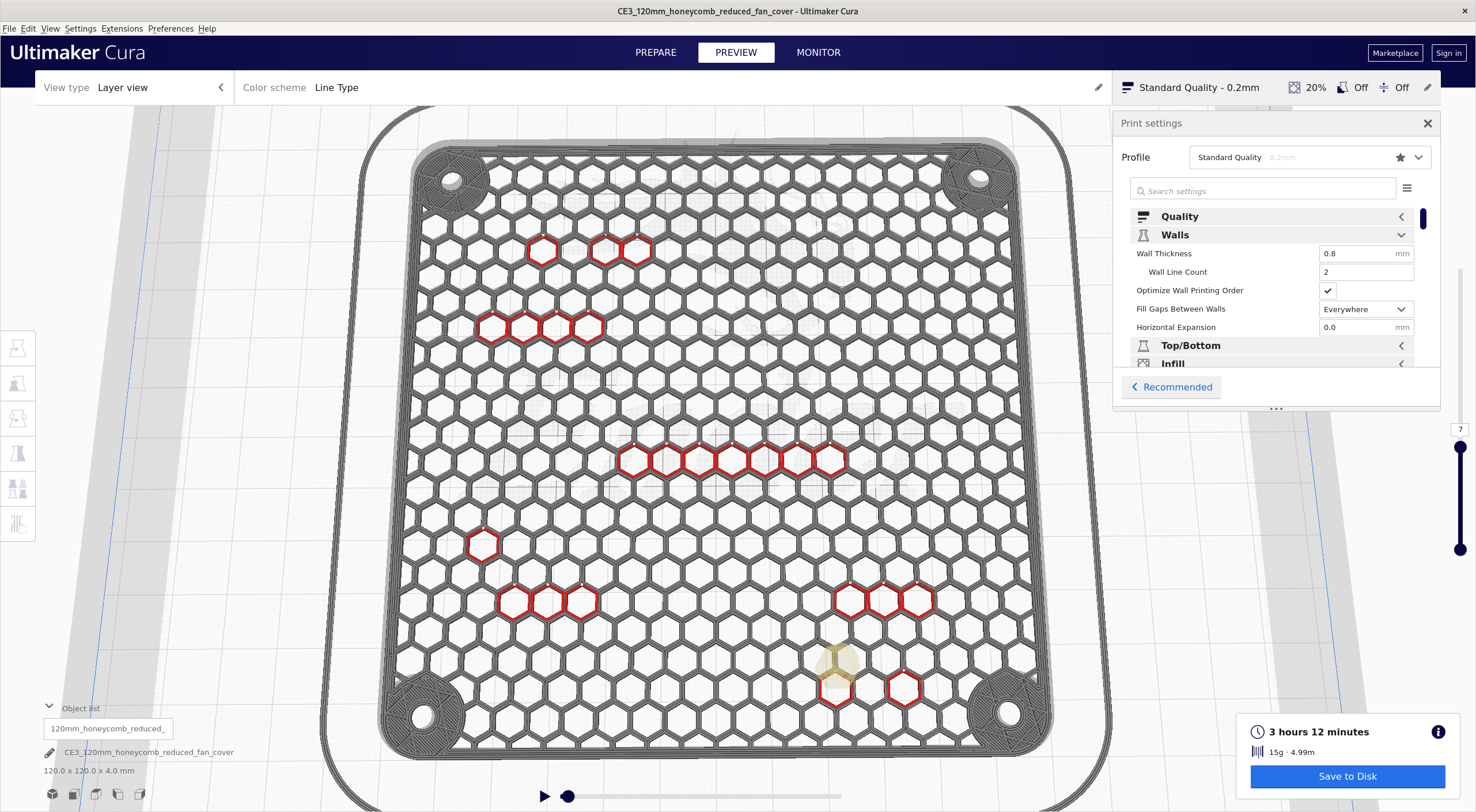
I first asked about this on reddit, but no one there seemed to know why Cura is doing this. It's possible there's a reason this print order makes sense, but I can't see it.
I understand that printing these shells in the perfectly optimal order may be an infeasible problem, but it doesn't seem like there's any reasonable heuristic being used at all. I would expect these hexagons to be printed either in a spiral or in a series of rows and columns rather than printing a few at a time, only to suddenly jump somewhere totally different to print a few more.
OddPrintOrder.curaproject.3mf.zip

Hi @rhofour thank you for your bug report. I will bring this up for discussion with the team. Keep you posted!

Thanks for the report @rhofour. This issue is now in our backog. Devs see CURA-8413.

Is there a regression test suite that can be run from the command-line to exercise fixes to this kind of issue / identify regressions etc?

The reason it is jumping about like that is because it is filling in the odd gaps first and then later on it prints contiguous areas. You can see that by moving the slider backwards and it will "un-print" areas of contiguous holes to leave a few isolated islands of holes to be un-printed.
What the code does is determine the order to print those holes by choosing the next hole to be the closest to the hole that's just been printed. If the z-seam hint is either "user specified" or "sharpest corner" it then reverses the order of printing the holes which is what is happening in your case. It reverses the order so that the travel distance from the last hole printed to the z-seam location on the outer wall is minimised.
Obviously, it would be best if it actually did optimise the travel to minimise the total distance moved but that would be very time consuming for prints such as this. Instead, it simply minimises the travel distance from the last printed hole to the next.
Hope this helps.

What we should've written down here is that we could reproduce the issue and found that it only happens if the Optimize Wall Printing Order is enabled. Please write down our findings, people, so that a workaround is available for the user! A workaround is to disable Optimize Wall Printing Order.
Indeed, the expected behaviour is that it prints contiguous areas of holes. Since the heuristic is to print the next closest contour after finishing the previous one, it is not expected that it would "skip" 4 rows of these hexagons completely in any case. It is not properly picking the next closest contour to print. Something is going on with the Optimize Wall Printing Order there.
Is there a regression test suite that can be run from the command-line to exercise fixes to this kind of issue / identify regressions etc?
We have our automated tests set up using CMake. So you'd need to run make test to run the tests. Or ctest --verbose if you want more verbose output on what went wrong inside a test. This case is ostensibly not caught by any test at the moment, or we'd have seen it. There is a Github runner that also runs the tests every time something is pushed to any branch.
The reason it is jumping about like that is because it is filling in the odd gaps first and then later on it prints contiguous areas.
I don't think this could be the case. For instance, there have been multiple "jumps" in the bottom half as well, but even after filling those in (which would be the contiguous areas then), it still makes jumps in the top half too:
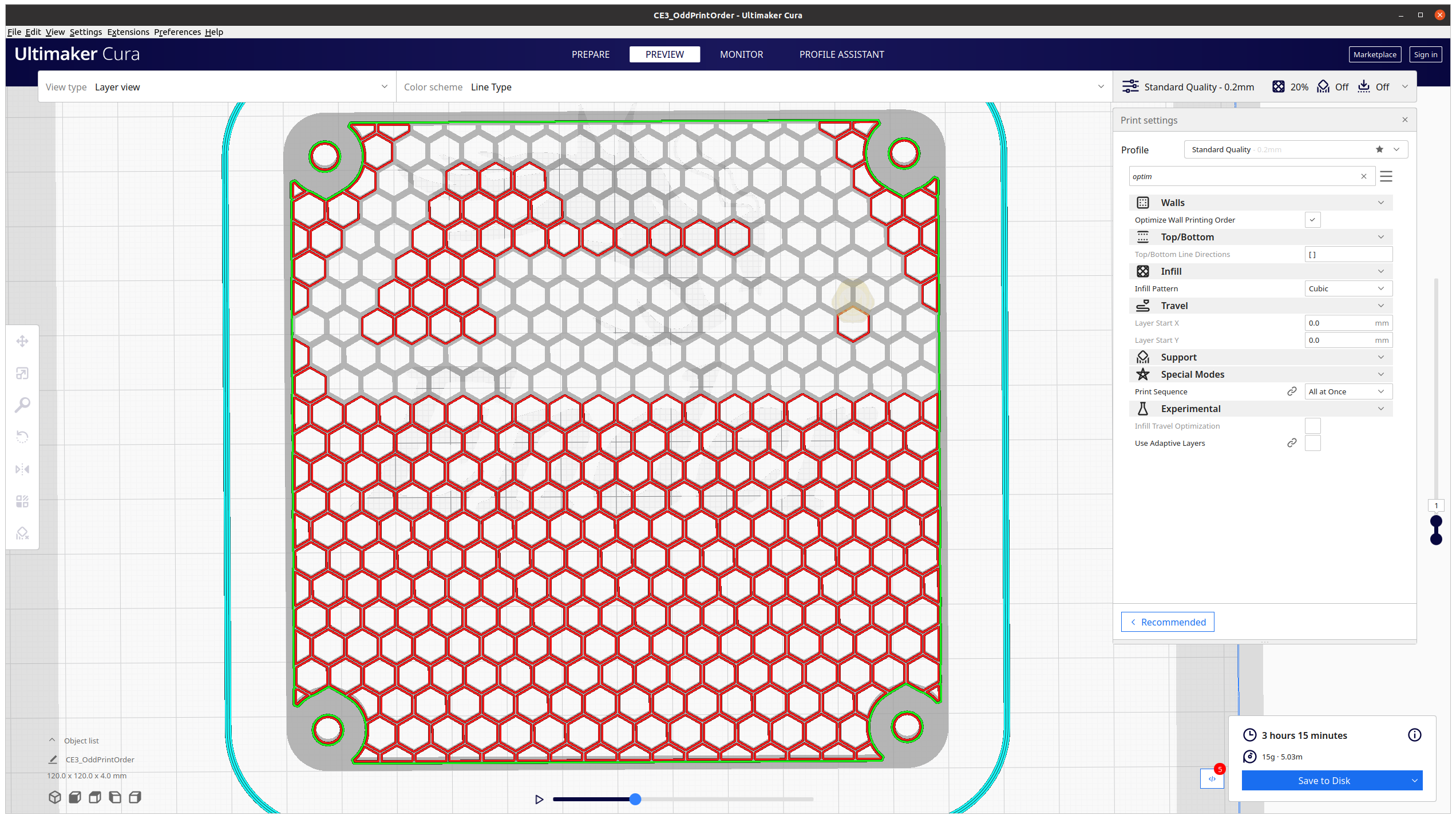 So it couldn't be split up into two groups. More than 2 groups, maybe? Or maybe I misunderstood what you meant?
If the z-seam hint is either "user specified" or "sharpest corner" it then reverses the order of printing the holes which is what is happening in your case. It reverses the order so that the travel distance from the last hole printed to the z-seam location on the outer wall is minimised.
Indeed, on "Shortest" it doesn't seem to be happening. On "Random" I'm still seeing some jumps to contours that are not the closest one (seam to seam). But indeed it could have something to do with the seam placement as well then. Although the hexagons seem to be identical to me bar tiny rounding errors.
