
TOCropViewController
 TOCropViewController copied to clipboard
 TimOliver
App getting crashed in share extension while cropping
I am using this library in my share extension for cropping but as soon as I click on the done button the extension is getting crashed. So I tried the example in this repo and to my surprise it is also getting crash.
OS Version - 10.14.4 Xcode version - 10.2.1 Objective - C
This is where the app is getting crashed:
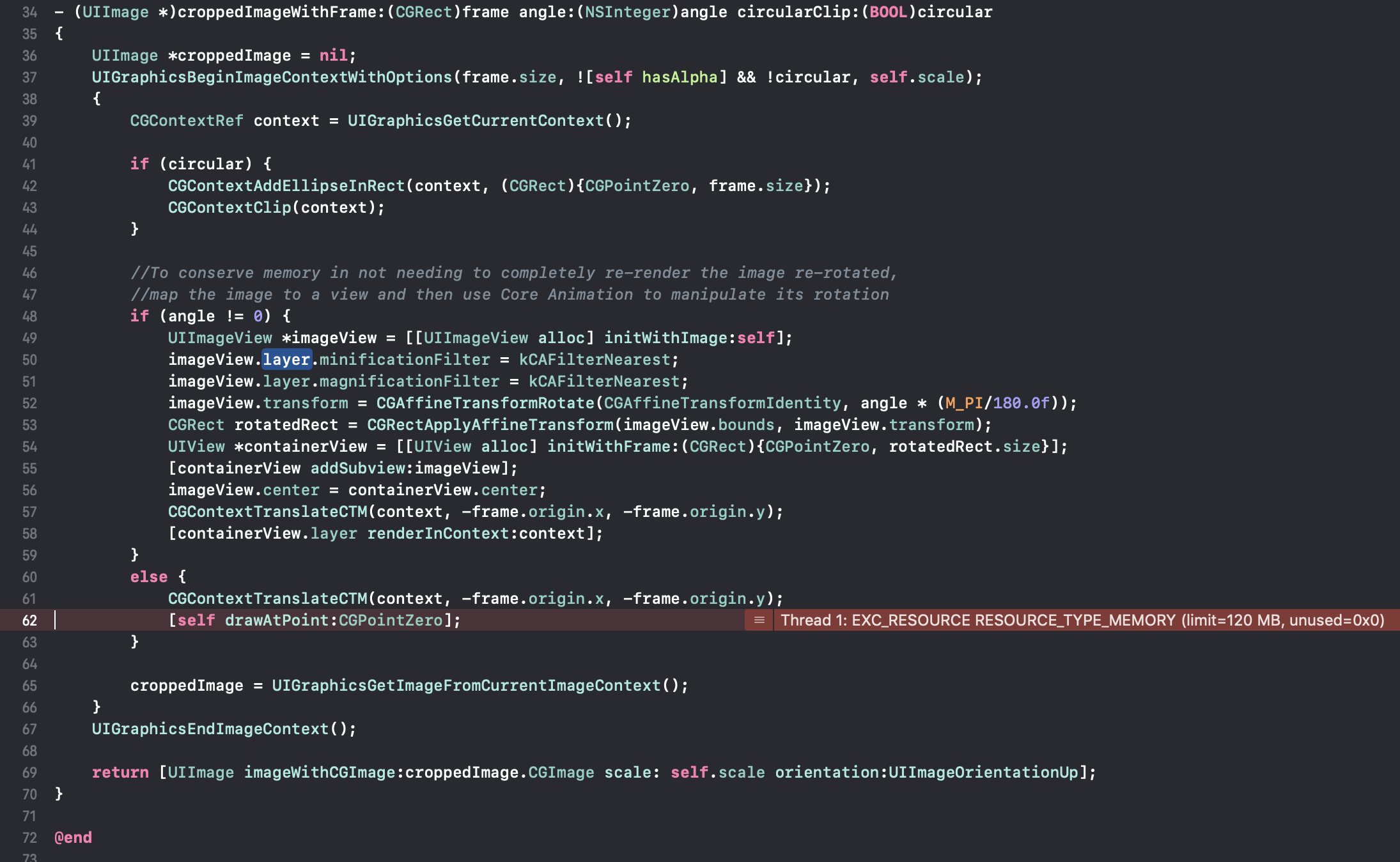
On further analysis I think it may be due to excess memory usage, more than the memory allocated to the share extension. According to the screenshot attached it seems the limit is 120MB.
Does anyone have a workaround for this issue?

Thanks for the bug report @georgek1991! I've never seen that sort of issue before.
Do you know the resolution of the image that's trying to be clipped here?
Thanks!

@TimOliver Image size - 3.2 MB Dimension - 3024 × 4032 Resolution - 72 × 72 Image extension - .JPG
Can you please suggest any work around
Hmm. That's not too big. Completely decompressed, that should only be about 48MB of memory.
Hmmmmm, it sounds like this is an issue caused by the fact the image you are cropping is incredibly big. I'm not sure what I can recommend to fix that other than recommending you downscale the image before you pass it to the cropper.
The image I am using is an image taken in iPhone 7 plus camera. Based on your suggestion I am trying to downscale the image before passing to the cropper. The thing I observed is that it work for some images and not for some, not sure why. The code for downscaling I am using is:
- (UIImage *)imageWithImage:(UIImage *)image scaledToSize:(CGSize)newSize isAspectRatio:(BOOL)aspect {
    if (!image) {
        return nil;
    }
    CGFloat originRatio = image.size.width / image.size.height;
    CGFloat newRatio = newSize.width / newSize.height;

    CGSize sz;

    if (!aspect) {
        sz = newSize;
    }else {
        if (originRatio < newRatio) {
            sz.height = newSize.height;
            sz.width = newSize.height * originRatio;
        }else {
            sz.width = newSize.width;
            sz.height = newSize.width / originRatio;
        }
    }
    CGFloat scale = 1.0;
    sz.width /= scale;
    sz.height /= scale;
    UIGraphicsBeginImageContextWithOptions(sz, NO, scale);
    [image drawInRect:CGRectMake(0, 0, sz.width, sz.height)];
    UIImage *newImage = UIGraphicsGetImageFromCurrentImageContext();
    UIGraphicsEndImageContext();
    return newImage;
}
I am calling it like this:
UIImage *temp = [self imageWithImage:image scaledToSize:CGSizeMake(512, 512) isAspectRatio:YES];
Did you had something like this in mind for downscaling?
@georgek1991 did you figure this out? I'm experiencing the same crash
