
rich
 rich copied to clipboard
 Textualize
[BUG] Status spinner not working with webbrowser
Describe the bug
When using rich with the in-build webbrowser package the spinner shows weird symbols. Every second the spinner looks correctly, but very other second it looks wrong. Maybe this is caused by the memory/cpu increase when starting the browser windows.
Reproduction code:
import webbrowser
from rich.status import Status

with Status("Opening browser windows"):
    for _ in range(5):
        webbrowser.open_new_tab("https://google.com")
Expected result:

Actual result:

Platform
Click to expand
Platform: Windows 10 Enterprise, 64 Bit, however, I am using WSL2, so it runs on Ubuntu 20.04 Browser / Default Browser: Microsoft Edge Terminal: Windows Terminal
I may ask you to copy and paste the output of the following commands. It may save some time if you do it now.
If you're using Rich in a terminal:
python -m rich.diagnose
pip freeze | grep rich
╭───────────────────────── <class 'rich.console.Console'> ─────────────────────────╮
│ A high level console interface.                                                  │
│                                                                                  │
│ ╭──────────────────────────────────────────────────────────────────────────────╮ │
│ │ <console width=120 ColorSystem.EIGHT_BIT>                                    │ │
│ ╰──────────────────────────────────────────────────────────────────────────────╯ │
│                                                                                  │
│     color_system = '256'                                                         │
│         encoding = 'utf-8'                                                       │
│             file = <_io.TextIOWrapper name='<stdout>' mode='w' encoding='utf-8'> │
│           height = 30                                                            │
│    is_alt_screen = False                                                         │
│ is_dumb_terminal = False                                                         │
│   is_interactive = True                                                          │
│       is_jupyter = False                                                         │
│      is_terminal = True                                                          │
│   legacy_windows = False                                                         │
│         no_color = False                                                         │
│          options = ConsoleOptions(                                               │
│                        size=ConsoleDimensions(width=120, height=30),             │
│                        legacy_windows=False,                                     │
│                        min_width=1,                                              │
│                        max_width=120,                                            │
│                        is_terminal=True,                                         │
│                        encoding='utf-8',                                         │
│                        max_height=30,                                            │
│                        justify=None,                                             │
│                        overflow=None,                                            │
│                        no_wrap=False,                                            │
│                        highlight=None,                                           │
│                        markup=None,                                              │
│                        height=None                                               │
│                    )                                                             │
│            quiet = False                                                         │
│           record = False                                                         │
│         safe_box = True                                                          │
│             size = ConsoleDimensions(width=120, height=30)                       │
│        soft_wrap = False                                                         │
│           stderr = False                                                         │
│            style = None                                                          │
│         tab_size = 8                                                             │
│            width = 120                                                           │
╰──────────────────────────────────────────────────────────────────────────────────╯
╭─── <class 'rich._windows.WindowsConsoleFeatures'> ────╮
│ Windows features available.                           │
│                                                       │
│ ╭───────────────────────────────────────────────────╮ │
│ │ WindowsConsoleFeatures(vt=False, truecolor=False) │ │
│ ╰───────────────────────────────────────────────────╯ │
│                                                       │
│ truecolor = False                                     │
│        vt = False                                     │
╰───────────────────────────────────────────────────────╯
╭────── Environment Variables ───────╮
│ {                                  │
│     'TERM': 'xterm-256color',      │
│     'COLORTERM': None,             │
│     'CLICOLOR': None,              │
│     'NO_COLOR': None,              │
│     'TERM_PROGRAM': None,          │
│     'COLUMNS': None,               │
│     'LINES': None,                 │
│     'JUPYTER_COLUMNS': None,       │
│     'JUPYTER_LINES': None,         │
│     'JPY_PARENT_PID': None,        │
│     'VSCODE_VERBOSE_LOGGING': None │
│ }                                  │
╰────────────────────────────────────╯
platform="Linux"
rich==12.5.1


Does it occur if you replace webbrowser with time.sleep(1)?
No, with time.sleep it works fine.
Same problem when using progress with webbrowser:
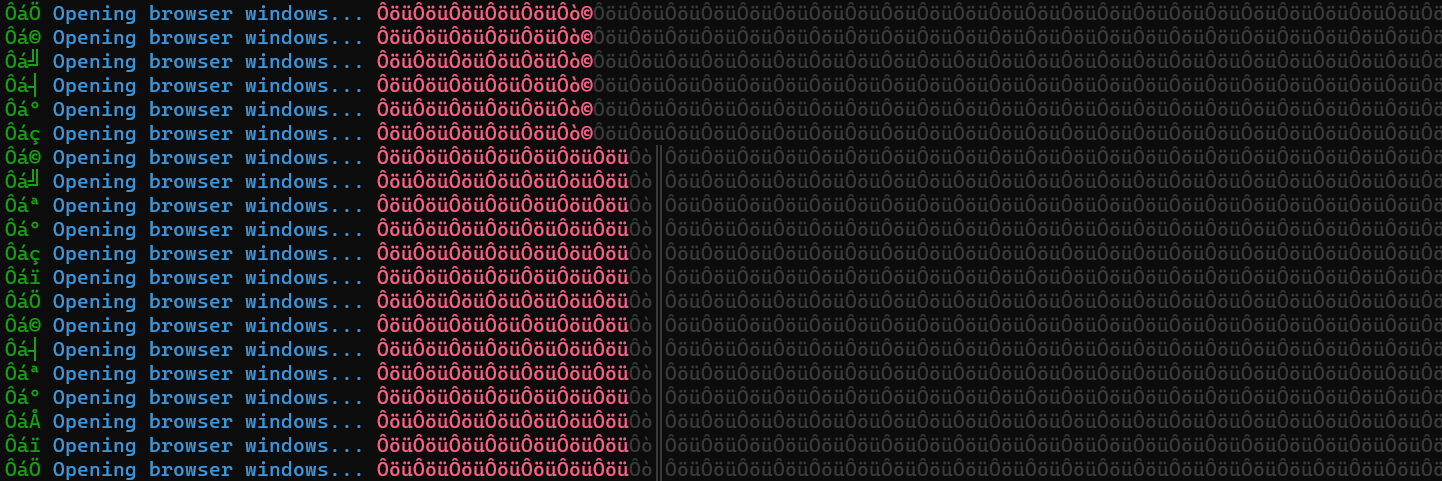

Opening browser windows... ÔöüÔöüÔöüÔöüÔöüÔöüÔöüÔöüÔöüÔöüÔöüÔöüÔöüÔöüÔöüÔöüÔöüÔöüÔöüÔöüÔöüÔöüÔöüÔöüÔöüÔöüÔöüÔöüÔöüÔöÔáç
Opening browser windows... ÔöüÔöüÔöüÔöüÔöüÔöüÔöüÔöüÔöüÔöüÔöüÔöüÔöüÔöüÔöüÔöüÔöüÔöüÔöüÔöüÔöüÔöüÔöüÔöüÔöüÔöüÔöüÔöüÔöüÔöÔáï
Opening browser windows... ÔöüÔöüÔöüÔöüÔöüÔöüÔöüÔöüÔöüÔöüÔöüÔöüÔöüÔöüÔöüÔöüÔöüÔöüÔöüÔöüÔöüÔöüÔöüÔöüÔöüÔöüÔöüÔöüÔöüÔ
Bizarre. We will investigate, but I suspect a bug in Windows Terminal at this point.
I wonder if the terminal is interpreting the spinner bytes in some encoding other than utf-8.
I haven't been able to reproduce it on Windows Terminal (albeit not on WSL).

Maybe there is a connection between CPU utilization and the bug. You can try to run the code on a slow computer or run a benchmark in the background where all your cores are utilized.
I also tried it with other terminals. I have the same bug with PowerShell, CMD, and the native WSL terminal. (The code always ran in WSL). Please try it in WSL, I think that could be the trigger of the bug.
In PowerShell it looks a little bit different:
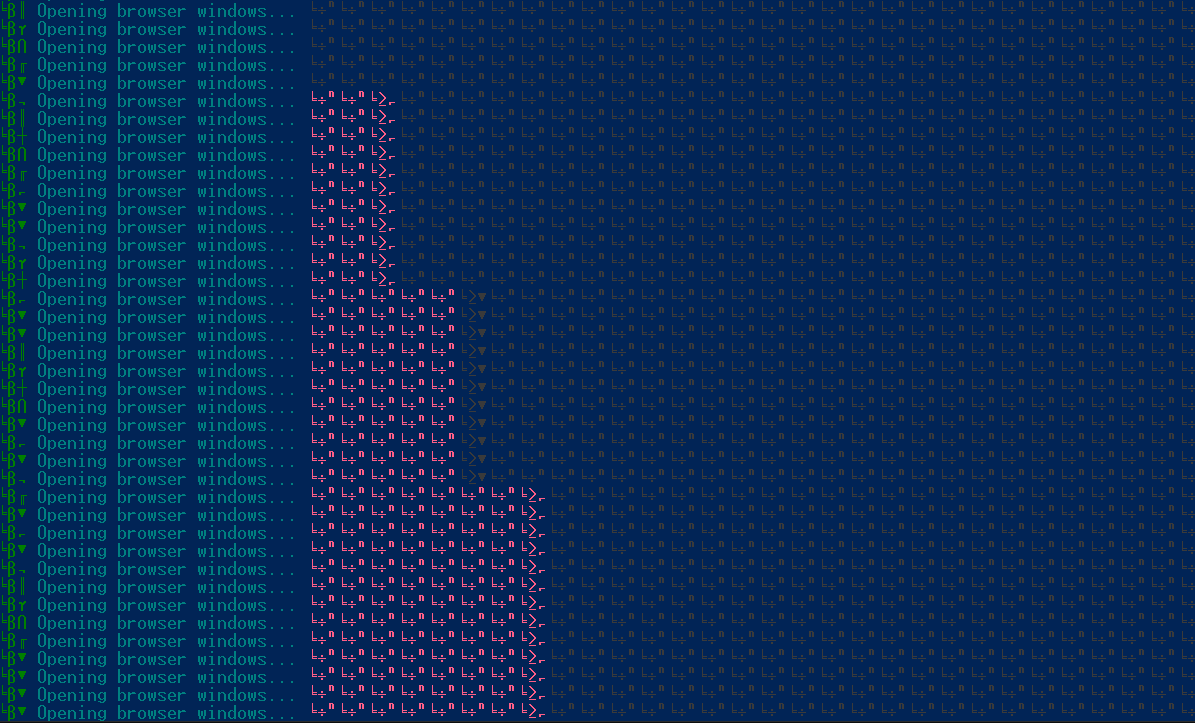 However, after copying the text into GitHub it looks like the same characters.
Ôá© Opening browser windows... ÔöüÔöüÔöüÔöüÔöüÔöüÔöüÔò©ÔöüÔöüÔöüÔöüÔöüÔöüÔöüÔöüÔöüÔöüÔöüÔöüÔöüÔöüÔöüÔöüÔöüÔöüÔöüÔöüÔöüÔ
öÔá┤ Opening browser windows... ÔöüÔöüÔöüÔöüÔöüÔöüÔöüÔò©ÔöüÔöüÔöüÔöüÔöüÔöüÔöüÔöüÔöüÔöüÔöüÔöüÔöüÔöüÔöüÔöüÔöüÔöüÔöüÔöüÔöüÔ
öÔ᪠Opening browser windows... ÔöüÔöüÔöüÔöüÔöüÔöüÔöüÔò©ÔöüÔöüÔöüÔöüÔöüÔöüÔöüÔöüÔöüÔöüÔöüÔöüÔöüÔöüÔöüÔöüÔöüÔöüÔöüÔöüÔöüÔ
@willmcgugan @darrenburns Is there any news regarding this issue? Were you able to reproduce the bug? Do you need more information?
We haven't managed to reproduce it. Suspect it isn't a Rich bug per se. More likely environmental, but it would be nice to know the root cause.
@willmcgugan If you need more information, to investigate or reproduce the bug, I am happy to help! :)
Sorry, we can't reproduce this at all. Let us know if you figure anything more out.
Closing for now, but more than happy to look at it again if we have something more to go on.
![github-actions[bot] avatar](https://avatars.githubusercontent.com/in/15368?v=4 "Published by a pub.dev verified publisher")