
NewPipe
 NewPipe copied to clipboard
 TeamNewPipe
Use picture-in-picture (PIP) for the popup player on Android >= 7.0.
What is it?
- [ ] Bugfix (user facing)
- [x] Feature (user facing)
- [ ] Codebase improvement (dev facing)
- [ ] Meta improvement to the project (dev facing)
Description of the changes in your PR
- Allow Android's picture-in-picture (PIP) mode to be used in the popup player functionality on Android 7.0 and later.
- Add setting to configure the popup mode (PiP or NewPipe's implementation.)
- TODO: Use PiP in the "Start playing in popup" option as well. Currently it uses the NewPipe popup.
Before/After Screenshots/Screen Record
- Before:


- After:
https://user-images.githubusercontent.com/31027858/183452539-9e7e1e11-a06c-4505-9163-08e6383defc1.mp4


Fixes the following issue(s)
- Fixes #2223
APK testing
The APK can be found by going to the "Checks" tab below the title. On the left pane, click on "CI", scroll down to "artifacts" and click "app" to download the zip file which contains the debug APK of this PR.
Due diligence
- [x] I read the contribution guidelines.

The PiP mode should be configurable and not enforced, in my opinion, as it have less advantages than the popup player such as:
- setting the quality played, subtitles and playback speed used;
- being not resizable on Android 10 and lower.
Good luck with the remaining work to make the feature working properly, including player UI changes!
You may use a separate Player UI for the PiP usage, though @Stypox may have better input on the subject, as they refactored how player UIs are in the app.
Also, be sure to enable PiP only if the feature is available on the device (some Android Go devices may not have this feature).

The PiP mode should be configurable and not enforced, in my opinion
Yeah, that sounds good to me. Allowing the user to choose between the popup and PiP could be useful.
- setting the quality played, subtitles and playback speed used;
I set those views to be hidden upon entering PiP for the moment. They could be shown and used instead of the standard controls.
- being not resizable on Android 10 and lower.
Good luck with the remaining work to make the feature working properly, including player UI changes!
Thank you!
You may use a separate Player UI for the PiP usage, though @Stypox may have better input on the subject, as they refactored how player UIs are in the app.
Got it, thanks for the input.

The video link in "After" isn't working. Maybe it wasn't uploaded correctly?

Super strange. After AudricV edited the link to separate it from the bullet point, the video works.
The method currently overridden is deprecated (after two API versions, in classic Android fashion). Is there a way to use the new one on the Android versions that support it?

The method currently overridden is deprecated (after two API versions, in classic Android fashion).
The overridden method is in the Fragment. That method isn't deprecated.
Added a setting to configure the popup mode.

At the moment, the issue is that the controls (resolution, etc.) aren't selectable in PiP. Maybe additional contributors could add changes here as well?
At the moment, the issue is that the controls (resolution, etc.) aren't selectable in PiP.
That's one of the limitations of Android Picture in Picture's feature: you can only tap on the actions provided at the bottom on the PiP window and tapping on everywhere else in the window would increase the PiP size on API 29 and lower. See https://developer.android.com/guide/topics/ui/picture-in-picture#handling_ui for more details.
By the way, it seems you have a few unwanted changes on your pushed code.
You may also show a message, probably a toast, when the PiP option it is not available, saying to check that the permission to use PiP may be not enabled or not available on the device NewPipe is running. Note that I am not sure about this.
Added a setting to configure the popup mode.
I’d call that Android Picture-in-picture and NewPipe picture-in-picture and also put in under video section, not appearance
Also the video player is broken, fullscreen button won’t fullscreen until you play/pause, then if you exit fullscreen it will do wtf and touch video controls still apply (like swipe up for volume up) until you press back button


Also the video player is broken, fullscreen button won’t fullscreen until you play/pause, then if you exit fullscreen it will do wtf and touch video controls still apply (like swipe up for volume up) until you press back button
Yeah, that's why this is a draft for the moment. @Stypox is doing some refactoring of the player code: https://github.com/TeamNewPipe/NewPipe/pull/8731 https://github.com/TeamNewPipe/NewPipe/pull/8678
What's with the massive values-v24 key string files? I'm pretty sure those aren't necessary, as keys can be accessed regardless of the SDK version.
Also, instead of copying everything in video_audio_settings.xml to xml-v24, just add it to the regular one, and have the preference be hidden below API 24 via code like this:
Lines 54-60 in VideoAudioSettingsFragment.java:
if (Build.VERSION.SDK_INT < Build.VERSION_CODES.N) {
    final ListPreference popupConfigPreference =
            findPreference(getString(R.string.popup_configuration_key));
    if (popupConfigPreference != null) {
        popupConfigPreference.setVisible(false);
    }
}
No dealing with duplicate XML :)
It always crashes with pip enabled ` ## Exception
- User Action: ui error
- Request: ACRA report
- Content Country: IT
- Content Language: it-IT
- App Language: it_IT
- Service: none
- Version: 0.23.3
- OS: Linux Android 11 - 30
Crash log
java.lang.NullPointerException: Attempt to invoke virtual method 'org.schabi.newpipe.player.ui.PlayerUiList org.schabi.newpipe.player.Player.UIs()' on a null object reference
	at org.schabi.newpipe.fragments.detail.VideoDetailFragment.switchToPipMode(VideoDetailFragment.java:1174)
	at org.schabi.newpipe.fragments.detail.VideoDetailFragment.openPopupPlayer(VideoDetailFragment.java:1161)
	at org.schabi.newpipe.fragments.detail.VideoDetailFragment.onClick(VideoDetailFragment.java:465)
	at android.view.View.performClick(View.java:7448)
	at android.view.View.performClickInternal(View.java:7425)
	at android.view.View.access$3600(View.java:810)
	at android.view.View$PerformClick.run(View.java:28305)
	at android.os.Handler.handleCallback(Handler.java:938)
	at android.os.Handler.dispatchMessage(Handler.java:99)
	at android.os.Looper.loop(Looper.java:223)
	at android.app.ActivityThread.main(ActivityThread.java:7669)
	at java.lang.reflect.Method.invoke(Native Method)
	at com.android.internal.os.RuntimeInit$MethodAndArgsCaller.run(RuntimeInit.java:594)
	at com.android.internal.os.ZygoteInit.main(ZygoteInit.java:947)
`

Fantastic work! I've been crossing my fingers for this feature for a long time.
After testing it out, I think it would be great if the popup player option under "Minimize on app switch" used whatever popup player option the user has selected; either NewPipe popup or PIP. This way one would be able to automatically switch to the PIP player when exiting to the home screen. As it stands, in order to use the new PIP player in the background, I have to manually use the "Popup" button on the player screen.

Fantastic work! I've been crossing my fingers for this feature for a long time.
After testing it out, I think it would be great if the popup player option under "Minimize on app switch" used whatever popup player option the user has selected; either NewPipe popup or PIP.
Thank you for pointing that out, I'll add that functionality.
It always crashes with pip enabled ` ## Exception
- User Action: ui error
- Request: ACRA report
- Content Country: IT
- Content Language: it-IT
- App Language: it_IT
- Service: none
- Version: 0.23.3
- OS: Linux Android 11 - 30
Crash log
java.lang.NullPointerException: Attempt to invoke virtual method 'org.schabi.newpipe.player.ui.PlayerUiList org.schabi.newpipe.player.Player.UIs()' on a null object reference
	at org.schabi.newpipe.fragments.detail.VideoDetailFragment.switchToPipMode(VideoDetailFragment.java:1174)
	at org.schabi.newpipe.fragments.detail.VideoDetailFragment.openPopupPlayer(VideoDetailFragment.java:1161)
	at org.schabi.newpipe.fragments.detail.VideoDetailFragment.onClick(VideoDetailFragment.java:465)
	at android.view.View.performClick(View.java:7448)
	at android.view.View.performClickInternal(View.java:7425)
	at android.view.View.access$3600(View.java:810)
	at android.view.View$PerformClick.run(View.java:28305)
	at android.os.Handler.handleCallback(Handler.java:938)
	at android.os.Handler.dispatchMessage(Handler.java:99)
	at android.os.Looper.loop(Looper.java:223)
	at android.app.ActivityThread.main(ActivityThread.java:7669)
	at java.lang.reflect.Method.invoke(Native Method)
	at com.android.internal.os.RuntimeInit$MethodAndArgsCaller.run(RuntimeInit.java:594)
	at com.android.internal.os.ZygoteInit.main(ZygoteInit.java:947)
`
How did you encounter this issue?
Hey, thanks for working on this! Here are some things I have to report:
- If I tap on the popup button before the video has started playing (in my case I'm on mobile data, so I have to tap on the thumbnail for the video to play, after it has loaded the rest of the info, I haven't changed that setting) I get this crash
Exception
- User Action: ui error
- Request: ACRA report
- Content Country: US
- Content Language: en-US
- App Language: en_US
- Service: none
- Version: 0.24.0
- OS: Linux Android 13 - 33
Crash log
java.lang.NullPointerException: Attempt to invoke virtual method 'void org.schabi.newpipe.player.Player.setRecovery()' on a null object reference
	at org.schabi.newpipe.fragments.detail.VideoDetailFragment.openPopupPlayer(VideoDetailFragment.java:1156)
	at org.schabi.newpipe.fragments.detail.VideoDetailFragment.onClick(VideoDetailFragment.java:465)
	at android.view.View.performClick(View.java:7506)
	at android.view.View.performClickInternal(View.java:7483)
	at android.view.View.-$$Nest$mperformClickInternal(Unknown Source:0)
	at android.view.View$PerformClick.run(View.java:29335)
	at android.os.Handler.handleCallback(Handler.java:942)
	at android.os.Handler.dispatchMessage(Handler.java:99)
	at android.os.Looper.loopOnce(Looper.java:201)
	at android.os.Looper.loop(Looper.java:288)
	at android.app.ActivityThread.main(ActivityThread.java:7894)
	at java.lang.reflect.Method.invoke(Native Method)
	at com.android.internal.os.RuntimeInit$MethodAndArgsCaller.run(RuntimeInit.java:548)
	at com.android.internal.os.ZygoteInit.main(ZygoteInit.java:936)
- The play-pause button in the middle of the bottom controls is missing from the PIP player (I think it was there in some of the previous builds).
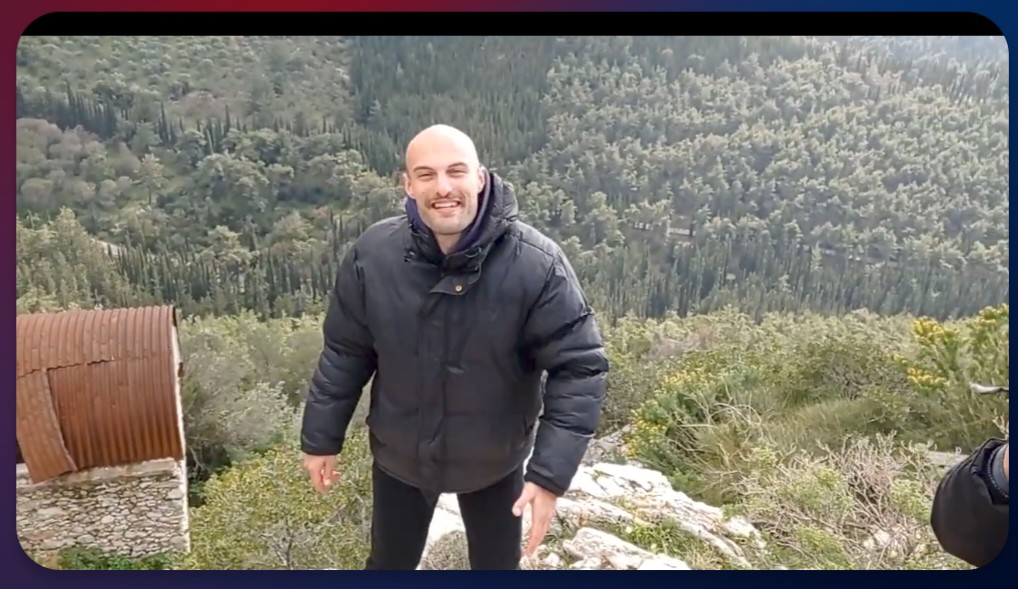
- Something that was there in Android 12.1 and now on 13 is that there's a black strip on the top of the PIP player, which becomes proportionally bigger the smaller the popup is.
Full size popup
 Small size popup
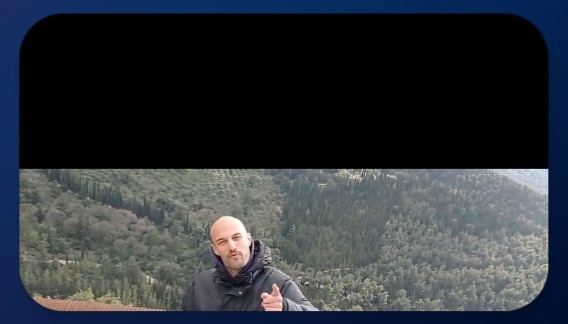

- Something that was there in Android 12.1 and now on 13 is that there's a black strip on the top of the PIP player, which becomes proportionally bigger the smaller the popup is.
Full size popup
Yeah, I know about the latter issue, will try to figure out a solution.
I've implemented the minimize functionality for picture-in-picture.
I also tested and it's fixed indeed, bravo! Here are another two issues I found:
- When returning to the app from PIP, controls are shown and, even worse, the don't get dismissed automatically.
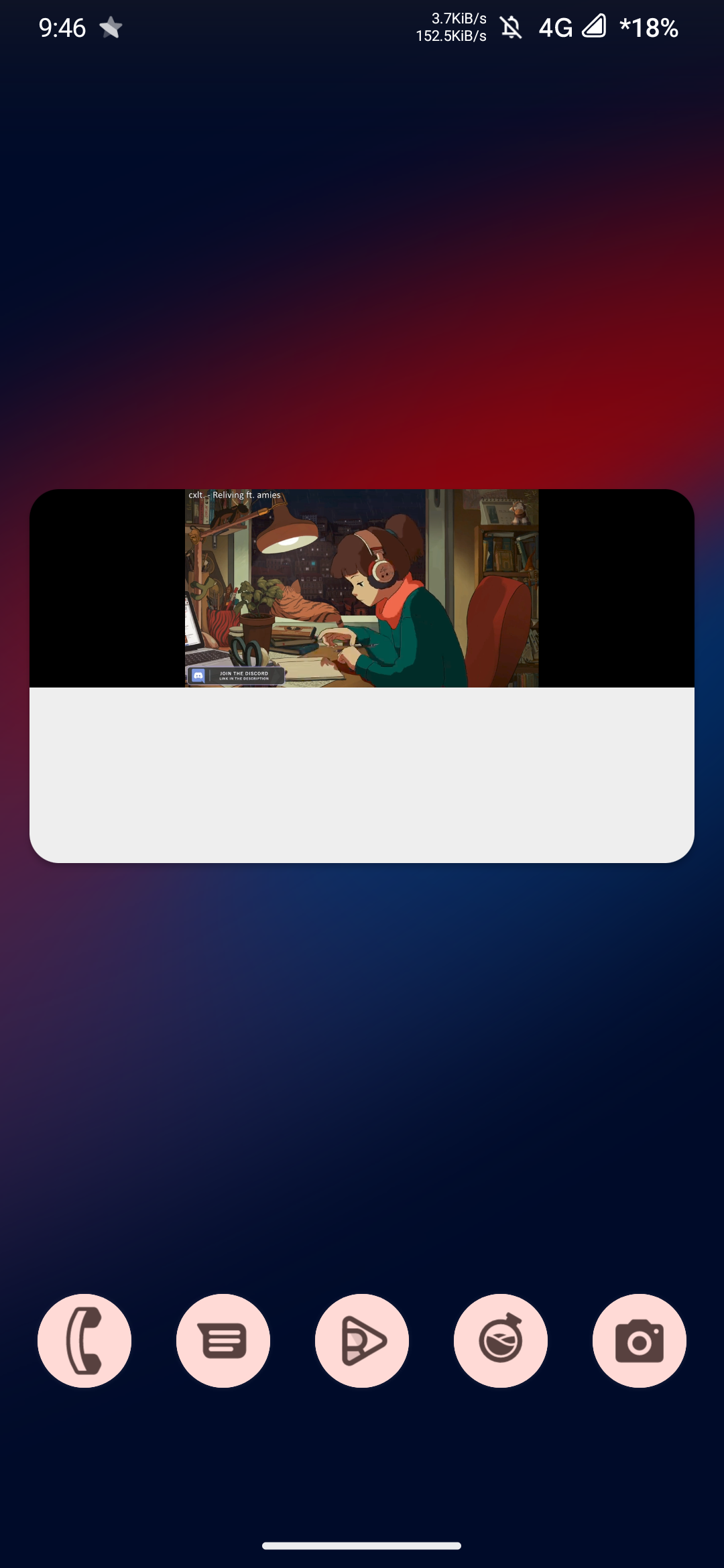
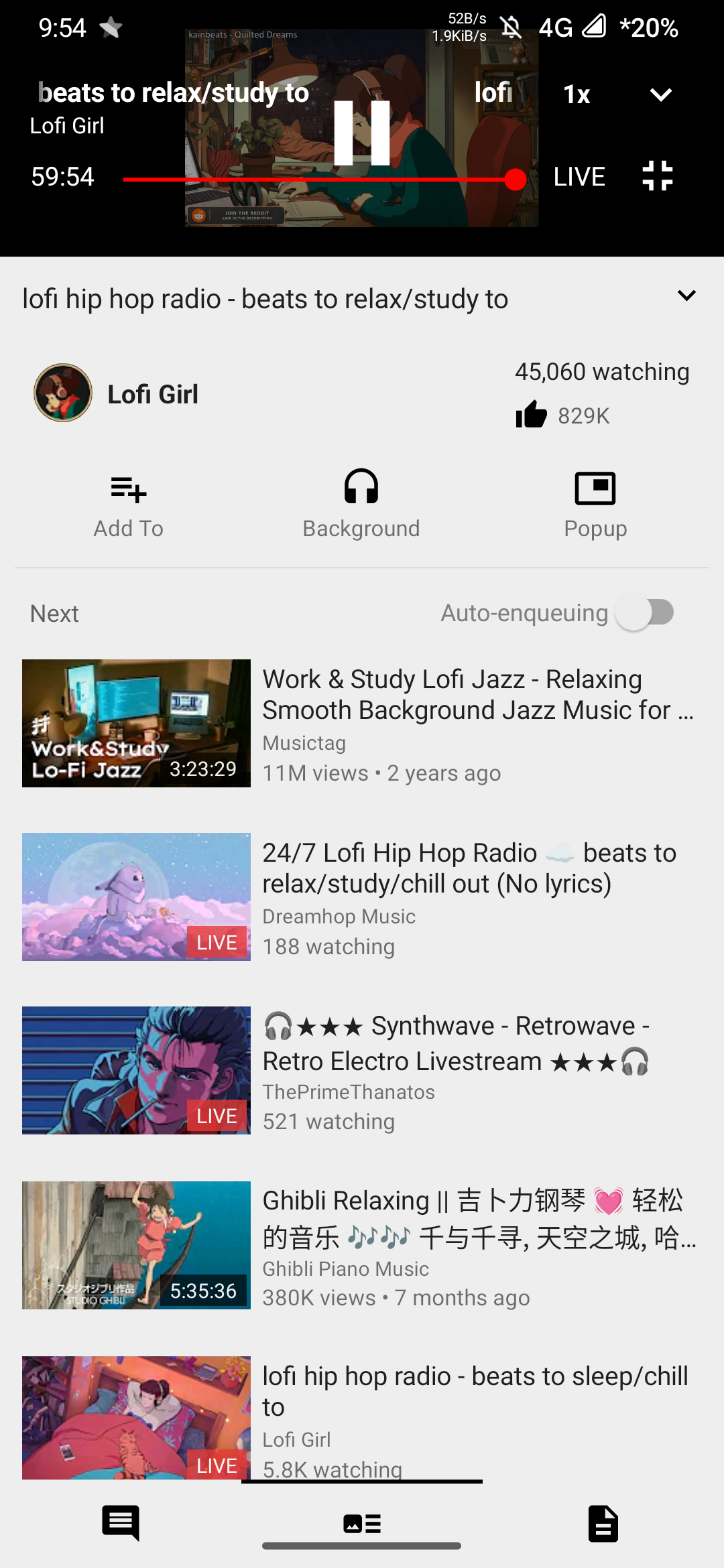
- Sometimes, the app seems like it gets broken. There's a white area at the bottom of the PIP player, and when returning to the main player, it's in a broken state, like some broken kind of fullscreen (I'm saying so because fullscreen controls are enabled in the video area). Somehow, I could only reproduce this with live streams only (maybe I didn't try hard enough with regular streams.
Thanks for the feedback, I'll look into the issues you mentioned.
Update: I was able to reproduce the first issue. I'm running Android 12 on my main device, so maybe that's why I couldn't reproduce the issue with the white area. I'll check on an emulator.
Also the video player is broken, fullscreen button won’t fullscreen until you play/pause, then if you exit fullscreen it will do wtf and touch video controls still apply (like swipe up for volume up) until you press back button
I'm still having this issue with full screen not working until I play/pause, and general glitchiness surrounding changing from the main player to PIP. I can elaborate further if needed; I thought these issues would be resolved with the play refactoring (which is done already as far as I know?) Anyway, thank you for your hard work on this!
Also the video player is broken, fullscreen button won’t fullscreen until you play/pause, then if you exit fullscreen it will do wtf and touch video controls still apply (like swipe up for volume up) until you press back button !
I'm still having this issue with full screen not working until I play/pause, and general glitchiness surrounding changing from the main player to PIP. I can elaborate further if needed; I thought these issues would be resolved with the play refactoring (which is done already as far as I know?)
Hmm, I was under the impression that one of the PRs I mentioned earlier was for this issue, my bad. As for switching to PiP, I'll make changes for that.
Anyway, thank you for your hard work on this!
👍
This debug build with Android's newer PiP feature does not crash on my Pixel running Android 13 while the older Newpipe pop-up crashes every time.
I get the same full screen play/pause issue as the previous person but I'd rather deal with that than crashes
Send it pls!

Bugs:
- Start a video in background. Switch to popup. The PIP shows the progress bar below the thumbnail, and nothing else. So it's like a PIP-audio, which is quite useless. This means that PIP seems to capture the video details page this way. It should only capture the player view.
- Portrait-only: going back from PIP may cause the embedded (portrait) player view to change size. It can go from slightly smaller to very small, with increasingly wide vertical black bars, but no horizontal ones.
- If you try to start a video in popup even once, the "Hold to enqueue" tooltip will permanently show up and never go away, until the app is cleared from Recents.
- Starting a video in embedded portrait mode and then tapping the full screen button causes it to go landscape, but not full screen.
- Going full screen seems to add an extra 'layer' to the backstack. If you tap full screen again to go back, you can tap Back, but you will stay on the same screen, and the video will pause. This 'layer' lets you use the brightness and volume gestures in the embedded portrait player, and disables the player swiping down gesture instead.
- While in full screen, switching to popup causes the PIP to show up, but with a black screen, and only audio playing.