
virtual
 virtual copied to clipboard
 TanStack
Scroll restoration doesn't work when using useWindowVirtualizer
Describe the bug
Scroll restoration doesn't work when using useWindowVirtualizer.
I used react-virtualized and it works fine.
Your minimal, reproducible example
https://stackblitz.com/edit/next-typescript-pokptk-mucmhs?file=pages%2FanotherPage.tsx,pages%2Findex.tsx
Steps to reproduce
- scroll down
- click any link
- click to go back.
Expected behavior
The scroll position is restored.
How often does this bug happen?
Every time
Screenshots or Videos
No response
Platform
Chrome
tanstack-virtual version
@tanstack/react-virtual@^3.0.0-beta.18
TypeScript version
No response
Additional context
No response
Terms & Code of Conduct
- [X] I agree to follow this project's Code of Conduct
- [X] I understand that if my bug cannot be reliable reproduced in a debuggable environment, it will probably not be fixed and this issue may even be closed.

I ended up restoring the scroll position manually. But I don't need to do this with react-virtualized.
Edit 1: It is not good, even with restoring the scroll position manually.
window.scrollTo just works when @tanstack/virtual was rendered completely - window.body.scrollHeight is changing when it is rendering.
And there is no way to know when @tanstack/virtual is rendered completely.
Edit 2: I have restored scroll position by using the option: initialOffset
@meotimdihia How did you fix this problem? because when you get the previous scroll position from local storage you need something like offset prop and not initialOffset! can you describe it, please?

@milad1367 This is my code while using next.js
I saved the position when users scroll and restore the position by using scrollToOffset
import { useRouter } from "next/router"
import useMounted from "@libs/use_mounted"
import { useCallback, useEffect } from "react"
import { useScroll } from "@use-gesture/react"

export default function useRestoration({
  minHeight = null,
  conditinal = true,
  virtual = null
}: {
  virtual?: any
  minHeight?: number
  conditinal?: boolean
}) {
  const mounted = useMounted()
  const router = useRouter()
  const key = "myapp-scroll-restoration-" + router.pathname

  // useScrollRestoration(router)
  const scrollToLastPosition = useCallback(() => {
    try {
      const pos = sessionStorage.getItem(key)
      if (pos) {
        const parsedPos = JSON.parse(pos)

        if (
          document.body.scrollHeight > parsedPos.y &&
          (!minHeight || minHeight < document.body.scrollHeight) &&
          (-1 > window.scrollY - parsedPos.y ||
            window.scrollY - parsedPos.y > 0)
        ) {
          window.scrollTo(parsedPos.x, parsedPos.y)

          if (virtual) {
            virtual.scrollToOffset(parsedPos.y)
          }
          try {
            sessionStorage.removeItem(key)
          } catch (e) {
            console.error(e)
          }
        }
      }
    } catch (e) {
      console.error(e)
    }
  }, [key, minHeight, virtual])

  if (mounted && conditinal) {
    scrollToLastPosition()
  }

  function getPosition(): number {
    try {
      const pos = sessionStorage.getItem(key)
      if (pos) {
        const parsedPos = JSON.parse(pos)
        // sessionStorage.removeItem(key)

        return parsedPos.y
      }
      return 0
    } catch (e) {
      return 0
    }
  }

  const savePostion = useCallback(() => {
    const x = window.scrollX
    const y = window.scrollY
    try {
      const position = sessionStorage.getItem(key)
      if (!position) {
        sessionStorage.setItem(key, JSON.stringify({ x, y }))
      } else if (position) {
        if (y != 0) {
          sessionStorage.setItem(key, JSON.stringify({ x, y }))
        }
      }
    } catch (e) {
      console.error(e)
    }
  }, [key])

  useEffect(() => {
    if (conditinal) scrollToLastPosition()

    // router.events.on("routeChangeStart", savePostion)
    // // window.addEventListener("mousedown", savePostion)
    // return () => router.events.off("routeChangeStart", savePostion)
  }, [conditinal, scrollToLastPosition])

  useScroll(
    () => {
      savePostion()
    },
    { target: window, axis: "y", threshold: 10 }
  )
  return [scrollToLastPosition, getPosition]
}
In latest beta virtualizer expose scrollOffset this can be save to storage, then restore it via initialOffset. In dynamic case we can also store measurementsCache and restore it via initialMeasurementsCache

@piecyk Can you write an example in fixed mode, please?
@milad1367 something like this https://codesandbox.io/s/busy-haslett-9t6yge?file=/pages/index.js
@piecyk My current code :
import useGetData from "@/pages/api/useGetData";
import { useRouter } from "next/router";
import { useVirtualizer, observeWindowOffset } from "@tanstack/react-virtual";
import React, { useState, useEffect } from "react";
import Link from "next/link";
import { useDebounce, useSessionStorage } from "usehooks-ts";

export function ProductList() {
  const { query } = useRouter();
  const { search, select } = query;

  const filter = select?.toString().split("-");
  const parentRef = React.useRef(null);
  const [value, setValue] = useSessionStorage("virtualizer_scrollOffset", 0);
  const { data, isLoading, isError } = useGetData(search?.toString(), filter); //TODO think about better option search?.toString()
  const [scrollY, setScrollY] = useState(0);
  const debouncedScrollPosition = useDebounce(scrollY, 1000); // TODO

  useEffect(() => {
    setValue(debouncedScrollPosition);
  }, [debouncedScrollPosition, setValue]);

  const rowVirtualizer = useVirtualizer({
    count: data?.length,
    getScrollElement: () => parentRef.current,
    estimateSize: () => 35,
    initialOffset: (() => {
      if (typeof sessionStorage !== "undefined") {
        return parseInt(
          sessionStorage.getItem("virtualizer_scrollOffset") || ""
        );
      }
      return 0;
    })(),
  });
  const onScroll = (e: any) => {
    setScrollY(e.target.scrollTop);
  };

  if (isLoading) {
    return <div>is loading ...</div>;
  }
  if (isError) {
    return <div>Error!</div>;
  }

  return (
    <>
      <div
        style={{
          height: `400px`,
          overflow: "auto", // Make it scroll!
        }}
        ref={parentRef}
        onScroll={onScroll}
      >
        <div
          style={{
            height: `${rowVirtualizer.getTotalSize()}px`,
            width: "100%",
            position: "relative",
          }}
        >
          {rowVirtualizer.getVirtualItems().map((virtualRow) => (
            <div
              key={virtualRow.index}
              className={virtualRow.index % 2 ? "ListItemOdd" : "ListItemEven"}
              style={{
                position: "absolute",
                top: 0,
                left: 0,
                width: "100%",
                height: `${data[virtualRow.index]}px`,
                transform: `translateY(${virtualRow.start}px)`,
              }}
            >
              <Link href={`/product/${data[virtualRow.index].id}`}>
                {data[virtualRow.index].id}- {data[virtualRow.index].title}
              </Link>
            </div>
          ))}
        </div>
      </div>
    </>
  );
}
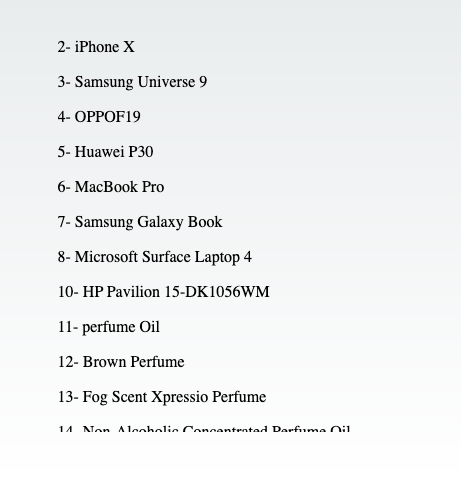
now when I add observeElementOffset:
import useGetData from "@/pages/api/useGetData";
import { useRouter } from "next/router";
import { useVirtualizer, observeWindowOffset } from "@tanstack/react-virtual";
import React, { useState, useEffect } from "react";
import Link from "next/link";
import { useDebounce, useSessionStorage } from "usehooks-ts";

export function ProductList() {
  const { query } = useRouter();
  const { search, select } = query;

  const filter = select?.toString().split("-");
  const parentRef = React.useRef(null);
  const [value, setValue] = useSessionStorage("virtualizer_scrollOffset", 0);
  const { data, isLoading, isError } = useGetData(search?.toString(), filter); //TODO think about better option search?.toString()
  const [scrollY, setScrollY] = useState(0);
  const debouncedScrollPosition = useDebounce(scrollY, 1000); // TODO

  useEffect(() => {
    setValue(debouncedScrollPosition);
  }, [debouncedScrollPosition, setValue]);

  const rowVirtualizer = useVirtualizer({
    count: data?.length,
    getScrollElement: () => parentRef.current,
    estimateSize: () => 35,
    initialOffset: (() => {
      if (typeof sessionStorage !== "undefined") {
        return parseInt(
          sessionStorage.getItem("virtualizer_scrollOffset") || ""
        );
      }
      return 0;
    })(),
    observeElementOffset: (instance, cb) => {
      return observeWindowOffset(instance, (offset) => {
        if (typeof sessionStorage !== "undefined") {
          sessionStorage.setItem(
            "virtualizer_scrollOffset",
            offset?.toString()
          );
        }
        cb(offset);
      });
    },
  });
  const onScroll = (e: any) => {
    setScrollY(e.target.scrollTop);
  };

  if (isLoading) {
    return <div>is loading ...</div>;
  }
  if (isError) {
    return <div>Error!</div>;
  }

  return (
    <>
      <div
        style={{
          height: `400px`,
          overflow: "auto", // Make it scroll!
        }}
        ref={parentRef}
        onScroll={onScroll}
      >
        <div
          style={{
            height: `${rowVirtualizer.getTotalSize()}px`,
            width: "100%",
            position: "relative",
          }}
        >
          {rowVirtualizer.getVirtualItems().map((virtualRow) => (
            <div
              key={virtualRow.index}
              className={virtualRow.index % 2 ? "ListItemOdd" : "ListItemEven"}
              style={{
                position: "absolute",
                top: 0,
                left: 0,
                width: "100%",
                height: `${data[virtualRow.index]}px`,
                transform: `translateY(${virtualRow.start}px)`,
              }}
            >
              <Link href={`/product/${data[virtualRow.index].id}`}>
                {data[virtualRow.index].id}- {data[virtualRow.index].title}
              </Link>
            </div>
          ))}
        </div>
      </div>
    </>
  );
}
 I don't know what's wrong!
I'm using Nextjs.
I don't know what's wrong!
I'm using Nextjs.
@piecyk Can you write an example in fixed mode, please?
@milad1367 something like this https://codesandbox.io/s/busy-haslett-9t6yge?file=/pages/index.js
I'm trying to get this to work with just useVirtualizer instead of useWindowVirtualizer but for some reason every time I return back from the 2nd page, it starts the offset back at 0. If I refresh the page before going back, then it starts at exactly 1250 every time... even though the value I have stored in localStorage for the last recorded offset is ~5000... I can't figure out why it is resetting to 0 when going back, and why it is using specifically 1250 every time when going back after a refresh.
I think the fact that it is using 0 when going back without refreshing is somehow due to the initialOffset only being applied on init when calling the constructor for the first time... when I navigate to another page and then return, something tells me that it is not taking my initialOffset value correctly...
Could you or someone please provide an update exactly with how to do this properly using useVirtualizer?
Thanks so much!
Edit: The 1250 seems to be coming from the fact that my size defined in estimateSize is 50 and currently I have 25 items showing at once on the screen... so 25*50 = 1250 but I am still not sure why that is happening...
The data I am displaying is dynamic and being fetched asynchronously from an api (using tanstack-query).. I thought maybe I needed to use initialMeasurementsCache but that didn't seem to do the trick either... Some examples would really help here! 🙏

The data I am displaying is dynamic
@Ugikie that is the case, basic when scroll is restored, virtualizer don't remember prev read sizes and auto adjustment kiks in, you also need to store measurementsCache and restore it by passing via initialMeasurementsCache.
for example you can save it on click
onClick={() => {
  initialOffset = virtualizer.scrollOffset;
  initialMeasurementsCache = virtualizer.measurementsCache;
}}
@Ugikie or even better you can save it on effect cleanup, checkout this react-router basic example https://stackblitz.com/edit/github-trynzk
@Ugikie or even better you can save it on effect cleanup, checkout this react-router basic example https://stackblitz.com/edit/github-trynzk
Thanks so much for the quick reply! I will check this out for sure!!
I actually have to admit after too many hours trying to figure this out, I found a line in my code in an old useEffect function that was resetting the scrollTop to 0 of the parentRef for the virtualized items... so I basically shot myself in the foot there... removed that and then it all started working..
The data I am displaying is dynamic
@Ugikie that is the case, basic when scroll is restored, virtualizer don't remember prev read sizes and auto adjustment kiks in, you also need to store
measurementsCacheand restore it by passing via initialMeasurementsCache.for example you can save it on click
onClick={() => {
  initialOffset = virtualizer.scrollOffset;
  initialMeasurementsCache = virtualizer.measurementsCache;
}}
Is it recommended to store the offset value in a useEffect cleanup? Or using the observeElementOffset like so:
observeElementOffset: (instance, cb) => {
  return observeElementOffset(instance, (offset) => {
    sessionStorage?.setItem?.(storageKey, '' + offset)
    cb(offset)
  })
},
I've just stumbled over this issue. I'm using tanstack-router and it doesn't seem to be solved between these two packages.
For those interested, my resulting, simple, solution is to use the history's state API. I like it because I don't have to worry about the scroll restoration being triggered by the wrong screen. Also, no ids!
  // Read from the history state
  const {
    vtableItemCount: restoreItemCount,
    vtableOffset: restoreOffset,
    vtableMeasureCache: restoreMeasurementsCache,
  } = history.state || {};

  const virtualizer = useWindowVirtualizer({
    // itemCount is undefined in my case, until the API resolves.
    count: itemCount == undefined ? restoreItemCount : itemCount,
    // Restore the offset and also the measurements cache (when measuring, not required otherwise)
    initialOffset: restoreOffset,
    initialMeasurementsCache: restoreMeasurementsCache,
  });

  // Update scrollpos and item count for scroll restoration.
  const scrollPos = useDebounce(useWindowScroll()[0].y, 500);
  React.useEffect(() => {
    history.replaceState(
      {
        vtableItemCount: itemCount,
        vtableOffset: scrollPos,
        vtableMeasureCache: virtualizer.measurementsCache,
      },
      document.title,
      window.location.href,
    );
  }, [itemCount, scrollPos, virtualizer.measurementsCache]);
Works perfectly!
