TablePlus-Windows
 TablePlus-Windows copied to clipboard
Published
20 hours ago •
 TablePlus
TablePlus
Check column in Table Structure view don't show constraints
Please answer the questions below, it helps us to track the issue.
-
Which driver are you using and version of it (Ex: PostgreSQL 10.0): PostgresSQL 11.1
-
Which TablePlus build number are you using (the number on the welcome screen, Ex: build 81): Table Plus Version 5.0.1 (210) - x64
-
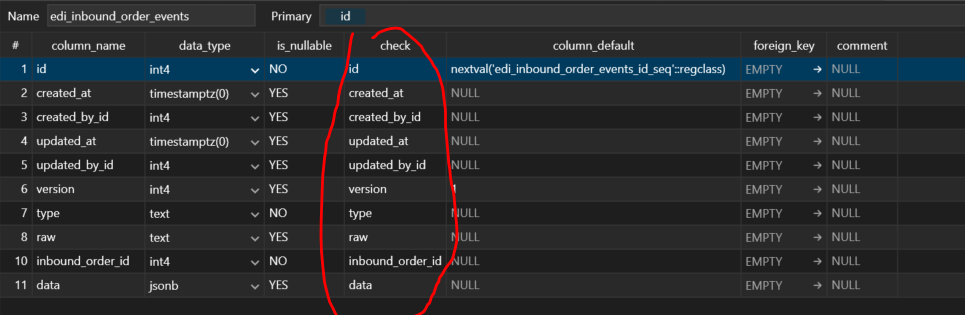
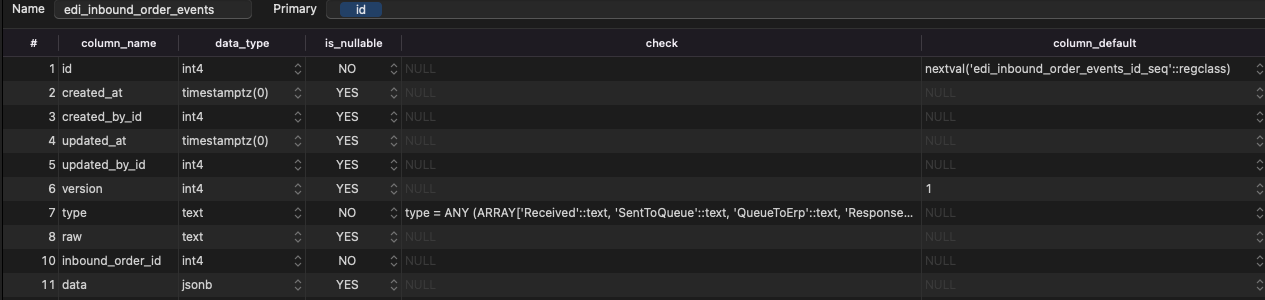
The steps to reproduce this issue: 3.1. Create table with column constraints. 3.2. Open the table and switch from "Data" to "Structure" view on Mac. 3.3. Do the same on Windows. 3.4. On Mac version I can see richer information about constraints (for example: "type = ANY (ARRAY['Received'::text]) ) On Windows version I can se only column name, but without any info. Attached screenshots tells you everything :-)
Noted: If the bug is related to data, please attach an example SQL data.