
TablePlus-Windows
 TablePlus-Windows copied to clipboard
Published
20 hours ago •
 TablePlus
TablePlus
Connection over a bastion that requires a username/password and a sshkey does not work
Please answer the questions below, it helps us to track the issue.
-
Which driver are you using and version of it (Ex: PostgreSQL 10.0): MariaDB
-
Which TablePlus build number are you using (the number on the welcome screen, Ex: build 81): Build 210
-
The steps to reproduce this issue: 3.1 Create a linux server that requires a username/password and a sshkey 3.2 Add a user unto that server with a password 3.2 Create a sshkey to link to that user (ssh-keygen and load the private key unto your desktop) 3.3 Configure your connexion as shown below:
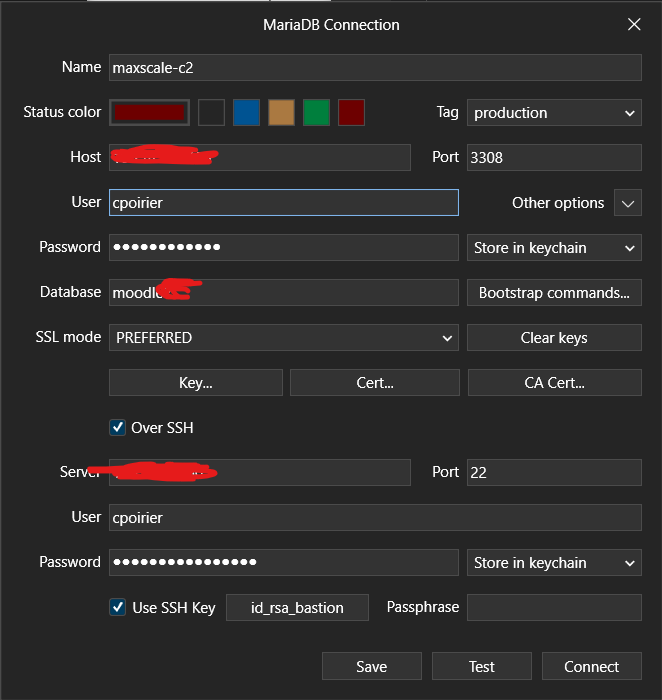 3.4 Test your connection and you should have this:
 In the SSH Debug Log, I have:
[14:31:18.916437] ssh_socket_unbuffered_write: Enabling POLLOUT for socket
[14:31:18.916437] packet_send2: packet: wrote [type=50, len=1152, padding_size=15, comp=1136, payload=1136]
[14:31:18.916437] ssh_socket_pollcallback: Poll callback on socket 4868 (POLLOUT ), out buffer 0
[14:31:18.916437] ssh_socket_pollcallback: sending control flow event
[14:31:18.916437] ssh_packet_socket_controlflow_callback: sending channel_write_wontblock callback
[14:31:18.958416] ssh_socket_pollcallback: Poll callback on socket 4868 (POLLIN ), out buffer 0
[14:31:18.958416] ssh_packet_socket_callback: packet: read type 51 [len=32,padding=17,comp=14,payload=14]
[14:31:18.958416] ssh_packet_process: Dispatching handler for packet type 51
[14:31:18.958416] ssh_packet_userauth_failure: Partial success for 'publickey'. Authentication that can continue: password
Noted: If the bug is related to data, please attach an example SQL data.
