
TablePlus-Windows
 TablePlus-Windows copied to clipboard
 TablePlus
Improvement: Show databases in side-bar
If I connect to a server with multiple databases, the sidebar is empty and promts me to press Ctrl+K:
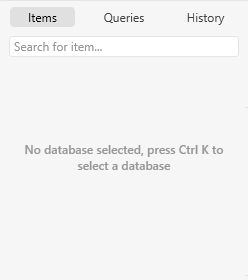
That's a bit inconvenient. It would be nicer to have a list of databases right away in the sidebar.
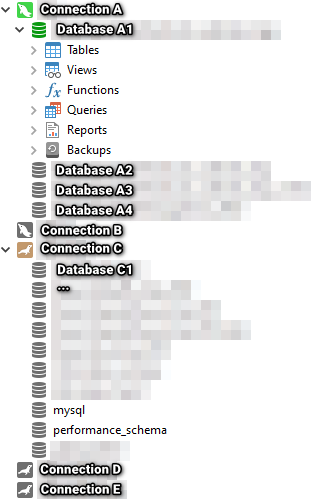
Best would be, if the databases would show up there all the time, so I can quickly switch between them. Even better would be to have a list of connections in the sidebar, to quickly switch between servers aswell.
Example of how Navicat solved that:
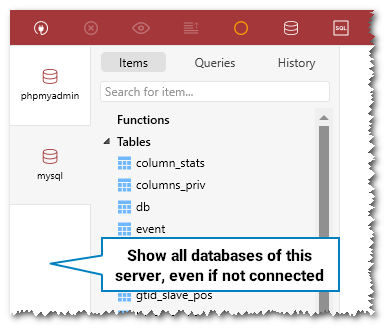
I just noticed how multiple open databases are displayed in TablePlus. That could be utilized to achive the request above: Just show every database in the most-left sidebar:
Please answer the questions below, it helps us to track the issue.
Please answer the questions below, it helps us to track the issue.
-
Which driver are you using and version of it (Ex: PostgreSQL 10.0): MySQL, MariaDB
-
Which TablePlus build number are you using (the number on the welcome screen, Ex: build 81): 186
-
The steps to reproduce this issue: Open connection to a server with multiple tables

In my opinion, the way TablePlus handles multiple databases is one of its best features. As someone with access to servers with a lot of databases, many of which I wouldn't touch in years, this change would ruin the user experience for me.

Hi @mamayer @KBulmer we know the trade off, so the current design is our decision. The only thing we can do to make it better is making an option to remember all the opened databases. So the next time, users open the connection, they don't have to open all database manually (this feature is available on the TablePlus macOS version)
