TablePlus-Windows
 TablePlus-Windows copied to clipboard
 TablePlus
Feature Request: Right-Click TablePlus Icon To Show List Of Recent Connections That Can Be Opened
-
Which driver are you using and version of it (Ex: PostgreSQL 10.0): N/A
-
Which TablePlus build number are you using (the number on the welcome screen, Ex: build 81): Version 3.12.10 (154) x64
-
The steps to reproduce this issue: N/A
Noted: If the bug is related to data, please attach an example SQL data.
Love the product. Very glad to have purchased it to make general data querying a much more positive experience.
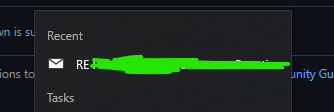
I would love to be able to select a recent connection (or select from all current connections I have created) by right-clicking on the TablePlus icon on my Windows Taskbar.
See included screenshot for example from my Microsoft Outlook which shows "Recent" emails when I right-click on the Outlook icon on my computer.
Having my recent connections available on right-click of the TablePlus icon would be a streamlined and faster way of accessing my connections vs. (1) waiting for TablePlus welcome screen to load, (2) waiting for connection list to load (3) double-clicking said connection, and (4) waiting for TablePlus to open said connection.
By right-clicking on the (1) TablePlus icon, (2) selecting the connection I want and immediately open the connection, I can accomplish the same process with relatively minimal movement of my mouse.
Thank you for a great product!