
TBLauncher
 TBLauncher copied to clipboard
 TBog
TBog
[FEATURE] Widget Previews
Is your feature request related to a problem? Please describe. Whenever I want to add a widget to my home screen, the selection page never gives me Previews of the widget I may select and it's really frustrating to delete the one you put and try to find the right one
Describe the solution you'd like Images should be shown under the widget name in the selection list
Describe alternatives you've considered I would use other launchers that execute this well. But, I like this one better

The menu that appears when you want to add a widget is the default one provided by Android.
I'll look into making it custom and probably look like the menu for deleting widgets. Would this be ok?

Whenever I want to add a widget to my home screen, the selection page never gives me Previews of the widget I may select
You mean this menu?
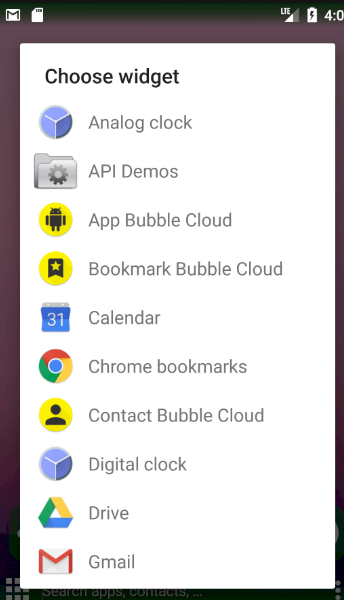 Like I said, currently I use the Android generated widget picker and I don't have control over how it looks.
it's really frustrating to delete the one you put and try to find the right one
The Remove widget menu looks like this
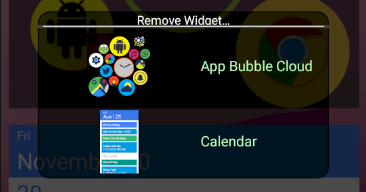 this menu does have a widget preview
If you can't long touch a widget (widget does not handle touch or there are multiple overlapping) you can customize it by:
- long touch empty wallpaper
- choose
Customize Widget… - choose the widget from the menu (this menu does have widget preview)
I may not understand what you mean by Previews . Please explain and provide a picture for details.
I may not understand what you mean by Previews . Please explain and provide a picture for details.
When I was talking about widget previews I was talking about a preview of the whole widget not just the label. Something similar to the "customize widget" function.
Is there a way to show the widget previews before you add the widget. Because when I open up the widget options, there are some widgets that have the same name. But are completely different.
there are some widgets that have the same name. But are completely different.
That list is a system generated dialog. I should be able to make a custom one but I'm not 100% sure.
Is the Remove Widget... dialog better? If you add widgets with the same name (but different) when you open the Remove Widget... menu do you see them differently?
Most launchers show a different window for adding widgets, with visual representations of the widgets. I honestly thought that was a system generated dialog, not the one shown by TBLauncher. Shows what I know...
