
blog
 blog copied to clipboard
 SunshowerC
你可能还没试过的 react modern build 构建优化!
- 前言
-
基本实现
-
编译
- 编译 ES5
- 编译 ES6
- 嵌入代码到 HTML
- 编译流程
- 编译结果
-
编译
- 浏览器的存在的坑
- react-scripts-modern
- 参考文章
前言
用过 vue-cli 3.0 的人可能会知道,vue-cli 提供了一个 modern 模式,可以在一个工程同时构建打包 ES5 和 ES6 两份代码:
Vue CLI 会产生两个应用的版本:一个现代版的包,面向支持 ES modules 的现代浏览器,另一个旧版的包,面向不支持的旧浏览器。
最酷的是这里没有特殊的部署要求。其生成的 HTML 文件会自动使用 Phillip Walton 精彩的博文(译文)中讨论到的技术:
现代版的包会通过
<script type="module">在被支持的浏览器中加载;它们还会使用<link rel="modulepreload">进行预加载。旧版的包会通过
<script nomodule>加载,并会被支持 ES modules 的浏览器忽略。一个针对 Safari 10 中
<script nomodule>的修复会被自动注入。对于一个 Hello World 应用来说,现代版的包已经小了 16%。在生产环境下,现代版的包通常都会表现出显著的解析速度和运算速度,从而改善应用的加载性能。
简单来说,通过这种技术能够
- 让现代浏览器加载 ES6 的未编译过的代码,直接使用最新的语法特性以及新的 API,无需任何 polyfill
- 让老版本的浏览器加载 使用 语法转换过的,以及Polyfill 过的 ES5 的代码。
这么棒的技术已经在 vue-cli 上集成了,可惜在 create-react-app 上有过一阵讨论,却依旧没什么进展。
所以我个人根据 create-react-app 2.x 的 react-scripts 做了些自己的改造,在 react 上实现了这个现代模式的构建。具体可以访问 github 仓库 : react-scripts-modern
接下来我们来看看基本实现思路。
基本实现
编译
上面说过,我们需要用 webpack 构建编译出 ES5 和 ES6 两份代码。
编译 ES5
首先是编译出 ES5 的代码,大家应该很熟悉 babel 7 那一套了,这里不再多说,这里直接给出 babel 配置代码。还对 babel 7
// .babelrc.js
module.exports = {
    "plugins": [
        [
            "@babel/plugin-transform-runtime",
            {
                "corejs": false, // 默认值,可以不写
                "helpers": true, // 默认,可以不写
                "regenerator": false, // 通过 preset-env 已经使用了全局的 regeneratorRuntime, 不再需要 transform-runtime 提供的 不污染全局的 regeneratorRuntime
                "useESModules": true, // 使用 es modules helpers, 减少 commonJS 语法代码
            }
        ]
    ],
    presets: [
        [
            "@babel/preset-env",
            {
                "modules": false, // 模块使用 es modules ,不使用 commonJS 规范
                "useBuiltIns": 'usage', // 默认 false, 可选 entry , usage
            }
        ]
    ]
}
对babel 7不是很了解的同学,可以看下官方文档或者我之前写的文章: Show me the code,babel 7 最佳实践!
编译 ES6
要编译 ES6 是不是说就可以直接不用 babel 了呢?
然鹅并不是,因为还有一些 ES7/ES8 特性是 浏览器尚未正式支持但我们确实需要的,例如:异步加载,JSX 语法等等,我们一般需要找到对应的 babel plugin 来实现,所以还是需要 babel。
module.exports = {
    // ... 其他可能需要的 plugin
    presets: [
        [
            "@babel/preset-env",
            {
                "modules": false, // 模块使用 es modules ,不使用 commonJS 规范
                "targets": {
                  "esmodules": true, // 忽略 browserslist 配置,不转换 ES6 语法也不 polyfill ES6 的 API
                },
            }
        ]
    ]
}
嵌入代码到 HTML
正常的构建过程,我们一般使用 HtmlWebpackPlugin 来将 webpack 构建出来的 JS/CSS 资源嵌入到 我们的 HTML 模板中。
那么,若要将我们的 HTML 的 script 标签加上 module 和 nomodule 属性,我们就需要额外写一个 webpack 插件,在 HtmlWebpackPlugin 的钩子中,做一些我们的处理。
  // 在 htmlWebpackPlugin 拿到资源的钩子函数中,
  // 给 script 标签加上 type=module 或者 nomodule 属性
  this.htmlWebpackPlugin
    .getHooks(compilation)
    .alterAssetTags
    .tapAsync(
      id,
      (data, cb) => {
        data.assetTags.scripts.forEach(tag => {
          // 遍历下资源,把 script 中的 ES2015+ 和 legacy 的处理开
          if (tag.tagName === 'script') {
            // 给 legacy 的资源加上 nomodule 属性,反之加上 type="module" 的属性
            if (/-legacy\./.test(tag.attributes.src)) {
              delete tag.attributes.type
              tag.attributes.nomodule = true
            } else {
              tag.attributes.type = 'module'
            }
          }
        })
      }
    )
完全的插件代码可直接访问 html-webpack-esmodules-plugin.js
编译流程
上面说到,我们其实是分别进行了 两次 webpack 编译打包构建:
(async ()=>{
    await buildByConfig(es6WebpackConfig)
    await buildByConfig(es5WebpackConfig)
})()
那么其实存在一个问题,打包一次,生成一份 js 代码,一个 index.html
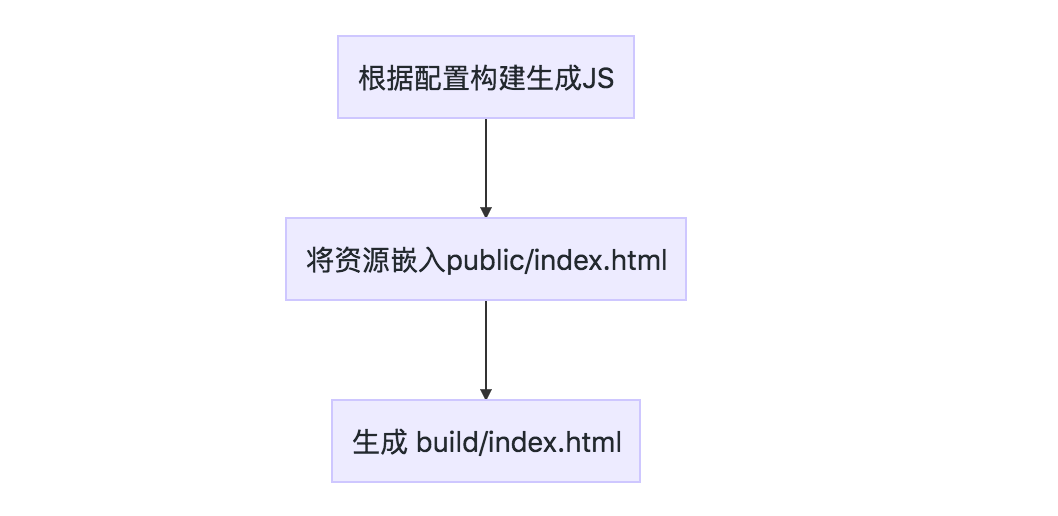
那如果 webpack 打包了两次,构建出了两份 JS 代码, 那岂不是也会出现 两份 index.html ?
当然事实上虽然不会构建出两份 index.html,但是这个问题明显会导致第二次构建出来 index.html 覆盖掉 第一次构建出来的 index.html。**导致只有 ES5 或者 ES6 的资源被 外链进 index.html **,不符合我们的预期。
解决方案其实很简单,第一次构建是用 public/index.html 为模板,构建出来 build/index.html;那么,第二次构建,就明显不能用 public/index.html 为模板,而是用第一次构建生成的 build/index.html 为模板,进行第二次构建,那么即便生成的 build/index.html 模板覆盖掉了原有的 build/index.html,但仍然是包含 es5 和 es6 的代码。

编译结果
<!-- ES6 的代码,只会被 现代浏览器下载执行 -->
<script type="module" src="/js/main.min.js" ></script>
<!-- ES5 的代码,只会被老版浏览器下载执行 -->
<script nomodule src="/js/main-legacy.min.js" ></script>
浏览器的存在的坑
-
safari 10.3 不支持 nomodule, 需要进行简单的 polyfill。
-
在 safari 浏览器或者 IOS webview 的场景下, 如果同时使用了 module/nomodule 和 常规的 script 外链。例如:
<script src="https://www.google.com/some-script.js" ></script>
<script type="module" src="/js/main.min.js" ></script>
<script nomodule src="/js/main-legacy.min.js" ></script>
由于
<script src="https://www.google.com/some-script.js" ></script>的存在, **safari 会同时下载main.min.js(ES6的代码),main-legacy.min.js(ES5的代码),但只会执行其中一份代码(所以不会影响代码逻辑),但是下载了 ES5 + ES6 的代码,有一份代码却没有用到,终究是造成了负面影响。解决方案是将所有带有
type=module/nomodule的script标签放到没有type=module/nomodule的script标签之前:<script type="module" src="/js/main.min.js" ></script> <script nomodule src="/js/main-legacy.min.js" ></script> <script src="https://www.google.com/some-script.js" ></script> -
在更低的浏览器版本(例如 Chrome 43),会出现和 2 类似的问题,同样会下载两份代码,却执行其中一份,同时2 的解决方案对此无效。这种情况,很大程度上只能用动态插入 script 标签取代
type=module/nomodule来解决。<!-- 将代码内联在 HTML --> <head> <script> (function(){ var insertScript = function(option, elem) { if(!option) return false; var s = document.createElement("script"); elem = elem || document.head for(var name in option) { s.defer = true s.setAttribute(name, option[name]) } elem.appendChild(s) } var script = document.createElement("script"); var supportEsModule = 'noModule' in script; var modernList = [{src: '/main.min.js'}]; var legacyList = [{src: '/main-legacy.min.js'}]; var scriptList = supportEsModule ? modernList : legacyList scriptList.forEach(function(item){ insertScript(item) }) })() </script> </head>但这种方法明显延缓 资源的下载时机(大概十几毫秒),虽然 现代浏览器通过
preload还是能够实现提前下载资源避免这种方案的缺陷,但是 不支持nomodule也不支持preload的老版浏览器依然会有这种缺陷。所以除非你的用户里老版浏览器占据了相当一部分份额,否则个人不建议这种做法。
react-scripts-modern
以上全部实现,我都已经封装到了 react-scripts-modern
习惯用 create-react-app 生成项目的同学 可以快速通过 create-react-app 工程名 --scripts-version react-scripts-modern (加上 --typescript 属性 生成 react + ts 工程) 命令生成支持 modern build 的工程,开箱即用
参考文章

非常感谢,参考你的代码成功实现了现代模式构建两套代码。 总结下基于create-react-app V5.0的经验,eject之后需要改的地方有:
- babel配置
- webpack.config.js 添加现代模式判断逻辑
- paths.js 添加buildHtml路径
- build.js 添加现代模式判断逻辑
