
SublimeLinter-eslint
 SublimeLinter-eslint copied to clipboard
 SublimeLinter
Fixables
Why not? Two new settings:
filter_fixableswill hide fixable errorsfix_on_savewill auto-fix the current buffer (only for js files)
🤹♂️ ?
Fixes https://github.com/SublimeLinter/SublimeLinter/issues/1305

@braver for critique.
I only implemented fix_on_save. Should we also have fix_on_manual? (A bit stupid: 'manual' also triggers for config changes. (That's actually the reason I did not include it here.))
You usually write the better messages.txt so ...
Looks really good! Messages are fine too I guess. I'll try to test later, perhaps tomorrow.

Should we also have fix_on_manual
Manual isn't on real files per se right? You can manually lint a dirty buffer. I think.
Hmmm, it works, but I'm not sure the UX is excellent. I make some changes, forget a semi-colon, then save. Then at some point eslint finishes fixing, which results in the buffer going from saved to modified, but and it's not clear what has changed. So, it's not clear that a fixer process is working on the file and when it returns with changes to the file it's not clear what's changed and why the buffer is now dirty again while I just hit save. Can we determine the changes were cause by the linter and update the buffer transparently (i.e. without making it dirty)? Can we add a little feedback to the statusbar? Is it better on a laptop that isn't some crap 7 years old backup thing I'm using now?
Now, I don't plan to be doing any intense JS work any time soon so I'm not going to really use-test it a lot. I've run with tslint and TypeScript formatters running while editing (using the Microsoft TypeScript thing for ST) and basically really hated that some mystery process would run and modify the file. It's just not seamless. On the other hand one of my colleagues likes it a lot, but he runs tons of obscure little tools in Emacs so his opinion doesn't count ;)
So, I don't know. It's a cool POC. It's not something I'll use a lot because I don't write enough JS to care about fancy small workflow improvements.
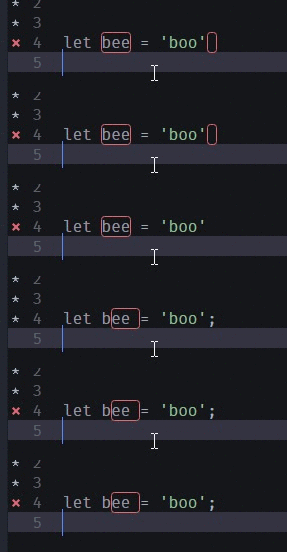
By the way, when I say I won't use it a lot, that's more to illustrate that I simply can't get a good grip on what makes this work well or not, rather than a value judgement. We need more/other people testing and tuning things like this.
Okay. If we use on_pre_save we can generally modify the buffer and Sublime will save afterwards. But we need to be sync then which is bad.
on_post_save, we generally get a dirty buffer bc we modify it. Unless tricks we don't know.
But we need to be sync then which is bad.
Actually, for this that might not be bad? If I know the fixer is running I can wait for it and end up with a clean and saved buffer. How does the ST built-in clean-white-space thing run? That's probably 1000x faster than eslint, but perhaps a good example?
Well open not as in "on GitHub", but it's in the default package which you can extract and read:
import sublime_plugin


class TrimTrailingWhiteSpaceCommand(sublime_plugin.TextCommand):
    def run(self, edit):
        trailing_white_space = self.view.find_all("[\t ]+$")
        trailing_white_space.reverse()
        for r in trailing_white_space:
            self.view.erase(edit, r)


class TrimTrailingWhiteSpace(sublime_plugin.EventListener):
    def on_pre_save(self, view):
        if view.settings().get("trim_trailing_white_space_on_save") is True:
            view.run_command("trim_trailing_white_space")


class EnsureNewlineAtEofCommand(sublime_plugin.TextCommand):
    def run(self, edit):
        if self.view.size() > 0 and self.view.substr(self.view.size() - 1) != '\n':
            self.view.insert(edit, self.view.size(), "\n")


class EnsureNewlineAtEof(sublime_plugin.EventListener):
    def on_pre_save(self, view):
        if view.settings().get("ensure_newline_at_eof_on_save") is True:
            if view.size() > 0 and view.substr(view.size() - 1) != '\n':
                view.run_command("ensure_newline_at_eof")
So, synchronously on pre-save. But lightning fast probably.
I honestly believe that autifixing stuff asynchronously (even on save) is bad UX and inherently hard to get right. I do not think this has any relation to SL and even having it as a plugin complicates things unnecessarily. Even when it's opt-in.
I would rather have a separate package with its own architecture handling this. Maybe you could make use of SL settings, though.
I would also show the differences between the current and the fixed version similar to what the Diff package does and then ask the user whether they are okay with this.
(just some feedback from reading the issue. I won't use this as I don't code js)

I don't know how well eslint --fix works, but I'm super used to Prettier which is just awesome, and pretty much has the exact same UX as this PR right now.
You sure don't want a diff view here bc you either can trust the tool or better uninstall it.
(I've read that one of the python autoformatters changes if x == True: to (surprise) if x: which is a no-go.)
(Also: I think eslint will remove console.log and debugger statements which renders the whole thing totally useless of course. A formatter should format the code and not change it.)
(PS.3: This small PR here is probably already better than the specialized eslint-fix plugin for Sublime. It should work e.g. for unsaved views.)
:man_shrugging: if you like it and it doesn't complicate things, go ahead. I'm sure it can be useful, I'm just not sure about potential races with the user (UX) or other fixing plugins (shouldn't happen when user has to opt-in).
(Also: I think eslint will remove console.log and debugger statements which renders the whole thing totally useless of course. A formatter should format the code and not change it.)
no-console isn't a "fixable" rule, but no-debugger. Which makes sense when running on pre-commit. Which is kinda how it's meant to be used.
Running formatters on-pre-save isn't where we should be taking SublimeLinter. I think it may end up being a feature where 5 people use it, until it takes them an hour to find out what's eating their debugger statements or they're bored of it taking so long (to me async isn't an option). And then they learn how to configure pre-commit hooks.
Just a quick mention that you won't get around asynchronous fixing since you will have to wait for the fixer to run on save (or when requested). There will be some delay. Now, when you do it in a non-ST-UI-blocking way (what I meant with asynchronous) you run into the situation of races where other plugins might perform on-save modifications and some changes might end up overwritten (e.g. trimming trailing whitespace). And when you don't you'll end up with a frozen UI until the fixer responds. Maybe that'd be better though :thinking:
Well, the UX of running async is super lame IMO, but sync of course also isn’t ideal. It’s an “hey, if it works for you” kinda thing. Perhaps just document it and let people build this for themselves if they want. Not everything needs to be on packagecontrol.
@kaste I guess this stranded... I think we might be able to do the filtering now, and perhaps keep the fixing out of it?
I used a prettier for sublime first, then I switched to using prettier as eslint plugin + ESLint-Formatter This is not lightning fast, but I usually don't hit ctrl+s in the middle of typing some phrase, little delay(~1 sec) is acceptable. So I think synchronous fixing is better. What is wrong with using ESLint-Formatter - it doesn't respect .eslintignore files, so I have a delay where I don't need linting/formatting at all (when file is huge - it's a problem) Please make sure this autofix feature will not trigger linting process for ignored files.

Hi @kaste, I am trying to install sublime eslinter from this branch to test it, but I can't make it fix the code. Could you please help me configure it properly?
- I cloned this branch into ~/.config/sublime-text-3/Packages/SublimeLinter-eslint
cd ~/.config/sublime-text-3/Packages/
git clone -b fixables https://github.com/SublimeLinter/SublimeLinter-eslint.git
- enabled this feature in the linter's config:
// SublimeLinter Settings - User
{
	"paths": {
        "linux": [
        	"/home/gor/.nvm/versions/node/v11.0.0/bin"
        ],
        "osx": [],
        "windows": []
    },
  "linters": {
    "eslint": {
        "fix_on_save": true
    }
  }
}
linter works and shows warnings in the code, but nothing happens on save
Should I add something to my .eslintrc.js?
Currently it's
module.exports = {
  extends: ['eslint:recommended', 'plugin:prettier/recommended'],
  env: {
    browser: true,
    es6: true
  },
  plugins: ['prettier'],
  globals: {
    "$": false,
    "_": false,
    "Ext": false,
    "localforage": false
  },
  rules: {
    // 'no-undef':1,
    'quotes': ["error", "single", { "avoidEscape": true }],
    'quote-props': ["error", "as-needed", { "keywords": true, "unnecessary": false }],
    'prettier/prettier': [
      'error',
      {
        singleQuote: true,
        trailingComma: 'es5',
        arrowParens: 'always',
        printWidth: 80,
      },
    ],
  },
};
Well, maybe enable debug mode and look if it's at least calling eslint with the '--fix-dry-run' switch. Also ensure you restarted Sublime.
It's finally working, thank you, I just didn't see any changes after the first few tries.
As I see this feature works with the same quality as ESLint-Formatter, it also has that highlighting shift, it's not a problem.
It works slightly slower(1.5-2x) but it respects .eslintignore file, and ESLint-Formatte,
so I had to disable plugin manually each time I must to work with huge js files.
Any plans to merge this branch into master?
Eagerly awaiting a merge to master.... @kaste is there a timeline for this?

Well, it is just the code to get this working. We cannot pull this bc as-it-is it would be not covered by any API or tests. (Let's face it "we" is basically just me 😁 and discussing API changes is a soliloquy.)
@kaste i think adding “ignore fixables” is a good setting to have. Actually running a fixer for me feels outside the scope of SL, but add-ons can do what they like of course. Perhaps we need a SublimeLinter-eslint-fixer plugin?. Want to move forward with this in any way?
This really should be merged, formatting on save is a staple of any good linting system.

Any changes here?
I've found this PR searching for a solution to my particular case, where I'm using only eslint with its own plugins (prettier, etc work only as eslint plugins, not in a standalone way, not with IDE plugins).
In my javascript project I have installed all the npm packages related with the versions i want to use (eslint, prettier, their plugins, etc), so there's no chance to have a versioning problem with the rest of my team mates. We do not depend of multiple IDE plugins. Just one that would execute eslint.
With just one command line execution of eslint I can see the errors of js, json, typescript and vue files, with plugins giving recommendations for prettier, angular, vue, mocha, protractor, jasmine, typescript through tslint as an eslint plugin, different file extensions use different parsers...
With exactly the same execution adding the --fix flag I can solve the prettier recommendations.
So... all advantages, except the eslintrc.json file is complex, of course. And I haven't been able to find any Sublime plugin that works with this. ESLint Fix does not work. ESLint-Formatter does not work (don't know why).
For me a change where this plugin would execute a --fix on a file save would be great.
